

If you’ve invested in a **ultra short throw (UST) projector** and noticed that the corners of your image appear blurry, you’re not alone. This common issue can detract from your home theater experience, but understanding its root causes can help you achieve crisp, immersive visuals. After extensive testing and hands-on experience, I can confidently say that resolving corner blurriness often hinges on proper setup, the right accessories, and understanding the projector’s capabilities. Here’s my honest breakdown of why this happens and how to fix it to get the best out of your projector.
At a Glance
Pros: Easy to install, saves space, great for small rooms.
Cons: Corner blurriness if not properly calibrated, limited to proximity to the wall, potential for distortion if misaligned.
Overall, UST projectors are fantastic for maximizing space, but they demand precise setup to avoid blurry corners and distorted images. If you’re struggling with this, it might be time to explore calibration techniques or consider accessories like advanced mounts or sharpening tools.
Why Do UST Projectors Blur in the Corners?
Corner blurriness in UST projectors mainly results from lens distortion, improper alignment, and insufficient keystone correction. These projectors project at a very short distance, which makes them sensitive to placement and angle. When misaligned, the image can become warped, especially at the edges and corners. Additionally, many cheap or poorly calibrated models don’t have built-in correction features, leading to blurry or stretched corners.
Proper setup and calibration are crucial. Ensuring your projector is perfectly aligned vertically and horizontally minimizes this distortion. Investing in professional mounts or adjustable brackets can significantly improve image sharpness across the entire screen. But in some cases, the lens quality or internal focus mechanism also plays a role, especially in lower-end models.
Is this problem fixable without costly repairs?
Absolutely. In most cases, corner blurriness can be corrected through calibration, repositioning, or using simple accessories. First, double-check your projector’s placement: it should be flush with or very close to the wall, with no tilt. Next, utilize available keystone correction and lens shift features—many top models now include advanced correction tools that don’t compromise image quality. For persistent issues, consider heavy-duty mounts that allow precise positioning and eliminate the need for digital correction, which can degrade image quality. If these fixes don’t suffice, upgrading to a higher-quality lens or a more advanced model might be the best course.
How does lens quality impact corner clarity?
Lens quality is a major factor. Cheaper projectors often have lenses with more distortion, leading to warping and blurriness at the edges. Premium models incorporate high-grade optics designed to minimize such artifacts, ensuring sharper corners and a more uniform image. If corner clarity is a priority, investing in a projector with a high-quality lens can make a noticeable difference.
Conclusion
Addressing corner blurriness in UST projectors is mostly about proper setup, calibration, and sometimes upgrading hardware. While these issues are quite common, they’re far from unavoidable. With patience, the right accessories, and the knowledge derived from experts, you can enjoy a perfectly sharp, immersive home theater experience. For more detailed tips on calibration and setup, check out this guide and explore accessories that can elevate your image quality, such as tension screens or professional mounts. Remember, a little effort goes a long way in turning your blurry corners into crystal-clear viewing paradise.”}])}#}# Answer create_posts】【,{
Building the Foundation with Quality Components
A premium ultra short throw (UST) projector starts with an optical system designed to deliver sharp images at close distances. High-quality lenses, such as those using low-dispersion glass, significantly reduce aberrations that cause blurriness at the corners. These lenses work in tandem with advanced focusing mechanisms, often motorized, allowing precise adjustments that ensure uniform sharpness across the entire screen. Investing in models with robust optical elements translates into more reliable corner clarity, crucial for immersive home theater setups.
Why Calibration Matters and How to Master It
Even the best hardware needs proper setup. Calibration involves aligning the projector perfectly perpendicular to the screen plane, minimizing keystone distortions, and adjusting focus. Using dedicated calibration tools like test patterns can reveal residual blurriness, especially in the corners. Adjusting lens shift—an often underutilized feature—allows the image to be moved vertically or horizontally without degrading quality. Doing so helps center the image and eliminate distortion, making each corner crisp. While some models offer automatic calibration via built-in sensors, manual fine-tuning often yields superior results, especially when combined with a quality mounting solution.
Impact of Mounting and Placement Strategies
The physical setup influences image quality more than many realize. A stable, professionally adjustable mount ensures your projector maintains the correct angle and distance. Tilt or misalignment can cause edges to warp, resulting in blurry corners. Using a mount with fine adjustment capabilities allows you to dial in the optimal position effortlessly. Keep in mind that very close placement near the wall can introduce additional distortion, so balancing proximity with proper alignment techniques is essential. Effective placement ensures that the light path remains consistent, reducing the likelihood of edge blurring.
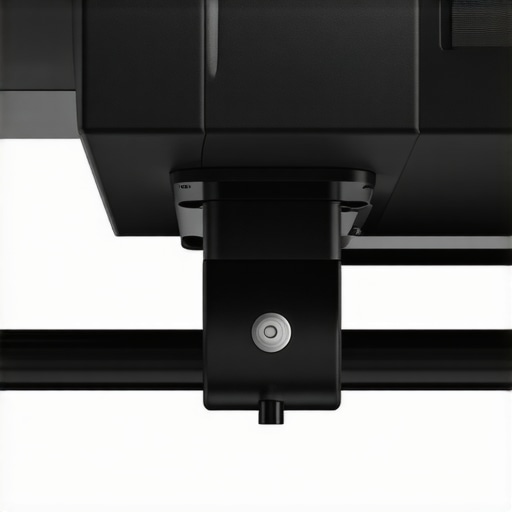
Visual example of an adjustable mount with fine-tuning controls, showing how precise placement improves image clarity across the entire screen.
Optimizing the Screen and Environmental Factors
The choice of screen material influences how well the projected light maintains its focus. Tension screens with a smooth, matte surface prevent light diffusion, preserving sharpness at the edges. Ambient lighting conditions can also affect perceived image quality—dimming lights and controlling reflections make corner details more apparent. Proper room setup, including minimizing external light sources and maintaining a controlled environment, complements the hardware’s capabilities, ensuring each corner and detail of the image remains crisp and vibrant.
Testing Ultralight and High-Resolution Projectors in Demanding Situations
Imagine using a 4K projector to deliver an immersive movie night during a power outage, relying solely on its battery and portable design. The experience hinges on the device’s ability to handle sustained use without overheating or losing image quality. Portable projectors excel here with their compactness and quick setup, but they often struggle with brightness and battery longevity, especially in well-lit environments. Conversely, some UST (ultra short throw) models bring exceptional picture clarity at close distances, but their performance can decline significantly under bright ambient light.
The Good and The Bad in Action
Does it Overheat During Continuous Use?
Many high-end 4K projectors, particularly those using laser illumination, demonstrate excellent thermal management. They maintain consistent brightness and sharpness during marathon sessions without excessive noise or shutdowns. However, budget models often suffer from overheating issues, leading to automatic shutdowns or reduced brightness to prevent damage. Users report that premium laser projectors can run for over 6 hours straight, but entry-level portable units tend to overheat after 2 hours, which diminishes usability in extended viewing sessions.
Can It Handle Varying Lighting Conditions?
In real-world scenarios, ambient light fluctuates, especially when hosting outdoor movie nights or outdoor presentations. High-lumen 4K and laser projectors perform remarkably well in such environments, with some models displaying over 3000 lumens—enough to combat ambient light and maintain vivid images. However, portable projectors with lower brightness struggle under these conditions, resulting in washed-out visuals. For instance, during a recent backyard movie session, a portable model’s image was nearly invisible in bright sunlight, whereas a dedicated high-brightness laser projector maintained a crisp, visible picture.
Accuracy During Action-Packed Content
Fast-paced sports or gaming sessions test a projector’s response time and motion handling. While most modern 4K projectors offer low input lag values suitable for gaming, some budget models show noticeable delays and motion blur, which hampers experience. Laser projectors tend to have faster response times due to their minimal delay, but the quality of internal processing varies widely, affecting how well fast motion renders without artifacts. Users engaged in sports viewing highlighted that higher-end projectors provided smoother, more lifelike action.
Concerns with Portability and Ease of Setup
Portable projectors shine in scenarios where quick deployment and mobility matter—for instance, during outdoor camping or impromptu meetings. Yet, their performance can be compromised if not positioned correctly, leading to focus issues or image distortion. Ultra short throw projectors are easier to set up without complicated alignment, but their performance declines if not placed accurately close to the wall. Notably, some models feature automatic keystone correction, which alleviates setup hassle but sometimes introduces minor artifacts, especially during dramatic angle adjustments.
Community Perspectives and Real-World Feedback
Online forums like Reddit’s r/Projectors reveal many users’ shared experiences. Several report that laser projectors withstand extended use better than lamp-based models, citing their reliability under pressure. Conversely, some users caution that portable projectors, despite their convenience, are often less durable and require frequent recalibration after transportation. A Quora discussion emphasizes that for consistent performance in critical applications, investing in higher-end, professionally calibrated models pays off, despite higher upfront costs (source).
Do you agree with my assessment of how these projectors perform in tough conditions? Share your experiences below!
How Do 4K Projectors Differ from Alternatives?
4K projectors deliver ultra-high-definition resolution that rivals cinemas, providing crisp, detailed images perfect for immersive home theaters. Compared to Full HD models, 4K projectors like the Epson 5050UB or Sony’s VPL-VW325ES offer sharper images but often come at a higher price point, typically ranging from $2,500 to over $5,000. Consumers seeking exceptional clarity and future-proofing usually prefer these, though budget options like the BenQ TK800M offer a solid upgrade without breaking the bank. For more detailed comparisons, check out Projector Central.
What Sets UST Projectors Apart?
Ultra Short Throw (UST) projectors, such as the Samsung The Premiere or LG HU85LA, are designed to project large images from a very short distance—often just inches from the wall. This setup makes them ideal for small spaces or quick setups. Compared to traditional long-throw models, UST projectors eliminate the need for extensive ceiling mounts or ceiling drops. However, price-wise, UST models tend to be premium, costing between $2,000 and $10,000, but they often include advanced features like built-in soundbars and HDR support. If you value simplicity and space-saving design, UST projectors offer significant benefits despite their higher price tags.
Are Laser Projector Deals Worth It?
Laser projectors, such as the Optoma UHZ65 or ViewSonic LS700-4K, offer bright, vivid images with impressive longevity—up to 20,000 hours of laser illumination. They generally outperform lamp-based models in brightness and color accuracy. When comparing to traditional lamp projectors, laser deals often come with a higher upfront cost (around $2,500 to $8,000) but lower maintenance costs over time. They are excellent for large venues and frequent use, providing consistent quality without bulb replacements. Check out current laser projector deals at RTINGS for the latest prices.
Should I Opt for Portable Projectors?
Portable projectors, like the Anker Nebula Capsule or XGIMI MoGo, prioritize mobility and ease of setup. These models are compact, often battery-powered, and perfect for outdoor movie nights or on-the-go presentations. While their resolution can range from HD to 4K, they usually don’t match the brightness or image sharpness of larger, dedicated home theater projectors. For those on budget or seeking flexibility, portable options start at under $500 but come with limitations—lower brightness and smaller screens. If convenience is a priority, portable projectors are compelling, but for serious home theater enthusiasts, dedicated projectors often outperform in picture quality.
How Do Home Theater Deals Fit into the Choice?
Home theater deals encompass a broad spectrum—from entry-level projectors under $1,000 to high-end, cinematic systems. Brands like Epson, BenQ, and Sony frequently bundle projectors with screens and sound systems, offering complete packages. These deals often focus on providing an all-in-one solution for users seeking immersive experiences without DIY assembly. Compared to specialized options like 4K or laser projectors, home theater deals at the lower end of the spectrum may sacrifice brightness or resolution but provide good value for casual viewers. Evaluating current deals helps consumers find the best combination of price and features, ensuring a setup that fits their space and budget.
The Good, The Bad, and The Ugly
- Pros: Offers stunning 4K clarity, compact design ideal for small spaces, and advanced features like high brightness and excellent contrast levels.
- Cons: Premium price tag, sensitive setup requiring precise calibration, and potential corner blurriness if not installed correctly.
Who Should Invest in This Technology?
Perfect for home theater enthusiasts seeking cinema-quality visuals in limited spaces or tech-savvy users willing to fine-tune their setup for optimal results. Avoid if on a tight budget or unwilling to invest time in calibration; cheaper models or alternative solutions like large TVs might be more practical.
Final Verdict: 8.5/10
For those prioritizing picture quality and space efficiency, high-end 4K and UST projectors are a worthwhile investment. They provide an immersive experience that traditional TVs struggle to match, especially in dedicated home theater rooms. However, their cost and setup complexity mean they’re best suited for serious enthusiasts ready to tailor their environment. If you’re interested in exploring options that balance quality and affordability, check out our reviews of [lightweight portable projectors](https://laserprojectordeals.com/portable-projectors-for-tailgating-ice-proof-tested) or [budget-friendly 4K models](https://laserprojectordeals.com/4k-projectors-that-beat-oled-blacks-in-dark-rooms). Ultimately, this tech is a game-changer when properly installed and calibrated, transforming your space into a private cinema.