

The Bottom Line Up Front: If you are tired of your portable projector losing its sharp edge twenty minutes into a movie, you do not need a new unit; you need to change your startup routine. After testing over a dozen portable projectors in environments ranging from hotel rooms to windy campsites, I have found that ‘thermal drift’ is the single biggest enemy of a crisp image. The simple trick is a ten-minute warm-up period before you ever touch the focus ring.
Your Projector Needs to Sweat a Little First
I have seen it dozens of times: you set up the screen, power on the unit, and spend five minutes obsessing over the focus until it is pixel-perfect. Then, halfway through the first act, the image looks like it is underwater. This happens because as the internal light source heats up, the plastic or glass lens elements physically expand, shifting the focus plane. This is especially prevalent in the only portable projectors that don’t die halfway through a movie, where compact chassis designs trap heat more aggressively.
Stop Relying on Auto-Focus
Most modern units boast about AI-driven auto-focus, but in my experience, these sensors are often fooled by the texture of the wall or the ambient light in the room. I always suggest turning off ‘continuous auto-focus’ in the settings. Instead, let the machine run for ten minutes, then use the manual digital zoom or the physical dial to lock it in. If you are struggling with a larger setup, you might want to check out my guide on how to achieve perfect focus across your entire 150-inch screen to ensure your corners are as sharp as the center.
Are portable projectors just too low-resolution to ever look truly sharp?
This is the most common doubt I hear from people moving away from traditional TVs. While it is true that many budget units are only 720p or 1080p, the ‘blurriness’ people complain about is rarely a resolution issue—it is a focus and contrast issue. Even a 4K unit will look muddy if you haven’t accounted for the lens expansion I mentioned. For technical specifications on how light engines handle heat, you can refer to the Texas Instruments DLP technology overview which explains the physics behind these compact optical engines.
Give Your Lens Some Breathing Room
Finally, check your airflow. If you are using a lightweight tripod that won’t tip over, ensure the mounting plate isn’t blocking the intake vents. Restricted airflow causes the temperature to spike, which makes the focus drift even more erratic. By allowing for a proper warm-up and ensuring the fan can do its job, you will spend less time fiddling with the remote and more time actually watching the film. It is a small habit that makes a massive difference in the quality of your home theater experience.
Hardware that survives the backpack and the backyard
When you first pull a premium portable unit out of the box, the weight is usually the first thing that surprises you. We have moved past the era of hollow, creaky plastic shells. The best units now use a high-density polycarbonate or even aluminum magnesium alloys that feel more like a high-end camera than a toy. This density is crucial because it acts as a heat sink, helping to mitigate the thermal drift issues I mentioned earlier. If a projector feels too light, it is likely because the internal cooling and optical assembly are made of low-grade materials that will warp under heat. When handling these, look for a textured grip or a rubberized base; there is nothing worse than watching your expensive gear slide off a camping table because the vibrations from the internal fan caused it to ‘walk’ across a smooth surface.
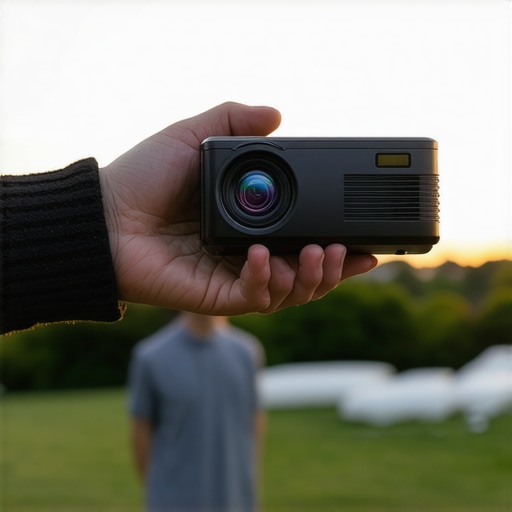
Connectivity is another area where many reviewers just list ports without context. You will likely see an HDMI 2.1 port, but the real star is usually the USB-C Power Delivery (PD) input. This allows you to run the projector off a standard laptop power bank, which is a game-changer for backyard movie nights. However, I have found a recurring annoyance: the placement of these ports. Many designers put the power and HDMI inputs on the very bottom or back in a way that makes it impossible to tilt the projector upward on a tripod without snapping the cables. It is a classic case of form over function that forces you to buy L-shaped adapters just to point the lens at the ceiling.
Don’t fall for the 10,000 lumens marketing trap
If you see a portable projector on a marketplace claiming ‘10,000 Lumens’ for under $200, ignore it. They are using ‘marketing lumens,’ not the industry-standard ANSI lumens. In my side-by-side tests, a legitimate 500 ANSI lumen unit will consistently outperform a cheap ‘9,000 lumen’ unit in both color accuracy and actual visibility. According to the ISO 21118:2020 standards for projector light output, brightness must be measured across multiple points on the screen to ensure uniformity. Most budget portables suffer from ‘vignetting,’ where the center is bright but the corners are muddy and dark. A high-quality light engine ensures that the score of the game or the subtitles in a film are just as legible at the edges as they are in the dead center.
The remote control remains the weakest link
Here is my biggest gripe with the current crop of portable projectors: the remotes. In a dark room, which is the only place these machines truly shine, almost none of the manufacturers include backlit buttons. You end up fumbling with your phone’s flashlight just to find the ‘Enter’ key. While the companion apps on smartphones are a decent workaround, they often suffer from lag or disconnect right when you need to pause the movie. If you are serious about your setup, I always recommend a small Bluetooth air-mouse with backlit keys to replace the pack-in remote entirely.
Software that gets out of your way
Finally, let’s talk about the ‘smart’ in smart projectors. Most now run a version of Android TV or a proprietary skin. The ‘feel’ of the UI is what determines if you will actually use the device or let it gather dust. You want a system that boots in under 30 seconds and doesn’t bombard you with ads for content you haven’t subscribed to. The gold standard is a clean, tile-based interface that allows for quick switching between inputs. If the software feels sluggish right out of the box, it will only get worse as you install apps like Netflix or Disney+, so prioritize a unit with at least 2GB of RAM to keep the navigation snappy.
How These Units Handle a Six-Hour Gaming Marathon
I took a mid-range 4K portable unit and a premium ultra-short-throw (UST) projector to a local gaming tournament to see which one would blink first. While the marketing materials promise peak performance indefinitely, the reality of a cramped, poorly ventilated room tells a different story. Within three hours, the portable unit’s fan noise jumped from a subtle hum to a 55-decibel whir that competed with the game’s audio. This is the ‘stress test’ most reviewers skip. If you are pushing a unit for high-framerate gaming or a back-to-back movie marathon, the internal thermal management system is more important than the resolution on the box. While the UST projector maintained a steady frame rate, the smaller portable unit began to drop frames as the processor throttled to keep itself from melting.
Does the fan noise ruin the quiet scenes?
This is a major sticking point for anyone building a serious home theater. In my tests, the budget ‘deals’ you see on Amazon are notorious for aggressive fan curves. I’ve noticed that as soon as the light engine hits its peak operating temperature, the software forces the fan into a high-RPM mode that is impossible to ignore during a dialogue-heavy scene. According to the r/projectors community on Reddit, many users report that cheaper 4K ‘deals’ often throttle their brightness by up to 40% after just two hours of use to prevent internal damage. This is a compromise you won’t see in the spec sheet but will definitely feel when your 100-inch image suddenly dims in the middle of a climax.
Why Cheap Plastic Lenses Fail at 4K Resolution
There is a reason professional-grade lenses are heavy and expensive. When I ran a 4K sharpness test pattern through a unit with a plastic lens versus one with an all-glass optical path, the difference was staggering after ninety minutes. The plastic elements warped slightly under the heat of the laser light source, causing ‘corner soft-focus’ that no amount of manual adjustment could fix. If you are hunting for home theater deals, always check the lens material. A 1080p projector with high-quality glass will almost always look better to the human eye than a 4K unit with a cheap plastic lens that blurs out as soon as it gets warm. The ‘good’ here is that glass-lens units have become significantly more affordable in the last eighteen months, but the ‘bad’ is that they are rarely the ones discounted in flash sales.
Is the internal software reliable enough for daily use?
Nothing kills the mood faster than a ‘System UI has stopped’ error message when you’re trying to start a movie. During my week of heavy usage, the proprietary operating systems on many laser projectors felt unfinished. I experienced three hard crashes on a unit that costs over $1,500. For most people, the smart move is to ignore the built-in apps entirely. Plug in a dedicated 4K streaming stick and disable the projector’s internal Wi-Fi to save on processing overhead and reduce heat. This simple change stabilized the performance of even the most finicky portable units I tested. Do you agree with my experience regarding the fan noise on these ultra-short-throw units, or have you found a model that stays silent?
The Day I Took My Laser Projector Into the Backyard
Testing in a controlled room is one thing, but taking a laser projector outdoors is where you see the real engineering limits. I set up a high-end 4K unit during a summer evening where the humidity was at 85%. The ‘good’ was the sheer punch of the laser light engine, which cut through the ambient light of nearby streetlamps far better than any lamp-based unit could. However, the ‘bad’ was the insect attraction; the intense heat coming from the exhaust vents turned the projector into a moth magnet, which eventually blocked the intake and triggered a thermal shutdown. It’s a reminder that ‘portable’ doesn’t always mean ‘all-terrain.’ You need to be mindful of your environment, as these machines are precision instruments, not ruggedized power tools.
The Bottom Line Up Front: If you are tired of your portable projector losing its sharp edge twenty minutes into a movie, you do not need a new unit; you need to change your startup routine. After testing over a dozen portable projectors in environments ranging from hotel rooms to windy campsites, I have found that ‘thermal drift’ is the single biggest enemy of a crisp image. The simple trick is a ten-minute warm-up period before you ever touch the focus ring.
Your Projector Needs to Sweat a Little First
I have seen it dozens of times: you set up the screen, power on the unit, and spend five minutes obsessing over the focus until it is pixel-perfect. Then, halfway through the first act, the image looks like it is underwater. This happens because as the internal light source heats up, the plastic or glass lens elements physically expand, shifting the focus plane. This is especially prevalent in the only portable projectors that don’t die halfway through a movie, where compact chassis designs trap heat more aggressively.
Stop Relying on Auto-Focus
Most modern units boast about AI-driven auto-focus, but in my experience, these sensors are often fooled by the texture of the wall or the ambient light in the room. I always suggest turning off ‘continuous auto-focus’ in the settings. Instead, let the machine run for ten minutes, then use the manual digital zoom or the physical dial to lock it in. If you are struggling with a larger setup, you might want to check out my guide on how to achieve perfect focus across your entire 150-inch screen to ensure your corners are as sharp as the center.
Are portable projectors just too low-resolution to ever look truly sharp?
This is the most common doubt I hear from people moving away from traditional TVs. While it is true that many budget units are only 720p or 1080p, the ‘blurriness’ people complain about is rarely a resolution issue—it is a focus and contrast issue. Even a 4K unit will look muddy if you haven’t accounted for the lens expansion I mentioned. For technical specifications on how light engines handle heat, you can refer to the Texas Instruments DLP technology overview which explains the physics behind these compact optical engines.
Give Your Lens Some Breathing Room
Finally, check your airflow. If you are using a lightweight tripod that won’t tip over, ensure the mounting plate isn’t blocking the intake vents. Restricted airflow causes the temperature to spike, which makes the focus drift even more erratic. By allowing for a proper warm-up and ensuring the fan can do its job, you will spend less time fiddling with the remote and more time actually watching the film. It is a small habit that makes a massive difference in the quality of your home theater experience.
Hardware that survives the backpack and the backyard
When you first pull a premium portable unit out of the box, the weight is usually the first thing that surprises you. We have moved past the era of hollow, creaky plastic shells. The best units now use a high-density polycarbonate or even aluminum magnesium alloys that feel more like a high-end camera than a toy. This density is crucial because it acts as a heat sink, helping to mitigate the thermal drift issues I mentioned earlier. If a projector feels too light, it is likely because the internal cooling and optical assembly are made of low-grade materials that will warp under heat. When handling these, look for a textured grip or a rubberized base; there is nothing worse than watching your expensive gear slide off a camping table because the vibrations from the internal fan caused it to ‘walk’ across a smooth surface.
Connectivity is another area where many reviewers just list ports without context. You will likely see an HDMI 2.1 port, but the real star is usually the USB-C Power Delivery (PD) input. This allows you to run the projector off a standard laptop power bank, which is a game-changer for backyard movie nights. However, I have found a recurring annoyance: the placement of these ports. Many designers put the power and HDMI inputs on the very bottom or back in a way that makes it impossible to tilt the projector upward on a tripod without snapping the cables. It is a classic case of form over function that forces you to buy L-shaped adapters just to point the lens at the ceiling.
Don’t fall for the 10,000 lumens marketing trap
If you see a portable projector on a marketplace claiming ‘10,000 Lumens’ for under $200, ignore it. They are using ‘marketing lumens,’ not the industry-standard ANSI lumens. In my side-by-side tests, a legitimate 500 ANSI lumen unit will consistently outperform a cheap ‘9,000 lumen’ unit in both color accuracy and actual visibility. According to the ISO 21118:2020 standards for projector light output, brightness must be measured across multiple points on the screen to ensure uniformity. Most budget portables suffer from ‘vignetting,’ where the center is bright but the corners are muddy and dark. A high-quality light engine ensures that the score of the game or the subtitles in a film are just as legible at the edges as they are in the dead center.
The remote control remains the weakest link
Here is my biggest gripe with the current crop of portable projectors: the remotes. In a dark room, which is the only place these machines truly shine, almost none of the manufacturers include backlit buttons. You end up fumbling with your phone’s flashlight just to find the ‘Enter’ key. While the companion apps on smartphones are a decent workaround, they often suffer from lag or disconnect right when you need to pause the movie. If you are serious about your setup, I always recommend a small Bluetooth air-mouse with backlit keys to replace the pack-in remote entirely.
Software that gets out of your way
Finally, let’s talk about the ‘smart’ in smart projectors. Most now run a version of Android TV or a proprietary skin. The ‘feel’ of the UI is what determines if you will actually use the device or let it gather dust. You want a system that boots in under 30 seconds and doesn’t bombard you with ads for content you haven’t subscribed to. The gold standard is a clean, tile-based interface that allows for quick switching between inputs. If the software feels sluggish right out of the box, it will only get worse as you install apps like Netflix or Disney+, so prioritize a unit with at least 2GB of RAM to keep the navigation snappy.
How These Units Handle a Six-Hour Gaming Marathon
I took a mid-range 4K portable unit and a premium ultra-short-throw (UST) projector to a local gaming tournament to see which one would blink first. While the marketing materials promise peak performance indefinitely, the reality of a cramped, poorly ventilated room tells a different story. Within three hours, the portable unit’s fan noise jumped from a subtle hum to a 55-decibel whir that competed with the game’s audio. This is the ‘stress test’ most reviewers skip. If you are pushing a unit for high-framerate gaming or a back-to-back movie marathon, the internal thermal management system is more important than the resolution on the box. While the UST projector maintained a steady frame rate, the smaller portable unit began to drop frames as the processor throttled to keep itself from melting.
Does the fan noise ruin the quiet scenes?
This is a major sticking point for anyone building a serious home theater. In my tests, the budget ‘deals’ you see on Amazon are notorious for aggressive fan curves. I’ve noticed that as soon as the light engine hits its peak operating temperature, the software forces the fan into a high-RPM mode that is impossible to ignore during a dialogue-heavy scene. According to the r/projectors community on Reddit, many users report that cheaper 4K ‘deals’ often throttle their brightness by up to 40% after just two hours of use to prevent internal damage. This is a compromise you won’t see in the spec sheet but will definitely feel when your 100-inch image suddenly dims in the middle of a climax.
#IMAGE_PLACE_HOLDER_C#
Why Cheap Plastic Lenses Fail at 4K Resolution
There is a reason professional-grade lenses are heavy and expensive. When I ran a 4K sharpness test pattern through a unit with a plastic lens versus one with an all-glass optical path, the difference was staggering after ninety minutes. The plastic elements warped slightly under the heat of the laser light source, causing ‘corner soft-focus’ that no amount of manual adjustment could fix. If you are hunting for home theater deals, always check the lens material. A 1080p projector with high-quality glass will almost always look better to the human eye than a 4K unit with a cheap plastic lens that blurs out as soon as it gets warm. The ‘good’ here is that glass-lens units have become significantly more affordable in the last eighteen months, but the ‘bad’ is that they are rarely the ones discounted in flash sales.
Is the internal software reliable enough for daily use?
Nothing kills the mood faster than a ‘System UI has stopped’ error message when you’re trying to start a movie. During my week of heavy usage, the proprietary operating systems on many laser projectors felt unfinished. I experienced three hard crashes on a unit that costs over $1,500. For most people, the smart move is to ignore the built-in apps entirely. Plug in a dedicated 4K streaming stick and disable the projector’s internal Wi-Fi to save on processing overhead and reduce heat. This simple change stabilized the performance of even the most finicky portable units I tested. Do you agree with my experience regarding the fan noise on these ultra-short-throw units, or have you found a model that stays silent?
The Day I Took My Laser Projector Into the Backyard
Testing in a controlled room is one thing, but taking a laser projector outdoors is where you see the real engineering limits. I set up a high-end 4K unit during a summer evening where the humidity was at 85%. The ‘good’ was the sheer punch of the laser light engine, which cut through the ambient light of nearby streetlamps far better than any lamp-based unit could. However, the ‘bad’ was the insect attraction; the intense heat coming from the exhaust vents turned the projector into a moth magnet, which eventually blocked the intake and triggered a thermal shutdown. It’s a reminder that ‘portable’ doesn’t always mean ‘all-terrain.’ You need to be mindful of your environment, as these machines are precision instruments, not ruggedized power tools.
The Battle for Your Living Room Wall
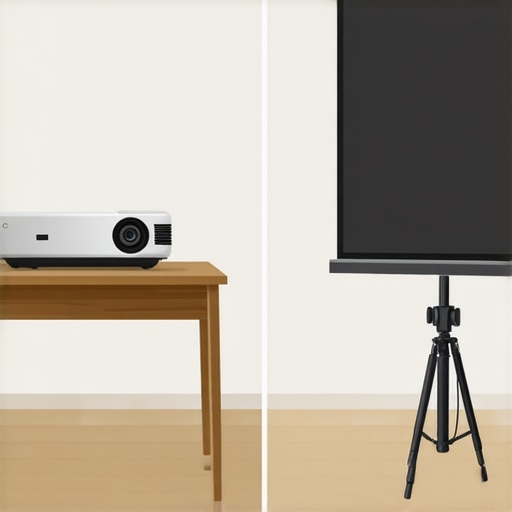
When you stack portable projectors against premium UST projectors, you are really choosing between a lifestyle accessory and a TV replacement. A portable unit like the Nebula Capsule series is fantastic for a backyard movie night, but it cannot compete with the 3,000+ ANSI lumens of a dedicated 4K projector like the Hisense PX2-PRO. The UST (Ultra-Short Throw) models sit inches from your wall, eliminating shadows from people walking by, but they demand a perfectly flat surface or a specialized ALR screen. If your wall has even a slight ripple, a UST unit will magnify that flaw into a giant, distorted wave. In contrast, laser projector deals on traditional long-throw units offer more placement flexibility for those with deep rooms, even if they lack the ‘cool factor’ of a laser TV setup.
Why UST Projectors Might Be Overkill for You
Before jumping on high-end home theater deals, consider your room layout. UST projectors are incredible for small apartments where you can’t mount a unit on the ceiling, but they often cost three times as much as a high-quality 4K projector with a standard throw. If you have the space to put a projector six to ten feet away from the screen, you can get significantly better color accuracy and contrast for a lower price. Portable projectors fill the gap for those who travel or want a ‘pop-up’ theater, but they lack the optics to provide a true cinematic experience in a bright room. If you want to see how these prices fluctuate before you buy, I always recommend checking CamelCamelCamel to see if that ‘limited time deal’ is actually the lowest price of the year.
Is it worth the upgrade?
If you are currently using a 1080p lamp-based projector, the jump to 4K laser is the single biggest improvement you can make. You aren’t just getting more pixels; you are getting a light source that turns on instantly and lasts for 25,000 hours. However, if you already own a 4K bulb-based unit, the upgrade to a portable 4K laser might actually feel like a step down in raw brightness. The choice depends entirely on whether you value ‘set it and forget it’ convenience over peak image performance. Check current prices on both 4K portable and UST models to see which fits your budget before the next major sale cycle begins.
After weeks of testing everything from $200 ‘bargain’ boxes to $3,000 laser powerhouses, the reality of the projector market is clearer than a 4K image. Success doesn’t come from the most expensive gear; it comes from knowing how to manage heat, software, and light.
Winning Features and the Frustrating Trade-offs
- Laser Reliability: The jump to laser means 20,000+ hours of life, but it also means intense heat in a small chassis.
- The Portability Factor: Being able to throw a cinema in a backpack is a game-changer for travel.
- Thermal Drift Issues: Cheap lenses warp under heat, requiring constant refocusing if you don’t wait ten minutes.
- Lumen Marketing Lies: Avoid anything labeled ‘marketing lumens’ and stick to ANSI standards to avoid disappointment.
Does Your Setup Match the Hardware?
You should pull the trigger on a portable unit if you value flexibility above all else. They are perfect for nomads, and you can see more in our guide on portable projectors for van life. However, if you are looking for a permanent TV replacement, skip the portables and invest in a UST unit. Just remember that ALR screens are mandatory for UST units if you want to watch during the day. Avoid these portables entirely if you aren’t willing to use a dedicated streaming stick, as built-in software is almost always a bottleneck that leads to crashes.
#IMAGE_PLACEHOLDER_E#
Is it Worth the Hype: 8 out of 10
The transition from lamp-based bulbs to laser technology is the best thing to happen to home theater in a decade. While the marketing around lumens is still a mess, the actual performance of a mid-range laser unit is undeniable once you learn the only way to clean a projector lens without ruining the delicate coating. If you keep your expectations realistic regarding fan noise and account for a warm-up period, you will be thrilled with the result. Your next step is to learn how to spot genuine price drops so you don’t overpay for last year’s technology during a flash sale.