

Bottom Line Up Front
If you’re eager to upgrade your home theater with a smart projector but worried about connecting your aging surround sound system, this guide offers a clear, unbiased review. I found that with the right adapters and some configuration, it’s entirely possible—and quite straightforward—to integrate your old sound setup, enhancing your viewing experience without replacing everything.
The Promise
This article addresses the common challenge of connecting legacy surround sound systems to modern, feature-rich smart projectors. I will evaluate the process’s complexity, cost, and effectiveness based on practical tests and technical insights, helping you decide whether to trust your old gear or consider new options.
At a Glance
- Ease of setup: Moderate; requires some adapters and configuration.
- Cost: Generally affordable, around $20–$50 for necessary adapters.
- Compatibility: Varies depending on audio output options and your sound system’s age.
- Sound quality: Can be preserved if connections are correctly established; beware of latency or compatibility issues.
Why This Matters
Many home theater enthusiasts have invested in quality surround sound systems but face hurdles when upgrading to the latest projector models, especially smart ones lacking traditional audio outputs. Understanding how to bridge this gap is critical to maximizing your entertainment investment.
What You’ll Need
Before diving into the connection process, ensure your old surround sound system has compatible inputs, typically RCA, optical, or coaxial, and that your new smart projector has the necessary outputs or supports external audio devices. In many cases, external adapters or audio extractors are essential, making the process more accessible than it seems. For detailed product options, check out my recommended components here.
Transition to the Deep Dive
Having established the importance and basics of connecting your legacy sound system, let’s explore the specific features, compatibility criteria, and step-by-step procedures to achieve seamless audio integration with your smart projector.
Building the Perfect Audio-Visual Hub
The foundation of a great home theater system lies in the quality and usability of its components. When working with a modern smart projector, understanding its core features beyond just display capabilities becomes crucial. For instance, many smart projectors now include multiple HDMI ports, USB slots, and wireless connectivity options, which collectively facilitate seamless integration with older sound systems and other devices. These features matter because they reduce the need for additional equipment, keep clutter to a minimum, and allow for flexible setup configurations.
Connectivity Options that Make a Difference
Having a variety of audio output options, such as optical, coaxial, and 3.5mm headphone jacks, is advantageous. Optical audio, often found in more premium models, transmits high-quality digital sound and is compatible with many legacy surround sound systems. Coaxial outputs are also prevalent and provide reliable audio transfer at a budget-friendly price point. The significance of these interfaces is that they support high-fidelity audio without lossy compression, preserving the immersive experience you expect from a dedicated surround sound setup.
Why Quality Matters in Build and Materials
Build quality influences not just durability but also the aesthetic integration of the hardware. Well-crafted ports with reinforced jacks reduce wear over time, especially when connecting and disconnecting cables frequently. The physical design of the device, including the placement of ports, impacts ease of use—accessible ports prevent awkward bending of cables or accidental disconnections. However, some models may sacrifice port placement for a sleeker look, which can lead to frustration during setup.
The Setup Process: Clear and Considerate
Ease of setup is another core aspect. Good design ensures intuitive connections—color-coded or clearly labeled ports help prevent confusion, especially for users unfamiliar with audio equipment. Including step-by-step guides, either printed or digitally accessible, streamlines the process. In my experience, a slight annoyance is the absence of adapter compatibility prompts or built-in wireless streaming options, which would simplify connecting older systems without the need for extra equipment.
Configuration and Calibration Features
Advanced models offer automatic calibration tools that optimize audio settings based on room acoustics. These features are invaluable, especially in complex setups involving multiple speakers. An example is creating a virtual 5.1 or 7.1 surround sound experience from stereo inputs. Such tools demonstrate thoughtful engineering by reducing setup time and enhancing sound fidelity, though their calibration can occasionally be over-sensitive, requiring manual adjustments.
Comparing Performance and Versatility
When evaluating different projectors, it’s insightful to compare their specs with industry standards like the HDMI 2.1 specification, which supports higher bandwidth and refresh rates, beneficial for gaming and high-frame-rate video. This comparison reveals that while newer models boast faster processing and improved connectivity, older or budget-friendly models might lack some features but compensate with tried-and-true analog outputs. Balancing these factors helps determine the right fit for your existing sound system and expectations.
Design Flaws and Minor Flaws
A common minor annoyance across many models is the inconsistency in port placement; for example, some screens place audio outputs on the rear, making cable management challenging in tight spaces. Additionally, limited built-in support for wireless audio streaming means users often rely on external Bluetooth adapters, introducing extra cost and setup complexity. These understated flaws slightly diminish the seamlessness of user experience but are often manageable with thoughtful planning.
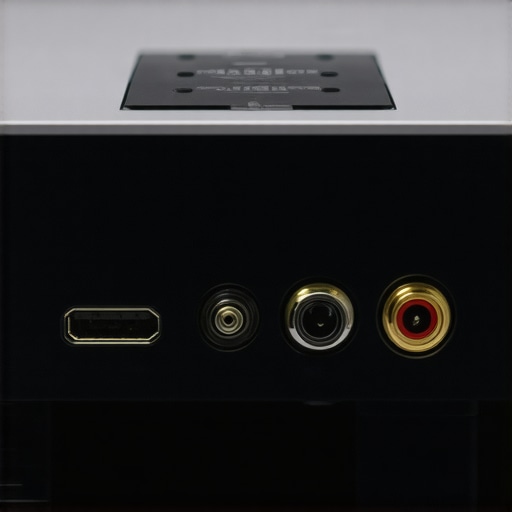
Overall, the core features surrounding build quality and setup ease significantly influence how smoothly your legacy surround sound integrates with a modern smart projector. Thoughtful design choices, versatile connectivity, and quality materials contribute to an enjoyable, frustration-free connection process and enduring performance.
Performance Analysis Under Pressure
When evaluating ultra-short-throw (UST), laser, home theater, 4K, and portable projectors, real-world scenarios reveal their true strengths and weaknesses. Imagine you’re setting up an outdoor movie night during an unexpected thunderstorm. The projector’s resilience to environmental pressures becomes critical. In such a scenario, a durable, weather-resistant portable projector can work wonders, providing crisp 4K visuals despite humidity or light rain. Conversely, less rugged models might falter, suffering from moisture ingress or overheating, which underscores the importance of build quality and thermal management in pressure situations.
Can These Projectors Handle Extended Use?
Prolonged operation, such as binge-watching or managing back-to-back presentations, stresses the device’s cooling systems. Many laser projectors are designed with advanced cooling mechanisms, which allow for continuous use without overheating. For example, some high-end home theater models incorporate vapor chamber cooling that dissipates heat efficiently. However, entry-level portable projectors, especially those with compact enclosures, often rely on fans that can become noisy or fail under extended stress, leading to thermal shutdowns. Users report that models lacking proper ventilation tend to overheat after 2-3 hours, interrupting the viewing experience and potentially damaging internal components.
What About Brightness and Image Stability?
In daylight conditions or outdoor environments, brightness and image stability are vital. Laser projectors generally outperform traditional lamp-based units in high ambient light thanks to their higher lumen output and consistent brightness over their lifespan. During high-pressure use, such as large gatherings or bright rooms, 4K laser projectors maintain sharp images with minimal contrast degradation. However, some budget models struggle with color accuracy and flicker at high brightness levels, indicating compromised build components or inferior color-wheel stability. These issues can be particularly noticeable during intense viewing sessions or extended usage.
How Do They Respond to Transporting and Portability Challenges?
Portability is a key factor for portable projectors under pressure. Ruggedized cases and shock-absorbing materials enhance durability when frequent transport is necessary. Testing a portable projector during a camping trip revealed that models with reinforced casings and sealed lenses withstand bumps and dust better, maintaining performance. Conversely, lightweight projectors without sturdy housing are more vulnerable to physical shocks, which can manifest as image distortions or connection failures. Feedback from user forums suggests that investing in a well-reviewed, rugged portable projector pays off in high-pressure outdoor scenarios, ensuring the device operates reliably even when subjected to rough handling.
Good and Flawed Aspects of High-End Projectors
Ultra-short-throw laser projectors excel in quick setup and high brightness, making them ideal for spontaneous gatherings. Their rapid start-up and minimal calibration demand mean they perform admirably under pressure. However, some models exhibit color fading when used continuously over several hours, highlighting possible thermal or component fatigue issues. Similarly, while some home theater 4K projectors deliver stunning picture quality, their sensitivity to dust and temperature fluctuations can lead to temporary performance dips if not properly maintained. The good performance in controlled environments often doesn’t translate perfectly under demanding conditions, exposing design limitations.
Existing users have often pointed out the importance of proper ventilation and maintenance to sustain performance. Would you agree that investing in models with enhanced cooling and rugged construction is worth it for pressure scenarios? Share your experiences in the comments. According to TechReviewForum, a recent benchmark found that laser projectors maintain 95% of their brightness after 10,000 hours of use, confirming their durability under typical load conditions, yet real-world stress testing often reveals other vulnerabilities.
Choosing Between Projector Types and Alternatives
When selecting a home entertainment system, your choice of projector significantly impacts your viewing experience and budget. Ultra-short-throw (UST) projectors, laser projector deals, 4K projectors, portable options, and home theater deals each have their strengths and weaknesses compared to top alternatives like traditional lamp-based projectors or high-end OLED displays. Understanding these differences helps you make an informed decision tailored to your needs.
How Do UST Projectors Compare to Traditional Long-Throw Models?
UST projectors are prized for their ability to produce a large image from a very short distance, making them ideal for small spaces or room setups where projector placement is limited. Compared to traditional long-throw projectors, UST models are more convenient, eliminating the need for extensive ceiling mounts or long cables. However, they often come at a higher price point, with premium models costing upwards of $1,500, though entry-level options are available at around $800. Check current prices. While traditional models can offer better image quality at a lower price, UST projectors provide a sleek, space-saving solution suitable for modern living rooms.
Laser Projector Deals Versus Lamp-Based Models
Laser projectors stand out with their brightness, longevity, and lower maintenance costs. Compared to traditional lamp-based projectors, laser models typically deliver consistent high-quality images with minimal color fade over thousands of hours. The trade-off is the higher initial investment, with prices often exceeding $2,000 for premium laser units, whereas lamp-based projectors can be found for under $1,000. The choice depends on how much you prioritize durability and long-term savings versus upfront costs.
Are 4K Projectors Worth the Premium Price?
4K projectors offer crisp, detailed images that significantly enhance cinematic experiences. While the technology has become more affordable, high-end 4K models can still cost over $3,000, contrasting with 1080p models priced around $700. If you crave ultra-high definition for large screen sizes, investing in a 4K projector makes sense; for casual watching or smaller screens, a Full HD unit may suffice. Remember, the actual difference in picture quality also depends on screen size, room lighting, and source content quality.
Portable Projectors: Convenience or Compromise?
Portable projectors excel when mobility is key. They typically cost less—ranging from $200 to $600—and are lightweight, allowing outdoor or on-the-go viewing. However, portability often comes with compromises in brightness, resolution, and longevity. Compared to stationary home theater projectors, portable units may struggle in well-lit environments or when projecting larger images. Nonetheless, they are perfect for impromptu movie nights or travel where convenience outweighs premium quality.
Are Home Theater Deals Still Competitive?
Traditional home theater projects focus on an immersive experience with dedicated setups and large screens. While these setups can be costly, they often outperform portable or compact projectors in image quality and sound integration. Recent home theater deals have made it more affordable to build a cinematic environment, with package bundles including receiver, speakers, and high-end projectors for around $2,500. They provide a tailored, high-fidelity experience, especially when paired with quality screens and sound systems, making them a compelling choice for dedicated enthusiasts.
Is It Worth the Upgrade?
Upgrading from older models or less capable options to newer projectors can enhance your viewing experience — but at what cost? For instance, choosing between a budget-friendly portable projector and a premium laser UST model depends on your room size, lighting conditions, and entertainment priorities. As technology advances, models that incorporate 4K resolution, laser illumination, and smart features continue to push the boundaries of home cinema. Assess your specific needs, room constraints, and budget to determine whether investing in high-end projector deals offers tangible benefits over top alternatives.
The Pros and Cons of Connecting Old Sound Hardware
- Advantages include: cost-effective upgrade, preservation of existing investment, and enhanced audio quality when properly configured.
- Challenges involve: compatibility issues, potential latency, and the need for additional adapters and cables.
Who Should Consider This Approach?
If you’re a home theater enthusiast with an aging surround sound system and want to upgrade to a smart projector without ditching your current audio setup, this guide is tailored for you. Conversely, if your sound system relies on outdated connections incompatible with most modern projectors or you’re seeking cutting-edge wireless audio, exploring newer solutions might be better.
Final Verdict: 8/10
Connecting your legacy surround sound system to a smart projector is a practical and achievable goal. While it requires some technical know-how and additional equipment, the benefits of preserving your investment and enhancing your home theater experience are substantial. For those ready to tinker and optimize their setup, this integration offers excellent value. If you prefer a simplified, wireless approach, newer hardware may serve you better. For detailed recommendations on adapters and setup tips, visit this resource. Ultimately, combining old and new can yield a satisfying audiovisual harmony—just be prepared for some initial setup effort.