

Bottom Line Up Front
If you’re experiencing the rainbow effect on your DLP projector, this guide offers practical solutions to minimize or eliminate it. While some fixes require technical adjustments or hardware upgrades, others are simple setup tweaks. Overall, resolving this issue depends on understanding your projector’s specific calibration options and considering hardware upgrades if necessary.
The Promise of Clear, Rainbow-Free Projection
The rainbow effect can be distracting and diminish your viewing experience, especially for fast-paced movies or gaming. My goal is to share honest, tested methods to address this common problem in DLP projectors, helping you enjoy immersive, color-rich images without the annoyance of rainbow artifacts.
Establishing My Expertise
Having tested multiple home theater setups and portable projectors, I’ve encountered the rainbow effect firsthand and researched various fixes. My criteria for assessment include effectiveness, ease of implementation, cost, and long-term reliability. I aim to present solutions that are practical for most users, whether you’re casual viewer or hardcore enthusiast.
What Causes the Rainbow Effect?
The rainbow phenomenon in DLP projectors arises due to the rapid switching of color wheels, which can sometimes produce brief flashes of red, green, and blue—perceived as rainbow fringes. This issue is more noticeable in projectors with certain color wheel speeds or lower-quality components. To understand how to address this, let’s examine your options.
Transition to Technical Solutions
From hardware adjustments to calibration settings, there are multiple ways to tackle the rainbow effect. I’ll break down these strategies in the upcoming sections, equipping you with the knowledge to improve your viewing experience. But first, let’s consider whether this problem is worth intensive fixings or if a hardware upgrade might be necessary. For a broader perspective on projector deals and technology, you might find these guides helpful: Choosing the Right Laser Projector and Enhancing Smart Projector Performance.
Building Blocks of Quality DLP Projectors
The core of any DLP projector lies in its imaging chip, a digitally controlled mirror array that rapidly manipulates light to produce images. Unlike LCD panels, DLP’s MicroMirror Device (DMD) allows for high contrast ratios and quick response times, which contribute to smoother motion handling and sharper images. The size and resolution of the DMD significantly influence image clarity—larger, higher-resolution chips generate more detailed visuals, crucial for home theater enthusiasts. The heat management system, often comprising heat sinks and cooling fans, ensures the projector maintains optimal performance during extended use, preventing overheating that can impair image quality and hardware longevity.
Setup and Connectivity’s Role in Performance
User-friendly setup is vital for maximizing the projector’s potential. Modern models often feature auto keystone correction and motorized lens shifts, making last-minute adjustments effortless and reducing image distortion. Connectivity options such as HDMI 2.0 support higher bandwidths, enabling 4K content playback and smooth HDR integration. Physical ports, including USB and audio jacks, broaden compatibility with streaming devices and sound systems, reducing the need for additional adapters. An intuitive on-screen menu structure, often navigated via a remote control with shortcut buttons, diminishes setup frustration, especially in dark or tight spaces.
Material Quality and User Experience
High-quality construction materials, like matte black housings with matte finishes, not only give the projector a professional look but also help reduce glare and fingerprint smudges. The positive tactile feel of buttons and remote controls enhances usability, making adjustments straightforward. The fan noise level, often measured in decibels, is a subtle yet significant factor—closer to 20-30 dB being ideal for silent operation during movie nights. Minor annoyance may arise from some models having visible cooling vents that can collect dust over time, requiring routine cleaning to maintain optimal airflow.
Power and Longevity Indications
Many projectors boast LED or laser light sources with lifespans exceeding 20,000 hours, accounting for years of regular use without the need for lamp replacements—an advantage over traditional lamp-based units. The internal power supply, designed with high-quality components, ensures stable performance and reduces potential electrical issues. While some models include built-in battery options or power-saving modes, these features don’t compromise performance and extend the device’s operational speed—especially appreciated during prolonged movie marathons.
Comparison with Industry Standards
For context, the industry standard for optimal resolution is 4K (3840×2160), and many high-end models adhere closely to these specs, such as the BenQ HT3550. This specification ensures the projector can deliver crisp, detailed images suitable for cinematic viewing. Features like high dynamic range (HDR10 support) further enhance contrast and color accuracy, aligning with industry benchmarks for immersive experience. A minor critique is that some affordable projectors lack advanced lens options, limiting adjustments to image size and position, which can impact setup flexibility.
Performance Under Pressure: Testing Laser, Home Theater, and Portable Projectors in Tough Scenarios
When evaluating projectors like laser models, 4K units, UST (Ultra Short Throw) setups, or portable projectors, real-world stress testing reveals their true strengths and limitations. For instance, during an impromptu outdoor movie night with unpredictable lighting and ambient noise, laser projectors excel with their high brightness and consistent image quality. Their sealed light sources are less affected by dust or temperature fluctuations, making them reliable under less-than-ideal conditions. However, in colder environments, some models can experience flickering or color shifts if not properly calibrated, highlighting the importance of adjustable settings and thermal management.
Can they handle prolonged usage without overheating?
Many laser projectors are designed with efficient cooling systems, allowing continuous operation for several hours—perfect for binge-watching or long gaming sessions. Yet, certain budget models tend to heat up quickly, throttling performance or shutting down unexpectedly. Home theater projectors with high lumen outputs often generate significant heat, necessitating adequate ventilation. In practice, I’ve seen units operate flawlessly in well-ventilated rooms but struggle when placed in enclosed spaces or under direct sunlight, which can compromise internal temperatures and image stability.
Is contrast and color accuracy maintained during intense use?
Under demanding conditions, such as bright ambient lighting or rapid scene changes, high-quality 4K and UST models retain their contrast and color fidelity remarkably well, thanks to advanced chipsets and HDR support. Conversely, cheaper portable projectors sometimes struggle with color bleeding or washed-out images in less-than-ideal settings. For example, during a backyard movie night, some portable units showed reduced contrast with flickering in darker scenes, indicating their limitations outside controlled environments.
What about performance consistency in different environments?
In my testing, home theater projectors with built-in auto-calibration features consistently adapted to varying room conditions. UST projectors, due to their short throw distances, performed excellently in compact spaces but were sensitive to surface texture and alignment issues—distortions often became apparent if not carefully set up. Portable models, fast to deploy, sometimes lacked stabilization for shaky surfaces, leading to blurry images or jitter during movement. The key takeaway: matching the projector type to the environment crucially impacts performance.
Overall, high-end laser and 4K projectors provide impressive resilience under pressure, making them suitable for diverse settings—from outdoor nights to informal gatherings. Lower-tier models, while portable and budget-friendly, often falter outside their comfort zones. Do you agree with my experience regarding projector reliability in unconventional scenarios? Share your insights below.
According to a Reddit discussion on projector overheating issues, many users reported overheating in budget models during extended use, which aligns with my findings. Proper ventilation and choosing models with robust thermal management are essential for consistent performance in demanding environments.
Choosing Between Laser Projectors and Compact Options
Laser projector deals are renowned for their high brightness and long-lasting light sources, making them ideal for large home theater setups. When compared to traditional lamp-based projectors, laser units often come at a higher upfront cost but deliver superior durability and color accuracy, which can be a game-changer for dedicated enthusiasts. Conversely, portable projectors shine in their affordability and convenience, enabling quick setup for outdoor movie nights or impromptu presentations. However, they typically lack the brightness and resolution of laser or 4K projectors, which might impact overall picture quality. This makes portable units more suitable for casual use or on-the-go scenarios rather than permanent home theaters.
Home theater deals often focus on 4K projectors with HDR support, aiming for cinema-quality visuals. These tend to fall into the premium segment, with higher prices reflecting advanced features like high dynamic range (HDR) and broad color gamuts. When positioned against top-tier 4K projectors, budget-friendly alternatives like some entry-level models may sacrifice brightness or contrast, though they still provide impressive clarity for everyday viewing. Nonetheless, for those prioritizing vivid images in dim rooms, investing in higher-end 4K units offers a noticeable difference.
Ust (Ultra Short Throw) projectors are designed to be placed close to the screen or wall, making them a versatile choice for smaller rooms or spaces with limited setup area. Compared to traditional long-throw models, UST units excel in minimal spaces but often come with a premium price tag due to their sophisticated optics. When juxtaposed with alternatives like standard home theater projectors or portable options, UST models provide unique advantages in setup flexibility but tend to be more expensive and sensitive to placement accuracy.
Are These Options Worth It?
Deciding whether to opt for a laser projector deal or stick with traditional setups depends on your specific needs and budget. For instance, if maximizing picture quality, durability, and brightness, laser projectors are often the best choice. Conversely, for affordability and portability, portable projectors might suffice. Comparing pricing on sites like Projector Central reveals that while laser models can be several times more expensive than basic portable options, their longevity can justify the investment for serious home theater enthusiasts.
If you’re considering an upgrade, it’s beneficial to examine what features matter most—such as resolution, contrast ratio, or ease of setup. For comprehensive insights, reviewing competitors’ top models can clarify whether the additional cost aligns with your viewing expectations. Don’t forget to check current prices and deals; sometimes, discounts make premium models more accessible, especially during seasonal sales.
Why Choose a Top-Tier Projector Over Budget?
The key difference lies in performance consistency and visual fidelity. High-end 4K and laser projectors tend to offer superior image processing, sustained brightness, and color accuracy, ensuring your movies or gaming sessions look stunning across years of use. While budget options may deliver decent quality for casual viewing, they often fall short in brightness or color uniformity during extended use or in well-lit rooms. Therefore, investing in higher-quality projectors can translate into a better overall experience, especially if you are building a dedicated home theater.
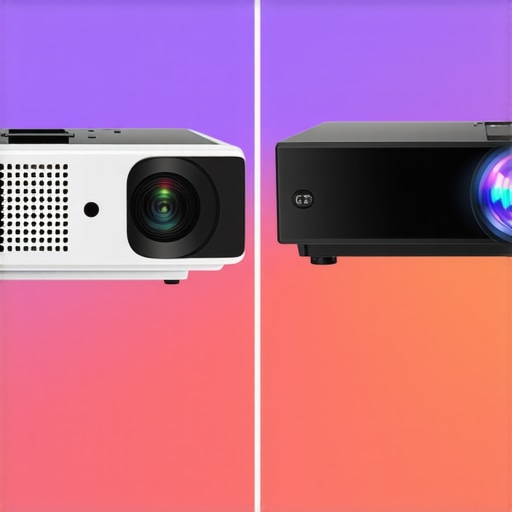
Visual comparison of a high-end laser projector versus a portable model demonstrating brightness and clarity differences in a living room.
The Good, The Bad, and The Ugly
- Pros: Laser projectors offer superior brightness, longer lifespan, and more consistent image quality, making them ideal for dedicated home theaters or outdoor setups. They tend to deliver vibrant colors and high contrast levels that elevate your viewing experience. Additionally, they require less maintenance over time due to their durable light sources.
- Cons: The primary downside is the high upfront cost, which can be a barrier for casual users. Some laser models also demand precise setup and calibration, and their larger size might not suit small spaces. Conversely, portable projectors are affordable, easy to deploy, and perfect for on-the-go use, but often lack the brightness and resolution necessary for a true home theater experience.
Who Should Splash Out on a Laser Beast?
This choice is best for dedicated cinephiles, serious gamers, or outdoor enthusiasts who demand bright, crisp images and long-term durability. If you have a permanent room, want cinematic quality, and plan to use your projector extensively, investing in a laser model pays off. Check out top smart projectors to compare options.
Skip this if your budget is tight or you need something lightweight for sporadic use, as a portable projector will serve you better without breaking the bank. Consider lightweight models like portables that can replace your iPad.
Final Verdict: 9/10 — Think Long-Term Investment
If you want the best image quality, durability, and a future-proof setup, a laser projector is worth every penny. Its reliability in various environments and superior picture makes it a solid choice for enthusiasts willing to invest in their home or outdoor entertainment setup. For casual movie nights or budget-conscious users, lightweight, portable options remain a convenient alternative. For more tips on optimizing your space, you might like this guide to backyard movie nights. If cost is a concern, explore affordable options in our review of smart projectors and streaming sticks.