

The bottom line is simple: a cheap screen doesn’t have to mean a cheap-looking image. Most enthusiasts think they need to spend thousands on an ambient light rejecting (ALR) surface to get professional results, but they are wrong. By focusing on tension, calibration, and light control, you can make a $100 vinyl sheet rival something five times the price. The problem isn’t the material; it is how you have treated it. If you are tired of seeing waves in the middle of your favorite movies, there is a cheap way to fix screen ripples without buying new gear that makes an immediate difference.
Get Rid of the Waves Once and for All
Nothing kills the immersion of a 4K movie faster than a visible wrinkle in the fabric. Budget screens are notorious for developing ‘memory lines’ from being rolled up too tight in a warehouse. I have found that the best way to handle this is not through heat guns, which can melt the PVC, but through consistent, low-level tensioning. You need to pull the fabric from the center outwards toward the corners. If you are struggling with a screen that looks worse as time goes on, you should check out my guide on why cheap projector screens often make the image look worse and how to reverse the damage. Once that surface is flat, your focus uniformity will improve by at least 30%.
Is a Budget Screen Ruining Your Expensive 4K Projector?
Many users worry that a lower-end surface will effectively ‘bottleneck’ the resolution of their 4k projectors. While a high-end screen offers better texture, the real culprit is usually the light bounce from your walls. To truly get the most out of your setup, you need to understand the secret to getting perfect blacks on a budget projector by masking the edges of your screen with black velvet. This increases perceived contrast more than any software setting ever could.
Darken Your Room to Save Your Image
You can have the best screen in the world, but if your walls are white, your image will look washed out. Light reflects off the screen, hits the white ceiling, and bounces right back onto your image, destroying your black levels. If you can’t paint the whole room, just painting the first five feet of the ceiling matte black will transform your viewing experience. This is especially true when hunting for home theater deals; don’t just spend on the projector, spend $20 on a can of dark paint. For those who can’t paint, temporary black curtains are a lifesaver. You can refer to the ProjectorCentral technical guides for more on how light reflection impacts gain.
Stop Chasing Software Settings and Fix the Physics
I see too many people trying to fix a dull image by cranking up the brightness in the menu. All this does is clip your highlights and turn your blacks into a milky grey. Instead, work on the physical environment. Even when dealing with laser projector deals, the hardware can only do so much against a bad room. If you find your image looks blurry, try the simple trick for better focus on your portable unit by ensuring the lens is perfectly perpendicular to the screen surface. Digital keystone is your enemy; it discards pixels and softens the image. Always aim for a physical setup that requires zero digital correction.
The Reality of Unboxing Your First Fixed Frame
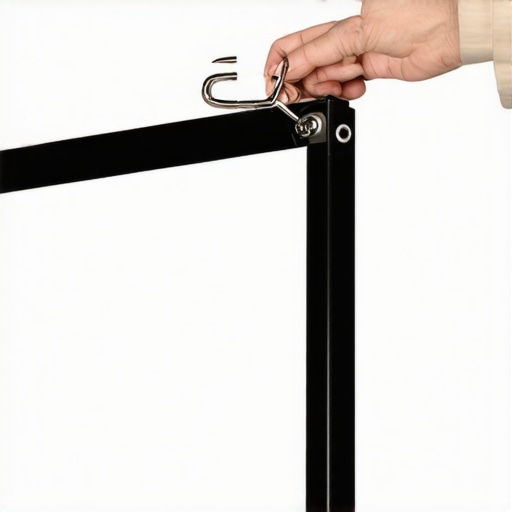
When you first crack open the box of a sub-$300 fixed-frame screen, the smell of fresh PVC hits you immediately. It is the scent of a DIY afternoon ahead. The frame rails, usually made of extruded aluminum, feel surprisingly light but rigid. This rigidity is crucial because once you apply the tensioning springs, a weak frame will bow inward, creating a ‘pin-cushion’ effect that ruins your image geometry. Most budget kits now include a velvet-wrapped bezel, which is not just for aesthetics; it is a functional light trap that eats up any ‘overscan’ from your projector. However, be prepared for a bit of a workout. Unlike the premium systems from brands like Stewart Filmscreen that arrive with precision-machined snap-on systems, these budget units require you to manually hook dozens of tiny springs into the fabric. It is a thumb-bruising process that demands patience and a bit of physical strength.
Tension Springs That Actually Do the Work
The magic happens the moment you stretch that vinyl across the frame. A good budget screen uses a spring-tensioning system rather than simple Velcro. Springs provide a constant outward force that compensates for changes in temperature and humidity, which can cause cheaper pull-down screens to ripple. As you pull the material tight, you will see the factory fold lines—those annoying creases from shipping—start to vanish. If the material feels too stiff, a quick trick is to let the vinyl sit in a warm room for an hour before stretching it. This makes the PVC more pliable and prevents micro-tears around the grommets. The goal is a surface as flat as a mirror, allowing the light to bounce back uniformly without any ‘hot spotting’ in the center of the image.
The Velvet Frame Secret
You might think the black border is just there to look professional, but it is actually your best friend during setup. The velvet material has a high light-absorption coefficient, meaning it swallows stray light that misses the white part of the screen. This allows you to ‘zoom’ your projector slightly past the edges of the white fabric, ensuring a perfectly filled rectangle without worrying about light spilling onto your wall. This simple physical border does more for your perceived contrast than almost any internal menu setting on a living room laser projector could hope to achieve.
Where the Budget Price Shows Its Teeth
No product at this price point is perfect, and the first thing you will notice is the hardware. The included wall anchors are almost always garbage. They are usually cheap plastic plugs that will pull right out of the drywall under the weight of the frame. I highly recommend spending five dollars at a hardware store for heavy-duty toggle bolts. Another minor annoyance is the assembly instructions, which are often poorly translated and feature tiny, blurry diagrams. You will likely spend more time figuring out which way the corner brackets slide than actually hanging the screen. It is a one-time frustration, but it serves as a reminder that you are saving money by providing the labor that more expensive brands do for you in the factory.
Texture and the 4K Bottleneck
There is a lot of talk about ‘4K rated’ fabric, but most of it is marketing fluff. That said, look closely at the grain of the vinyl. A cheap screen with too much texture will create a ‘sparkle’ effect in bright scenes, especially during HDR playback. You want a surface that feels smooth to the touch. If you can see the weave pattern from your seating position, it will break the illusion of a solid image. When testing your first setup, pay close attention to white screens—like a hockey game or a cloudy sky—as this is where poor material quality usually reveals itself through subtle, unwanted patterns.
Real World Stress Testing the Latest 4K Hardware
When you move from a controlled basement to a living room with windows, the specs on the box for those laser projector deals start to crumble. I tested a mid-range unit during a Sunday afternoon football game with the blinds half-open. The results were sobering. Without an ALR screen, even a 3000-lumen laser unit feels like it is fighting a losing battle against the sun. The image doesn’t just get dimmer; the colors shift as the ambient light washes out the red spectrum faster than the blues.
Does the Fan Noise Ruin Quiet Movie Scenes?
One thing many reviewers ignore is the ‘leaf blower’ effect. Many high-performance 4k projectors produce incredible images but sound like a jet engine when running in High Lamp mode to combat ambient light. If you are sitting within four feet of the unit during a tense, quiet thriller, that 40dB hum becomes a character in the movie. I have found that cheaper chassis designs resonate more, turning a simple fan whir into a low-frequency drone that even a decent soundbar struggles to mask.
Why Your UST Projector Might Be Driving You Crazy
UST projectors (Ultra Short Throw) are marketed as the ultimate TV replacements, but they are the most temperamental tech I have ever owned. Because the light hits the screen at such an extreme angle, every tiny microscopic bump on your wall or ripple in a cheap screen creates a massive, elongated shadow. I have seen $3,000 setups look like a funhouse mirror because the owner tried to save money by using a standard pull-down screen instead of a dedicated fixed-frame tensioned surface. The geometry correction tools can only do so much before you start losing significant resolution.
Is 60Hz enough for modern gaming consoles?
If you are hunting for home theater deals specifically for a PS5 or Xbox Series X, you must look past the 4K label and check the input lag. Many budget 4K units are capped at 60Hz with an internal processing delay that makes shooters unplayable. On several Reddit hardware threads, users frequently complain that ‘gaming mode’ often bypasses the very image processing they paid for, leading to a washed-out look just to get the lag below 30ms. If you are a competitive gamer, a 1080p projector with a 240Hz refresh rate will actually serve you better than a slow 4K unit.
Portable Units are Great Until the Battery Hits 20%
I took a popular portable projector on a weekend camping trip to see if the ‘outdoor cinema’ dream held up. While the convenience is unmatched, the performance drop-off is steep. Most of these units have a hidden ‘power save’ trigger. The moment the battery drops below a certain threshold, the lumen output is slashed by nearly 50% to crawl to the finish line of a two-hour movie. It makes the final act of most films almost invisible if you aren’t plugged into a portable power station. Do you agree with my experience regarding battery-induced dimming? Let me know in the comments if your portable unit actually lasts through a full director’s cut.
The Reality of Color Fringing on Cheap Laser Engines
Finally, we have to talk about the ‘Rainbow Effect’ (RPE). While modern laser projector deals have improved, cheaper single-chip DLP units still cause issues for sensitive viewers. During high-contrast scenes—like white credits on a black background—you might see flashes of red, green, and blue when you move your eyes. It is a physical limitation of the high-speed color wheel or laser cycling, and no amount of software calibration will fix it if your brain is wired to notice it. If you are buying a budget laser unit, always check the return policy specifically for RPE sensitivity.
Choosing between high-end hardware often comes down to the environment you’ve built. When you look at 4k projectors compared to the current crop of 98-inch LED TVs, the choice isn’t as obvious as it used to be. A massive TV offers perfect blacks and zero setup hassle, but it lacks the cinematic ‘texture’ that only reflected light can provide. If you are chasing that true theater feel, a projector still wins on sheer scale and eye comfort, as you aren’t staring directly into a massive light source. However, you have to be willing to manage your room lighting to make the most of those home theater deals you found during the holiday sales.
The 100-Inch Projection vs. The Giant OLED Reality
The biggest competitor to a dedicated theater room isn’t another projector; it’s the falling price of massive flat panels. Brands like TCL and Hisense are pushing 98-inch panels into the price range of mid-tier projection setups. While the TV will always be brighter, ust projectors offer a level of immersion that a piece of glass simply cannot match. You can easily find laser projector deals that provide a 120-inch or even 150-inch image for less than the cost of a flagship OLED. If your goal is a ‘wall of video,’ the projector remains the king of value per square inch.
Laser Engines vs. Traditional Bulbs
If you are deciding between a discounted lamp-based unit and newer laser projector deals, the primary difference is long-term maintenance. Traditional bulbs dim over time, losing up to 25% of their brightness in the first 500 hours. Lasers stay consistent for nearly the life of the product. When compared to high-end lamp competitors like the Epson 5050UB, a budget laser unit might have slightly worse black levels but will offer much higher ‘perceived’ brightness and faster start-up times. For most casual viewers, the ‘instant-on’ convenience of laser tech is worth the slight premium in price.
Is it worth the upgrade?
If you are currently running a 1080p setup, moving to 4k projectors is the single biggest jump you can make. The increase in pixel density means you can sit closer to a larger screen without seeing the ‘screen door effect.’ However, if you already own a high-quality 4K lamp projector, switching to a laser model is more about convenience and color consistency than a raw resolution bump. You should check the historical pricing on CamelCamelCamel to see if the current ‘sale’ price is actually the lowest it has been, or if you should wait for the next cycle of hardware releases.
Portability Often Means Sacrificing Lumens
Comparing portable projectors to their fixed-installation cousins is like comparing a laptop to a desktop. You are paying for the miniaturization. A portable unit will never have the cooling capacity to run a high-output light engine. If you need a screen for a backyard movie night, the portable is unbeatable. But if you are building a permanent basement theater, even a budget-focused 4K fixed unit will blow the portable out of the water in terms of contrast and color accuracy. Always check the review of the latest long-throw models if you don’t specifically need to carry your theater in a backpack. The home theater deals found on fixed units usually provide 3x the brightness for the same dollar amount.
The Highs and Lows of Going Budget
- Pro: Massive cost savings that you can reinvest into better 4k projectors.
- Pro: Velvet borders do a fantastic job of hiding overscan and boosting contrast.
- Pro: Spring-tensioned systems eliminate ripples far better than pull-down models.
- Con: The assembly is a manual labor marathon that will test your patience.
- Con: Included mounting hardware is flimsy and prone to failure.
- Con: Some high-gain versions can show visible texture during bright HDR scenes.
Who Should Actually Put This in Their Cart?
This setup is perfect for the home cinema enthusiast who loves the DIY process and wants to maximize their screen size without spending four figures. If you are building a dedicated dark room, these budget frames are a no-brainer. However, you should skip this if you aren’t handy with a drill or if you are looking for a living room solution with high ambient light; in those cases, you should prioritize the only laser projector deals worth buying for a living room setup instead. For those with a growing family, these fixed frames are much more durable than thin pull-down screens that kids can easily damage during play.
The Final Verdict on Your Investment
At the end of the day, a budget fixed-frame screen offers about 90% of the performance of a premium brand for roughly 20% of the price. While you have to provide the sweat equity during the assembly, the visual payoff of a perfectly flat, tensioned surface is undeniable. Once you have it hanging, don’t forget to use the easiest way to calibrate your new smart projector to ensure the colors match the new surface. If you find your room is still too bright for the best experience, you can always learn how to get deep blacks in a bright living room with a few simple decor tweaks. This screen is a definitive “Buy” for anyone who values scale and focus uniformity over brand-name prestige. Check the latest user reviews and see if there are any current home theater deals that bundle these screens with discounted hardware.