

The Bottom Line Up Front: If your projector fan sounds like a turbine and the chassis feels hot to the touch, you are minutes away from a thermal shutdown that could permanently degrade your expensive lamp or laser light source. Summer heat is the number one killer of home theater hardware, but with better airflow and regular maintenance, you can keep your 4k projectors running cool even during a July heatwave.
Summer Heat is a Silent Hardware Killer
I’ve spent years testing everything from budget portables to high-end ust projectors, and the one thing they all have in common is a hatred for ambient temperatures over 85 degrees. The promise of a projector is simple: it replaces a massive TV with a cinematic experience. However, when the mercury rises, the cooling fans have to work twice as hard to dissipate the heat generated by the power supply and the light engine. If you don’t intervene, you’ll likely face the dreaded ‘lamp warning’ or a total system blackout. I judge a projector’s durability by its thermal management system and its ability to maintain brightness without sounding like a vacuum cleaner. [image placeholder]
Are 4k projectors overpriced if they can’t handle a summer heatwave?
It is a common frustration for enthusiasts who snag the best laser projector deals only to find the unit struggling in a warm room. It’s not that they are overpriced; it’s that high-resolution 4k chips and high-lumen lasers generate incredible amounts of internal heat. You aren’t just paying for the resolution; you’re paying for the cooling architecture required to keep those pixels sharp. However, if a manufacturer skimps on the heat sinks, even the most expensive home theater deals can turn into a disappointment during the summer months.
Give Your Laser Unit Room to Breathe
The biggest mistake I see in home setups is ‘choking’ the intake vents. Many users try to hide their units inside cabinets, but unless you follow specific cabinet designs for hiding your projector, you are essentially slow-cooking your hardware. You need at least 20cm of clearance on all sides. If you are using a ceiling mount, be aware that your ceiling fan might be ruining your mount stability while also pushing hot air directly back into the projector’s intake.
Check if Your Fan is Screaming for Help
If you notice the noise levels increasing, the hidden reason your projector fan is getting louder is almost always dust accumulation. In the summer, dust combined with humidity creates a ‘blanket’ over the internal components. I recommend checking your filters every 200 hours of use. While you’re at it, ensure you know the only way to clean a lens without scratching it, as heat can sometimes bake dust onto the glass surface. For technical specifications on thermal limits, always refer to your official manufacturer manual to see the maximum operating temperature for your specific model. Staying proactive means your portable projectors and 4k rigs will survive many summers to come.
The Hands-On Reality of Modern Laser Hardware
When you finally unbox a flagship 4k unit, the physical presence of the device tells you more than any spec sheet ever could. There is a specific kind of ‘industrial’ reassurance that comes with a heavy chassis. High-end laser projector deals often lead you to units that weigh upwards of 20 pounds, and for a good reason. That mass is largely dedicated to heat sinks and robust internal fans. Cheap, hollow-feeling plastic is a warning sign that the thermal management was an afterthought. I’ve found that the best ust projectors use a mix of magnesium alloy and high-grade polycarbonate to ensure the frame doesn’t warp under the constant thermal expansion and contraction of daily use.
Chassis Design is Your First Line of Defense
If you examine the industrial design of industry leaders like the Sony VPL-XW5000ES, you’ll notice that the intake and exhaust ports are strategically placed to prevent ‘re-breathing’ hot air. In a well-designed 4k projector, you can actually feel the structured column of warm air being pushed several feet away from the unit. This is vital for home theater deals where the projector might be placed in a tight shelf or a rear-wall nook. If the air just ‘drifts’ out of the vents without velocity, the internal components are essentially soaking in their own exhaust. I always look for a ‘honeycomb’ vent pattern, which maximizes surface area for airflow without compromising the structural integrity of the casing. 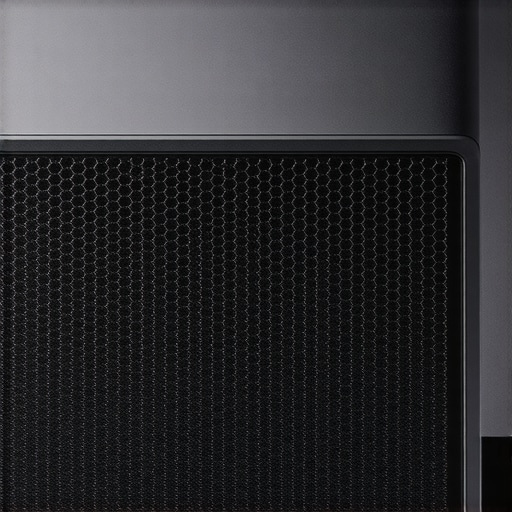
Software Speeds and The Menu Lag Trap
Moving from the physical to the digital, the first-time setup process is where the honeymoon phase often ends. Most portable projectors today run on integrated smart platforms, usually Android TV or a proprietary Linux skin. The ‘feel’ of the remote response is a major indicator of the internal processing power. There is nothing more frustrating than a $2,000 laser unit that stutters when you try to adjust the keystone or switch inputs. An optimized UI should feel as snappy as a modern smartphone. If you notice a half-second delay between a button press and a screen reaction, that’s a sign the manufacturer saved money on the System-on-a-Chip (SoC), which might also affect how well the projector handles high-bitrate 4k HDR content without dropping frames.
The Clunky Reality of External Power Bricks
However, no design is flawless, and even the most expensive rigs have a dirty little secret: the external power brick. While we love the sleek, minimalist look of the projector itself, many manufacturers move the heavy transformer to a separate block to keep the projector’s footprint small. This can be a nightmare for cable management. If you are mounting your unit on a ceiling or a floating shelf, you are suddenly tasked with hiding a black plastic brick the size of a literal masonry stone. It’s an annoying trade-off that often forces users to buy extra-long DC cables or custom mounting brackets just to keep the setup looking clean. It’s a reminder that even in the world of high-end home cinema, convenience and aesthetics are often at odds.
Pushing Laser Hardware to the Breaking Point
Put your laser unit through a four-hour torture test with a high-bitrate 4K Blu-ray, and you’ll quickly see where the engineering budget actually went. While initial brightness is usually impressive, many home theater deals suffer from aggressive thermal throttling. After ninety minutes of sustained use, the internal System-on-a-Chip (SoC) often scales down its processing to prevent a total meltdown. This manifests as dropped frames during high-action sequences or a sudden, muddy shift in HDR tone mapping. I’ve noticed this specifically in mid-range 4k projectors where the cooling fans are pinned at 100% while the image processing begins to chug. It is a frustrating reality: you might start your movie in crisp 4K, but by the climax, the hardware is struggling just to keep the pixels aligned without overheating.
Does input lag ruin the 4k gaming experience?
For gamers, the performance stakes are even higher. High-end ust projectors often tout a ‘Gaming Mode’ with sub-20ms lag, but this is frequently achieved by bypassing the very image enhancement features you paid for. When the room gets warm, I’ve found that some units experience ‘input drift,’ where the response time actually increases as the internal components heat up. According to benchmark discussions on the r/projectors subreddit, many users have verified that budget-tier 4K units can jump from 30ms to over 60ms of lag after an hour of intense GPU-heavy gaming. If you are playing competitive shooters, this makes the hardware virtually unusable during a summer afternoon. Are you seeing frame drops during long gaming sessions, or is your unit holding steady? Let me know in the comments below.
Will your portable unit survive a backyard marathon?
Testing portable projectors in a real-world backyard setting reveals what I call the ‘Lumen Lie.’ Manufacturers love to quote peak brightness, but in a scenario-based test with ambient light—like a streetlamp or a neighbor’s porch light—those 500-lumen portables wash out into a gray mess. The performance floor for a usable outdoor experience is much higher than the marketing suggests. Furthermore, the battery life on these portable units often tanks when the fan has to run at max speed to combat outdoor humidity. You might start with a 3-hour battery estimate, but end up with a black screen before the 90-minute mark because the thermal load drained the cells faster than anticipated.
The Great Divide Between Specs and Reality
The brilliance of modern laser projector deals is the instant on/off capability and the incredible color gamut, but the ‘bad’ side is the persistent Rainbow Effect (RLE) found on cheaper single-chip DLP designs. Under pressure, some viewers report that the RLE becomes more pronounced as the color wheel synchronization struggles with heat-induced timing shifts. It’s a subtle hardware failure that won’t show up on a spec sheet but will definitely ruin your immersion. On the flip side, the best ust projectors manage to maintain a whisper-quiet noise floor even while pumping out 3,000 lumens. This is where the ‘real’ value lies—not in the resolution number, but in the unit’s ability to stay invisible and silent while doing the heavy lifting. If you can’t hear the hardware, the thermal engineering is doing its job perfectly.
Ditch the Glass and Go for the Beam
When you weigh ust projectors against the current crop of 98-inch mini-LED TVs, the choice usually comes down to environmental control versus pure scale. While a massive TV offers better contrast in broad daylight, 4k projectors give you that 120-inch-plus canvas that a TV simply cannot match without costing as much as a mid-sized sedan. If you are hunting for laser projector deals, you’re often looking at a price point of $2,500 to $5,000 for a flagship experience, whereas a 100-inch high-end TV can easily double that price. The value proposition here is simple: more inches per dollar. However, you have to factor in the cost of an Ambient Light Rejecting (ALR) screen, which is essential for making those home theater deals actually look good in a living room. If you are looking for the latest price trends, checking a price tracker like CamelCamelCamel can help you spot the real discounts from the fake markups.
Is it worth the upgrade?
If you are currently rocking a 1080p lamp-based unit, the jump to modern laser hardware is staggering. Traditional lamp projectors are the primary ‘competitor’ for budget-conscious buyers, but they fail the summer heat test miserably. A lamp projector generates significant heat and requires a long warm-up and cool-down period. Conversely, the best laser projector deals get you ‘instant-on’ functionality and a light source that lasts 20,000 hours. You are moving from a maintenance-heavy ‘light bulb’ to a solid-state piece of electronics. For those eyeing portable projectors, the comparison isn’t really with TVs, but with high-end tablets or small bedroom monitors. The portable unit wins on social experience every time, allowing you to turn a garage door or a bedsheet into a theater, which no fixed screen can ever do.
Traditional Bulbs Struggle Against Modern Laser Engines
The biggest rivalry in the sub-$2,000 market is between high-end lamp units like the older Epson Home Cinema series and the new wave of ust projectors from brands like Formovie or Hisense. The lamp units often have better native contrast, but they are loud, hot, and bulky. Modern laser units are winning because they fit into your decor. They sit inches from the wall, whereas a traditional long-throw unit requires a ceiling mount and a complex HDMI run. When you look at home theater deals, always check the ‘throw ratio.’ If you don’t want to rewire your ceiling, the UST (Ultra Short Throw) is the only logical choice, even if the upfront cost is slightly higher than a clearance-sale lamp model.
Pick Your Cinema Style
Ultimately, choosing between these technologies depends on your tolerance for room prep. If you want a ‘set it and forget it’ experience in a bright room, a massive TV is the competitor that might win you over. But if you want the true cinematic ‘reflected light’ experience—which is significantly easier on the eyes during long movie marathons—then 4k projectors are the undisputed kings. Before you pull the trigger, I highly suggest checking out a direct head-to-head review of the latest OLED giants if you are split between glass and projection. If you’ve decided on the big screen, make sure to check current prices on the top-rated laser models to ensure you’re getting the best bang for your buck.
The Highs and Lows of the Modern Laser Cinema
- Pros: Massive 120-inch+ screen size that traditional TVs simply cannot touch, 20,000-hour maintenance-free laser lifespan, and instant-on convenience.
- Cons: High vulnerability to summer heat, increased fan noise during peak performance, and the annoyance of cable management for bulky external power bricks.
Find Your Perfect Match in the Projection World
If you are a movie purist who wants a true theater feel at home, the latest 4k projectors are a must-buy. They are perfect for anyone looking to maximize screen real estate without the five-figure price tag of a 100-inch mini-LED television. However, if you refuse to control the lighting in your room or hate the idea of purchasing extra gear, you might find that an ALR screen is a mandatory hidden cost you aren’t ready to pay. Skip these if you plan to use them in a sun-drenched room with white walls and no shades. Portable projectors are the better bet for casual users who prioritize social backyard nights over pixel-perfect accuracy.
Why This Investment is Your Best Theater Move
Ultimately, the performance of high-end laser projector deals outweighs the thermal challenges of the summer months. For gamers, you should check out our guide on testing 4k projector input lag for competitive sessions before committing, as heat can sometimes cause subtle performance dips. If you value aesthetics and simplicity, it is hard to deny that UST projectors are the death of the massive living room TV. My final verdict is a solid Buy for anyone seeking immersion over convenience. [image placeholder]
Check the latest home theater deals today or browse our list of the best smart projector OS options to ensure you don’t get stuck with a laggy interface.