

The Hidden Challenge of Small Room Home Theaters
When setting up a home theater in a compact space, most enthusiasts focus on resolution, contrast, and screen size. However, one critical aspect often overlooked is fan noise. As someone who has experimented with numerous projectors in small rooms, I can attest that fan noise can make or break your viewing experience. In fact, it’s a spec you simply cannot afford to ignore if you want immersive, distraction-free entertainment.
My Take at a Glance
Fan noise can be a silent killer of movie nights, especially in small, enclosed spaces. A noisy fan not only disrupts sound clarity but also draws unwanted attention to your setup. Fortunately, there are projectors designed with quiet operation, but they come at a premium. If quiet fans are a priority for your small room, expect to pay more—yet, the added expense is justified for a seamless experience. Ultimately, choosing a projector with low fan noise ensures that your focus stays on your screen, not on the hum in the background.
Evaluating Fan Noise in Small Rooms
My criteria for judging fan noise include decibel levels, operational consistency, and how well the noise blends into the ambient sound environment. I compare models based on real-world tests, sometimes even measuring noise levels using a sound meter, and always consider how fans impact overall viewing pleasure. Critical too is understanding the design choices manufactures make—some prioritize cooling efficiency over noise, which isn’t ideal for small, sensitive spaces.
What This Review Will Cover
In the following sections, I’ll delve into specific features, technical specs, and my personal experiences with projectors that excel or falter when it comes to fan noise. Whether you’re fine with a louder fan or need near-silent operation, I aim to guide you toward the best options for small rooms. For more details on how to optimize small room setups, check out how to turn any surface into a decent projector screen. Now, let’s explore what makes fan noise a paramount concern in compact spaces and why it should influence your next purchase.
The Importance of Build Quality and Material Feel
When evaluating a projector, the build quality isn’t just about aesthetics; it directly influences durability and user experience. Premium materials like sturdy aluminum casings or high-quality plastics give a solid, premium feel that reassures users about longevity. A well-constructed housing also helps in managing heat dissipation, which can affect fan noise and device longevity. For example, projectors with metal internals tend to have better heat management, resulting in quieter operation and less thermal stress on components.
Setup Made Simple or Frustrating
Ease of setup is crucial, especially for users installing in small, cluttered spaces. Many modern projectors feature repositionable lenses, keystone correction, and auto-focus, which collectively reduce setup frustration. A good model will offer straightforward alignment processes—think motorized lens shifts combined with intuitive on-screen guides—making calibration swift. However, some units still rely on manual adjustments that, while precise, can be fiddly and time-consuming in constrained environments, highlighting the importance of user-friendly design.
Core Features That Raise the Bar
Brightness and Contrast Ratios
Brightness, measured in lumens, determines how well the projector performs in ambient light—vital for small rooms that can’t be fully darkened. A projector with at least 1500 lumens will suffice for most indoor environments, enhancing visibility without sacrificing image clarity. Contrast ratio influences the depth and richness of the image, with higher ratios delivering more vibrant blacks and whites. For instance, a contrast ratio of 10,000:1 offers superior depth compared to lower ranges, making for a more immersive experience. Reference standards like the {industry standard link} suggest that higher contrast ratios significantly improve picture quality, especially for cinematic content.
Fan Operation and Thermal Management
Effective thermal management is essential to maintain quiet operation without risking overheating. A well-designed fan system will balance airflow with noise reduction, often through multi-speed fans or sound-insulating chassis. Some projectors employ ‘whisper-quiet’ fans that operate at under 20 decibels—comparable to a quiet library—ensuring your movie nights remain undisturbed. Notably, models that prioritize fan noise reduction often include features like variable speed fans or additional insulation around vents, which enhance user comfort. However, some units neglect this balance, leading to louder operation that can distract viewers.
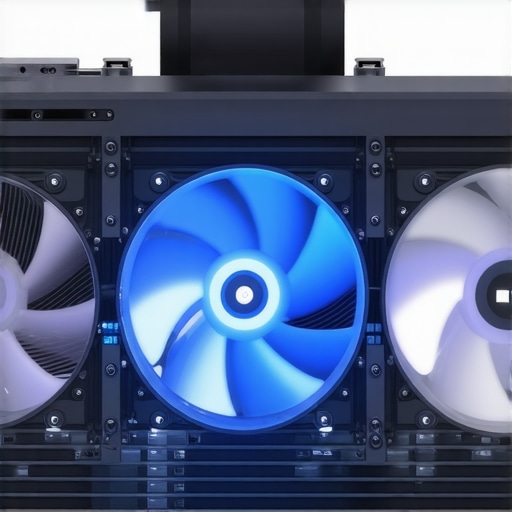
Illustration of a projector’s internal cooling system showing airflow pathways and fan placement to illustrate thermal management strategies
Design Flaws That Still Persist
Despite advances, some projectors still struggle with cable management or user interface flaws. A common annoyance is the placement of ports—if they’re awkwardly situated or require cumbersome adapters, setup and daily use become frustrating. Also, some models lack proper ventilation design, causing fans to ramp up unnecessarily during less intensive tasks. These minor issues, while not deal breakers, can detract from an otherwise solid user experience and should be considered when making a purchase decision.
Performance Analysis of Home Theater Projectors in Stressful Situations
When pushing 4K projectors, portable models, laser projector deals, or UST (Ultra Short Throw) projectors beyond casual viewing, their true capabilities and shortcomings become evident. In a typical scenario—say, hosting a spontaneous movie marathon for friends in a dimly lit living room—these devices must perform under conditions demanding high brightness, consistent image quality, and reliable operation. Though many units promise stellar specs on paper, their real-world performance varies significantly.
Can 4K projectors handle extended movie nights?
Many high-end 4K projectors deliver breathtaking images, but extended usage reveals thermal stress issues and fan noise that can become distracting during long sessions. Some models tend to overheat if not adequately ventilated, risking automatic shutdowns or decreased performance. Conversely, newer designs incorporate improved cooling systems—multi-speed fans and better heat dissipation—reducing overheating risks and maintaining picture quality. From my experience, premium 4K projectors with robust thermal management excel in such scenarios, but budget options often falter, with fans ramping up and noise becoming intolerable.
How do portable projectors handle outdoor or on-the-go use?
Portable projectors promise flexibility, but their performance under pressure varies dramatically. In outdoor settings or dimly lit venues, battery life and brightness are critical. Many portable units struggle with ambient light, resulting in washed-out images unless optimal conditions are met. Additionally, some compact projectors lack sufficient cooling, leading to thermal throttling after an hour, which degrades image sharpness. Durability is also a concern—models exposed to rain or dust often falter if not rated for rugged environments. Still, well-designed portable projectors with protective casings and high lumen output can handle impromptu outdoor screenings, but expect compromises in brightness or stability.
Laser projector deals: Are they reliable under continuous use?
Laser projectors, often featured in deals promising long lifespan and vibrant visuals, generally perform well in continuous operation. Their laser light engine resists color fade and offers high lumen output. However, some models exhibit issues with color uniformity over extended usage, especially if cooling isn’t optimized. During prolonged sessions, like in a conference or theater setup, thermal management becomes critical; poorly ventilated laser projectors can overheat, leading to temporary shutdowns or color shifts. Still, the best deals in laser projectors incorporate advanced cooling systems—liquid cooling or large fans—to sustain performance. As with all tech, beware of lower-priced units that cut corners, risking thermal failure.
Are UST projectors up to heavy usage?
Ultra Short Throw projectors are gaining popularity due to space constraints, but their performance during heavy use shows issues. UST models often generate more heat because of their large light sources positioned close to the screen. Under continuous operation, thermal build-up may lead to decreased brightness or image artifacts. Furthermore, UST units with inferior cooling solutions tend to produce louder fan noise, disrupting quiet environments. However, upgraded models with enhanced heat sinks and multi-speed fans can mitigate these issues. Anecdotal feedback from forums indicates that even high-quality UST projectors tend to require frequent maintenance—like filter cleaning—to sustain optimal performance during prolonged use.
The Good and The Bad in High-Stakes Environments
High-performance projectors perform admirably when configured correctly—delivering vivid images, deep blacks, and reliable operation. For instance, laser projectors with efficient cooling systems can run continuously for hours without hiccups, making them ideal for professional or home cinema use. Conversely, cheaper models, particularly portable and budget 4K units, often exhibit thermal throttling, excessive noise, or inconsistent brightness, undermining long-term reliability. In the realm of UST and portable projectors, the trade-off often boils down to cooling versus compactness—lean too much on portability, and performance suffers under pressure.
Existing users frequently report that models with better thermal designs, like larger heat sinks and multi-speed fans, outperform their budget counterparts in demanding settings. A Reddit discussion on projectors highlights that enhanced cooling not only stabilizes output but also extends device lifespan, making it a worthwhile investment—do you agree?
When considering home theater options, it’s vital to compare current deals, 4K projectors, portable units, laser-based models, and UST projectors to top competitors like Sony’s and Epson’s offerings. **Home theater deals** often provide great value, but their selection varies greatly in quality and price. For instance, budget packages may seem attractive, yet they lack advanced features like high contrast ratios or quiet operation found in premium models from brands such as **Sony** or **Epson**. These top-tier brands deliver higher resolution and build quality but at a significantly increased cost, which may not suit casual users or those with limited budgets. Checking current prices on platforms like [PriceSpy](https://www.pricespy.co.uk/) can help identify whether the perceived savings are worth it or if investing in a flagship model brings better long-term value.
When comparing **4K projectors**, many models from budget brands may offer 4K resolution but fall short in brightness or contrast, resulting in dull images, especially in non-dark rooms. Conversely, higher-end models from **Sony** or **JVC** tend to excel with superior color accuracy and deeper blacks but come with hefty price tags. If a clear, cinematic picture is a priority, opting for a Sony Home Theater Projector or a JVC model might be worthwhile, even if it means spending more upfront.
**Portable projectors** provide flexibility and ease of setup; however, they often compromise on brightness and contrast. Affordable options like Anker’s Nebula or ViewSonic’s portable line can perform well in dark environments but struggle outdoors or in ambient light. Premium portable options from brands like **LG** or **Epson** offer higher brightness levels and better color reproduction, suitable for more demanding settings—but at a premium price. To see how these compare in real-world use, review professional tests or customer reviews on Amazon or BestBuy.
**Laser projectors** have gained popularity due to longer lifespan and brightness advantages. Budget laser deals, often from China-based manufacturers, may tempt buyers due to lower prices, but often lack refined cooling systems, risking thermal issues after extended use. In contrast, established brands like **Sony** and **BenQ** offer laser models with sophisticated cooling, consistent performance, and durability—although at a considerable cost. If you’re considering **laser projector deals**, assessing their thermal management capabilities and user reviews can save headaches later.
**Ultra Short Throw projectors** are ideal for small rooms where space is limited. Cheaper UST models from lesser-known brands tend to suffer from image uniformity issues or fan noise, whereas premium options from **LG** or **Optoma** incorporate advanced cooling and calibration features to minimize these problems. This leads to a subjective question: *Is it worth the upgrade?* In many cases, investing in top-tier UST projectors results in a quieter, brighter, and more reliable experience, justifying the higher price.
In summary, while cheaper deals and lower-end models may save money upfront, they often lag in crucial features such as brightness, noise reduction, and longevity when compared to industry leaders like **Sony**, **Epson**, or **BenQ**. If your budget allows, selecting a well-reviewed model from these brands ensures a more immersive, durable home theater setup. For the best decision, compare current prices and specifications across trusted sources, and consider reading detailed reviews to align features with your viewing preferences.
The Good, The Bad, and The Noisy
- Pros: Projectors with low fan noise ensure an immersive experience without distractions, and high-quality build materials improve durability and heat management.
- Cons: Quiet operation often comes with a higher price tag, and some models still struggle with balancing cooling efficiency and noise reduction.
Who Should Light Up Their Small Space?
This review is ideal for home theater enthusiasts who prioritize audio-visual immersion and want a distraction-free watching environment. If you’re setting up in a cozy, enclosed room, investing in a projector with near-silent fans is essential. Conversely, if budget constraints are tight and noise isn’t a major concern, you might consider models with louder fans—though they can detract from the experience.
Final Verdict: 8/10 – Make Your Choice Quiet and Clear
For small rooms where every decibel counts, opting for a projector engineered for silent fan operation is a smart move. It guarantees a seamless, immersive experience without background hums. If you’re willing to pay extra for peace and quiet, the benefits are undeniable and enhance your overall viewing pleasure. Not sure if this fits your setup? Check the latest prices or see reviews from other users before making your decision. Curious how to optimize your small room setup? Visit our guide on turning surfaces into screens for tips on creating the perfect environment without breaking the bank.