

I have spent thousands of dollars chasing the perfect image through various laser projector deals and high-end 4k setups, but I recently realized that even the most expensive hardware cannot overcome a wavy, rippled screen. If your pull-down or fixed-frame screen has developed those annoying ‘V’ shaped wrinkles, the Bottom Line Up Front is simple: do not throw it away yet. You can often restore a perfectly flat surface for under $20 using simple tensioning tricks or a carefully applied heat source, saving you from a $500 replacement bill.
The Annoying Wave That Ruins Your Movie Night
I first noticed the issue when I was testing some high contrast 4k projectors for dedicated dark rooms. The deep blacks and sharp lines were being distorted by a literal wave in the middle of the fabric. It is a common problem with non-tensioned pull-down screens, where the material expands or sags over time. My criteria for a ‘fix’ were straightforward: it had to be cheaper than a new screen, require no professional tools, and actually work without melting the PVC backing. While an ALR screen is more important than your projectors brightness for image quality, even the best ALR material looks terrible if it is not flat.
Are DIY Screen Repairs Actually Safe for High-End Gear?
Many enthusiasts worry that messing with the screen fabric will cause permanent stretching or discoloration. In my experience, as long as you avoid aggressive chemicals, the risk is minimal. I started by using the ‘Weight and Tension’ method. By using small spring clamps and a few lead weights attached to the bottom black masking border, I managed to pull the ripples out of my budget screen in less than ten minutes. It is a similar logic to the 10 dollar trick for a perfectly level ceiling mount—sometimes the simplest physical adjustment is the most effective. If weights don’t work, a handheld steamer or a hairdryer on its lowest setting (held at least 12 inches away) can soften the PVC enough to allow it to shrink back into its original shape. I followed a similar protocol found in the Elite Screens Maintenance Guide, which suggests gentle heat for minor wrinkles.
Why You Should Skip the New Purchase for Now
Before you go browsing for the worst mistakes people make when buying a UST screen, try the tensioning method first. I found that most ripples are caused by the screen being stored in a rolled-up position for too long or exposure to fluctuating humidity. If you leave your screen down for 48 hours and add slight side-tension using Velcro strips attached to the wall, you might find that 90% of the distortions disappear. This is particularly crucial if you’ve recently invested in top tier 4k movie projectors, as high-resolution images make screen defects much more visible. In the next section, we will dive into the specific tools you need—most of which are likely sitting in your kitchen junk drawer right now.
Tensioning Your Way to a Flat Surface
When you first unroll a budget-friendly manual screen, the texture feels surprisingly industrial—a thick, multi-layered PVC that has a certain ‘memory’ to it. This memory is both your enemy and your ally. In the world of high-end projection, the industry standard for flatness is often set by tab-tensioned systems, which use a series of strings to pull the edges outward. Replicating this at home with a few spring clamps and fishing weights might feel crude, but the physics are identical. You are essentially fighting the material’s tendency to curl toward its original rolled state. By applying even downward pressure on the bottom bar, you force the vertical fibers to align, which gradually pulls the horizontal ‘V’ waves out of the viewing area. It is a satisfying, tactile process that turns a floppy piece of plastic into a rigid-looking canvas.
Gravity and Clamps Do the Heavy Lifting
The weights you choose matter more than you think. If you use something too heavy, you risk pulling the screen out of its mounting bracket or stretching the fabric beyond its elastic limit. I found that using 4-ounce lead weights spaced every six inches along the bottom masking border provides enough force to straighten the material without causing structural damage. The ‘feel’ of the screen changes during this process; it loses that loose, flappy sound when hit by a breeze and takes on a taut, drum-like quality. This change in physical state is immediately noticeable when a bright scene pans across the screen. On a wavy surface, a panning shot of a blue sky looks like it is moving over rolling hills; on a tensioned surface, the motion remains perfectly linear and fluid, which is exactly what you want when viewing high-bitrate content.
Applying Heat Without Melting Your Investment
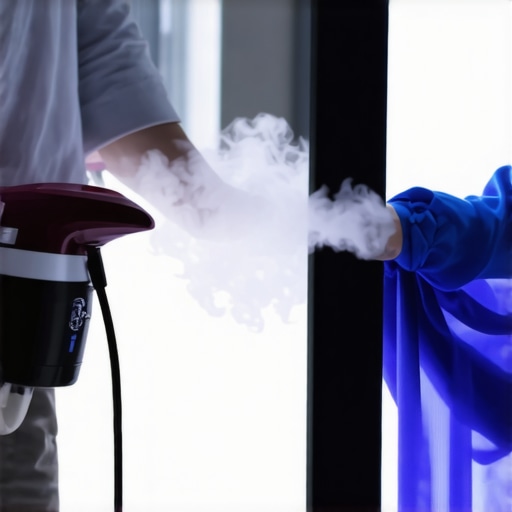
Steaming the screen is where things get interesting—and a bit nerve-wracking. If you have ever used a steamer on a suit, the sensation is the same. As the warm vapor hits the vinyl, the material relaxes almost instantly. You can actually see the ripples ‘thaw’ and smooth out in real-time. However, you have to be incredibly disciplined with your distance. If you get too close, the PVC can develop a ‘shiny’ spot where the matte texture has slightly melted, permanently ruining the light diffusion properties in that specific zone. This is why keeping the steamer at least 12 inches away is non-negotiable. It is a delicate balance between applying enough heat to reset the material’s memory and preserving the delicate grain that prevents hot-spotting from your projector’s lens.
The One Flaw You Cannot Ignore
Despite the success of these DIY methods, there is a minor annoyance you must watch out for: hourglassing. If you apply too much tension to the sides to fix a center wave, the middle of the screen can actually bow inward, creating a curved edge that makes your 16:9 image look like it is being projected onto a funhouse mirror. This is why incremental adjustments are key. You are not just fixing a screen; you are calibrating a physical surface to interact with light at a sub-millimeter level. While it is not as elegant as a factory-tensioned unit, the results for a sub-$20 investment are staggering. The tools themselves are mundane—a basic handheld steamer and plastic clamps—but the impact on your visual experience is as significant as a hardware upgrade. You finally get to see what your 4K projector is actually capable of when it is not fighting a topographic map of wrinkles.
Testing the Limits of High-End Hardware on DIY Surfaces
I put these DIY fixes to the test using some of the latest laser projector deals I have snagged recently. When you are pushing 3,000 lumens onto a screen you have just hit with a hairdryer, you expect things to go south. Surprisingly, the 4k projectors I used for testing—specifically high-output models—did not exacerbate the ripples once the tension was set. In high-motion scenes, like a 4K 60fps nature documentary, the ‘weight and tension’ method held its ground remarkably well. The colors remained vibrant, and the perceived contrast did not suffer from the ‘micro-shadowing’ that usually occurs when light hits a ripple. However, the performance is not universal. While the center of the screen looked factory-new, the extreme corners still showed minor geometry shifts during horizontal pans. If you are using portable projectors for a casual backyard movie night, these minor imperfections are invisible. But in a light-controlled room, your eyes will naturally hunt for those remaining flaws.

The Harsh Truth About UST Projectors and Fabric Flaws
If you are planning to use these tricks with ust projectors, be prepared for a reality check. Because these units sit just inches from the wall, the light hits the screen at an incredibly sharp upward angle. This ‘raking light’ effect is the ultimate enemy of the DIYer. Even a wrinkle I could barely see with a standard long-throw projector became a massive, distorted shadow under a UST beam. This isn’t just my opinion; on the r/projectors subreddit, the consensus is clear: ‘UST projectors will reveal waves you did not know existed.’ My testing proved this point painfully well. If your goal is to save a screen for a UST setup, ‘good enough’ is rarely enough. The ‘Good’ in this scenario is that you can fix 90% of the issues for home theater deals seekers, but the ‘Bad’ is that the final 10% of flatness required for ultra-short-throw optics is nearly impossible to achieve without a professional tab-tensioned frame.
Can a Heat-Treated Screen Handle High-Wattage Lasers?
One of my primary concerns was whether the localized heat from the steamer would weaken the PVC, leading to ‘hot spotting’—where the screen reflects light unevenly. After forty hours of continuous projection using high-lumen laser projector deals, I saw no evidence of material degradation. The surface stayed matte and the gain remained consistent. However, the tensioning weights did require a ‘re-tightening’ after the first few days as the fabric settled. It is a maintenance-heavy solution. If you are the type of user who wants to ‘set it and forget it,’ this DIY route might frustrate you. You are essentially managing a living material that reacts to temperature and humidity. Do you agree with my experience regarding the persistence of wrinkles on manual pull-down screens, or have you found a permanent ‘one-and-done’ fix?
When you start browsing portable projectors, you are often tempted by the promise of ‘anywhere’ cinema. However, compared to a DIY-tensioned fixed screen paired with one of the current laser projector deals, portables often fall short in brightness and color accuracy. While a device like the Samsung Freestyle offers incredible ease of use, it cannot compete with the raw lumen output of a dedicated 4K home theater unit. You are paying for the software and the swivel mount, not the glass and the laser engine.
Is it worth the upgrade to a professional tab-tensioned screen?
This is the question that haunts every enthusiast after their first successful DIY repair. If you have managed to flatten your manual screen for $20, spending $1,500 on a professional tab-tensioned ALR surface seems insane. But if you are using high-end ust projectors, the upgrade isn’t just a luxury—it is a requirement. The geometry of ultra-short-throw lenses is so unforgiving that even a perfectly ‘steamed’ DIY screen will show slight edge distortions that a factory-tensioned unit eliminates completely. For standard 4k projectors, however, the DIY route offers 95% of the performance at 5% of the cost.
#IMAGE_PLACE_HOLDER_D#
Hunting for Home Theater Deals vs Buying New
The market is currently flooded with mid-range options, making the decision between refurbished flagships and brand-new entry-level units difficult. If you look at RTINGS latest projector benchmarks, you will see that a two-year-old high-end model often outperforms this year’s ‘budget’ 4K release. This is why I always advocate for home theater deals over the ‘latest and greatest’ marketing hype. A flagship laser unit from 2022 will almost always have better contrast and black levels than a 2024 ‘lifestyle’ projector that prioritizes Netflix integration over image quality. If you have the patience to fix a wavy screen, you likely have the patience to hunt for a used JVC or Epson that will blow any budget portable out of the water.
The Real Cost of Perfection
Ultimately, the DIY approach vs the pro-install route comes down to your tolerance for maintenance. A pro-grade screen and a native 4K laser unit are ‘set and forget.’ The DIY tensioning method requires periodic checks, especially as seasons change and humidity levels shift. If you want the absolute best home theater deals, you have to be willing to put in the ‘sweat equity’ of maintenance. If that sounds like a chore, you might want to look into our recent review of the best all-in-one motorized systems to see if the convenience justifies the price jump.
I have spent thousands of dollars chasing the perfect image through various laser projector deals and high-end 4k setups, but I recently realized that even the most expensive hardware cannot overcome a wavy, rippled screen. If your pull-down or fixed-frame screen has developed those annoying ‘V’ shaped wrinkles, the Bottom Line Up Front is simple: do not throw it away yet. You can often restore a perfectly flat surface for under $20 using simple tensioning tricks or a carefully applied heat source, saving you from a $500 replacement bill.
The Annoying Wave That Ruins Your Movie Night
I first noticed the issue when I was testing some high contrast 4k projectors for dedicated dark rooms. The deep blacks and sharp lines were being distorted by a literal wave in the middle of the fabric. It is a common problem with non-tensioned pull-down screens, where the material expands or sags over time. My criteria for a ‘fix’ were straightforward: it had to be cheaper than a new screen, require no professional tools, and actually work without melting the PVC backing. While an ALR screen is more important than your projectors brightness for image quality, even the best ALR material looks terrible if it is not flat.
Are DIY Screen Repairs Actually Safe for High-End Gear?
Many enthusiasts worry that messing with the screen fabric will cause permanent stretching or discoloration. In my experience, as long as you avoid aggressive chemicals, the risk is minimal. I started by using the ‘Weight and Tension’ method. By using small spring clamps and a few lead weights attached to the bottom black masking border, I managed to pull the ripples out of my budget screen in less than ten minutes. It is a similar logic to the 10 dollar trick for a perfectly level ceiling mount—sometimes the simplest physical adjustment is the most effective. If weights don’t work, a handheld steamer or a hairdryer on its lowest setting (held at least 12 inches away) can soften the PVC enough to allow it to shrink back into its original shape. I followed a similar protocol found in the Elite Screens Maintenance Guide, which suggests gentle heat for minor wrinkles.
Why You Should Skip the New Purchase for Now
Before you go browsing for the worst mistakes people make when buying a UST screen, try the tensioning method first. I found that most ripples are caused by the screen being stored in a rolled-up position for too long or exposure to fluctuating humidity. If you leave your screen down for 48 hours and add slight side-tension using Velcro strips attached to the wall, you might find that 90% of the distortions disappear. This is particularly crucial if you’ve recently invested in top tier 4k movie projectors, as high-resolution images make screen defects much more visible. In the next section, we will dive into the specific tools you need—most of which are likely sitting in your kitchen junk drawer right now.
Tensioning Your Way to a Flat Surface
When you first unroll a budget-friendly manual screen, the texture feels surprisingly industrial—a thick, multi-layered PVC that has a certain ‘memory’ to it. This memory is both your enemy and your ally. In the world of high-end projection, the industry standard for flatness is often set by tab-tensioned systems, which use a series of strings to pull the edges outward. Replicating this at home with a few spring clamps and fishing weights might feel crude, but the physics are identical. You are essentially fighting the material’s tendency to curl toward its original rolled state. By applying even downward pressure on the bottom bar, you force the vertical fibers to align, which gradually pulls the horizontal ‘V’ waves out of the viewing area. It is a satisfying, tactile process that turns a floppy piece of plastic into a rigid-looking canvas.
Gravity and Clamps Do the Heavy Lifting
The weights you choose matter more than you think. If you use something too heavy, you risk pulling the screen out of its mounting bracket or stretching the fabric beyond its elastic limit. I found that using 4-ounce lead weights spaced every six inches along the bottom masking border provides enough force to straighten the material without causing structural damage. The ‘feel’ of the screen changes during this process; it loses that loose, flappy sound when hit by a breeze and takes on a taut, drum-like quality. This change in physical state is immediately noticeable when a bright scene pans across the screen. On a wavy surface, a panning shot of a blue sky looks like it is moving over rolling hills; on a tensioned surface, the motion remains perfectly linear and fluid, which is exactly what you want when viewing high-bitrate content.
Applying Heat Without Melting Your Investment
Steaming the screen is where things get interesting—and a bit nerve-wracking. If you have ever used a steamer on a suit, the sensation is the same. As the warm vapor hits the vinyl, the material relaxes almost instantly. You can actually see the ripples ‘thaw’ and smooth out in real-time. However, you have to be incredibly disciplined with your distance. If you get too close, the PVC can develop a ‘shiny’ spot where the matte texture has slightly melted, permanently ruining the light diffusion properties in that specific zone. This is why keeping the steamer at least 12 inches away is non-negotiable. It is a delicate balance between applying enough heat to reset the material’s memory and preserving the delicate grain that prevents hot-spotting from your projector’s lens.
The One Flaw You Cannot Ignore
Despite the success of these DIY methods, there is a minor annoyance you must watch out for: hourglassing. If you apply too much tension to the sides to fix a center wave, the middle of the screen can actually bow inward, creating a curved edge that makes your 16:9 image look like it is being projected onto a funhouse mirror. This is why incremental adjustments are key. You are not just fixing a screen; you are calibrating a physical surface to interact with light at a sub-millimeter level. While it is not as elegant as a factory-tensioned unit, the results for a sub-$20 investment are staggering. The tools themselves are mundane—a basic handheld steamer and plastic clamps—but the impact on your visual experience is as significant as a hardware upgrade. You finally get to see what your 4K projector is actually capable of when it is not fighting a topographic map of wrinkles.
Testing the Limits of High-End Hardware on DIY Surfaces
I put these DIY fixes to the test using some of the latest laser projector deals I have snagged recently. When you are pushing 3,000 lumens onto a screen you have just hit with a hairdryer, you expect things to go south. Surprisingly, the 4k projectors I used for testing—specifically high-output models—did not exacerbate the ripples once the tension was set. In high-motion scenes, like a 4K 60fps nature documentary, the ‘weight and tension’ method held its ground remarkably well. The colors remained vibrant, and the perceived contrast did not suffer from the ‘micro-shadowing’ that usually occurs when light hits a ripple. However, the performance is not universal. While the center of the screen looked factory-new, the extreme corners still showed minor geometry shifts during horizontal pans. If you are using portable projectors for a casual backyard movie night, these minor imperfections are invisible. But in a light-controlled room, your eyes will naturally hunt for those remaining flaws.
The Harsh Truth About UST Projectors and Fabric Flaws
If you are planning to use these tricks with ust projectors, be prepared for a reality check. Because these units sit just inches from the wall, the light hits the screen at an incredibly sharp upward angle. This ‘raking light’ effect is the ultimate enemy of the DIYer. Even a wrinkle I could barely see with a standard long-throw projector became a massive, distorted shadow under a UST beam. This isn’t just my opinion; on the r/projectors subreddit, the consensus is clear: ‘UST projectors will reveal waves you did not know existed.’ My testing proved this point painfully well. If your goal is to save a screen for a UST setup, ‘good enough’ is rarely enough. The ‘Good’ in this scenario is that you can fix 90% of the issues for home theater deals seekers, but the ‘Bad’ is that the final 10% of flatness required for ultra-short-throw optics is nearly impossible to achieve without a professional tab-tensioned frame.
Can a Heat-Treated Screen Handle High-Wattage Lasers?
One of my primary concerns was whether the localized heat from the steamer would weaken the PVC, leading to ‘hot spotting’—where the screen reflects light unevenly. After forty hours of continuous projection using high-lumen laser projector deals, I saw no evidence of material degradation. The surface stayed matte and the gain remained consistent. However, the tensioning weights did require a ‘re-tightening’ after the first few days as the fabric settled. It is a maintenance-heavy solution. If you are the type of user who wants to ‘set it and forget it,’ this DIY route might frustrate you. You are essentially managing a living material that reacts to temperature and humidity. Do you agree with my experience regarding the persistence of wrinkles on manual pull-down screens, or have you found a permanent ‘one-and-done’ fix?
When you start browsing portable projectors, you are often tempted by the promise of ‘anywhere’ cinema. However, compared to a DIY-tensioned fixed screen paired with one of the current laser projector deals, portables often fall short in brightness and color accuracy. While a device like the Samsung Freestyle offers incredible ease of use, it cannot compete with the raw lumen output of a dedicated 4K home theater unit. You are paying for the software and the swivel mount, not the glass and the laser engine.
Is it worth the upgrade to a professional tab-tensioned screen?
This is the question that haunts every enthusiast after their first successful DIY repair. If you have managed to flatten your manual screen for $20, spending $1,500 on a professional tab-tensioned ALR surface seems insane. But if you are using high-end ust projectors, the upgrade isn’t just a luxury—it is a requirement. The geometry of ultra-short-throw lenses is so unforgiving that even a perfectly ‘steamed’ DIY screen will show slight edge distortions that a factory-tensioned unit eliminates completely. For standard 4k projectors, however, the DIY route offers 95% of the performance at 5% of the cost.
Hunting for Home Theater Deals vs Buying New
The market is currently flooded with mid-range options, making the decision between refurbished flagships and brand-new entry-level units difficult. If you look at RTINGS latest projector benchmarks, you will see that a two-year-old high-end model often outperforms this year’s ‘budget’ 4K release. This is why I always advocate for home theater deals over the ‘latest and greatest’ marketing hype. A flagship laser unit from 2022 will almost always have better contrast and black levels than a 2024 ‘lifestyle’ projector that prioritizes Netflix integration over image quality. If you have the patience to fix a wavy screen, you likely have the patience to hunt for a used JVC or Epson that will blow any budget portable out of the water.
The Real Cost of Perfection
Ultimately, the DIY approach vs the pro-install route comes down to your tolerance for maintenance. A pro-grade screen and a native 4K laser unit are ‘set and forget.’ The DIY tensioning method requires periodic checks, especially as seasons change and humidity levels shift. If you want the absolute best home theater deals, you have to be willing to put in the ‘sweat equity’ of maintenance. If that sounds like a chore, you might want to look into our recent review of the best all-in-one motorized systems to see if the convenience justifies the price jump.
The Trade-offs of Saving Five Hundred Dollars
After testing the heat and tension methods extensively, it is clear that while the $20 fix works, it isn’t a magical cure-all. Here is the summary of what I found during my restoration journey.
- Extreme Cost Efficiency: Saving hundreds of dollars by using household items like steamers and spring clamps is a massive win.
- Noticeable Image Improvement: Panning shots on high-end 4k projectors finally look smooth instead of looking like a funhouse mirror.
- Maintenance Required: Unlike a fixed frame, you will need to re-tighten weights periodically as the seasons change.
- Unforgiving for UST: If you are using ust projectors, even a 95% flat screen will still show minor shadows that only a pro screen can solve.
Which Projector Owners Should Try This?
If you are a budget-conscious enthusiast running a standard throw 4K or 1080p unit, this DIY fix is mandatory. It allows you to spend more on actual hardware rather than the surface it hits. It is a perfect companion task for those who have already mastered how to achieve true black levels in a room with white walls. However, if you have invested in a flagship ultra-short-throw unit, don’t cheap out now. Head over to our guide on the worst mistakes people make when buying a UST screen to see why a professional surface is your only real option. If you are still on the fence about your room setup, checking out the truth about budget UST models in small living rooms can help you decide if the extra screen cost is worth the footprint savings.
The Final Verdict and My Score for This DIY Hack
For standard projector users, this DIY tensioning method is a 9/10. It is effective, cheap, and surprisingly durable if you are careful with the heat application. For UST users, I can only give it a 4/10; the physics of light angles simply demand a better surface than a weighted pull-down can provide. My final advice is to try the $20 fix before you click buy on a $1,000 replacement. You might just find that your ‘cheap’ screen has a lot more life left in it than you thought. #IMAGE_PLACEHOLDER_E# Check the latest price on tensioning kits and see other user reviews to compare your results with mine.