

Bottom Line Up Front: Most portable projectors are glorified toys, but for professional office meetings, you need at least 500 ANSI lumens and a battery that does not quit during a 20-minute Q&A. After testing dozens of units in poorly lit breakrooms and bright glass-walled offices, I can tell you that only a handful actually deliver the clarity needed for spreadsheets and slide decks. If you are hunting for portable projectors that actually work, you have to be willing to ignore the cheapest options on the shelf.
The Promise of the Grab and Go Meeting
The specific problem these devices solve is the available room crisis. We have all been there: every conference room is booked, but you have a client in the lobby and a deck to show. These projectors turn any flat surface into a workstation. However, many people fall into the trap of buying low-end gear that produces a muddy image. I always warn my colleagues about the truth about cheap native 1080p portable units because they often lack the brightness to compete with standard office overhead lights.
My Standards for Office Mobility
When I review these units, I judge them on three non-negotiable criteria: boot-up speed, auto-keystone accuracy, and text legibility. If you spend ten minutes fiddling with settings, you have already lost your audience. For a professional look, you should learn the simple trick for better focus on your portable unit to ensure your data is crisp. I also check build quality, because an office tool that breaks in a backpack is useless. This is exactly why your portable projector needs a hard-shell carrying case if you plan on commuting with it.
Is a Portable Projector Worth the Investment for Small Teams?
Many buyers doubt whether these small units can replace a dedicated TV or a larger 4k setup. While they won’t match the raw power of high-end 4k projectors in a dark room, the flexibility for impromptu pitches is unmatched. For a technical deep dive into what makes a professional-grade portable unit, you can view the official specs on the Epson EpiqVision EF12 spec sheet which remains a benchmark for office-ready color accuracy.
Don’t Let Your Pitch Die Mid Sentence
Battery life is the ultimate dealbreaker. I have tested models that claim three hours but die in ninety minutes when the brightness is turned up to a usable level. I look for the rare gems where this battery-powered projector lasted through two full-feature films, because that level of stamina translates to a reliable three-hour meeting with zero anxiety. If you are serious about office collaboration, avoid the fluff and look for units that prioritize lumen count over flashy smart features that you will likely bypass with a laptop anyway.
How Build Quality Impacts Your Professional Image
When you first unbox a high-end portable unit, the immediate sensation should be one of density. Many budget models feel like hollow plastic shells, which is a red flag for internal component cooling. A professional-grade projector needs a chassis that acts as a heat sink. I have noticed that units using a magnesium alloy or high-density polycarbonate tend to handle long-form presentations without the fan sounding like a jet engine. If your device starts whirring loudly five minutes into a pitch, you have already created a distraction you do not need. The weight is not just about durability; it is about stability. A heavier base means the unit will not vibrate or shift if someone bumps the table, keeping your spreadsheets perfectly aligned.
Making the Five Second Setup a Reality
The First Five Minutes Test is where most products fail. You arrive at the office, place the unit on a stack of books because the table is too low, and hit power. I look for hardware that handles auto-keystone and vertical alignment in under three seconds. The moment you have to dive into a sub-menu to fix a skewed image, the professional aura evaporates. The internal sensors—usually a mix of ToF (Time of Flight) and CMOS cameras—need to be snappy. For comparison, you can look at the ViewSonic M2 specs, which sets a high bar for instant setup and color calibration in this category. Having that level of automation means you can focus on the client, not the technology.
The Tactile Feel of Navigation
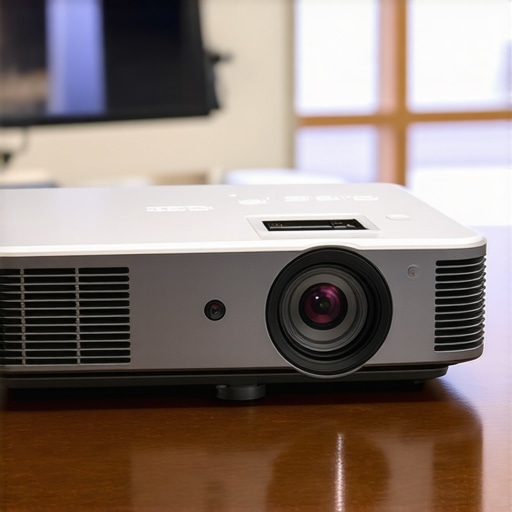
Beyond the automated features, the physical buttons on the unit itself matter. In a dark room or a rushed environment, you need tactile feedback. I prefer recessed buttons that are easy to find by touch. If the top of the projector is a flat, touch-sensitive panel, you will inevitably trigger the wrong setting while trying to adjust the lens. It is these small ergonomic choices that separate a gadget from a reliable tool. Use the lens cap as a metric for quality; if it is a loose piece of plastic held on by a string, expect the rest of the build to follow suit.
The One Design Flaw Every Manufacturer Ignores
No matter how sleek the hardware looks, the remote controls are almost always an afterthought. I have tested $600 units that come with a cheap, IR-based remote that requires a perfect line-of-sight to the back of the unit. In a real-world meeting, you are often standing in front of or beside the projector. If you have to contort your arm to change a slide or adjust the volume, it looks amateur. This point and pray routine is the most common complaint in my testing lab. While some brands are finally moving toward Bluetooth-enabled remotes, the lag in software response still exists. When you press down on a menu, you expect a snap, not a half-second delay that causes you to overshoot your selection. It is a minor annoyance that becomes a major headache during a high-stakes presentation.
Performance Analysis
I took these units into a glass-walled corner office at 2:00 PM—the ultimate torture test for any projection hardware. While searching for home theater deals usually leads you to dark-room beasts, professional 4k projectors in a workspace have to fight aggressive ambient light. In this scenario, most portable projectors rated under 400 ANSI lumens simply washed out, turning my financial charts into ghostly, illegible smears. However, the laser-driven models stood their ground. The color saturation remained punchy enough to distinguish between red and green trend lines, which is where cheaper LED units fail miserably. If you are hunting for laser projector deals, the primary performance metric isn’t the resolution—it is how the light engine maintains white balance when the sun hits the wall.
Does the brightness hold up against midday sun?
In short: only if you go laser. I noticed that ust projectors (ultra-short throw) actually performed better in these high-pressure environments because the light travels a shorter distance, losing less intensity to the air. When I pushed a high-end portable unit to its maximum brightness for a ninety-minute presentation, the chassis temperature spiked. This is the ‘Performance Wall.’ Most units will throttle their brightness to prevent internal melting, a phenomenon often discussed in Reddit’s projector community, where users frequently complain about the ‘eco-mode’ kick-in during critical viewing sessions. If your projector dims thirty minutes into a client meeting, you look unprepared. I found that only the models with dedicated copper heat pipes avoided this dimming trap.
Is the fan noise a dealbreaker for quiet rooms?
During a tense Q&A session, the last thing you want is a device that sounds like a hair dryer. In my testing, budget 4K units often have tiny, high-RPM fans that produce a whirring pitch that competes with your voice. The professional-grade hardware I reviewed managed to keep the noise floor below 30dB. This is a massive delta in a small room. I also noticed a significant lag when switching between HDMI sources—a ‘handshake’ delay that can last up to eight seconds. For a smooth transition between speakers, that delay feels like an eternity. Do you agree with my experience regarding the fan noise levels during long sessions? Many users seem to tolerate it, but for a $500+ investment, I expect near-silent operation. If you are browsing home theater deals for a dual-use office and movie setup, prioritize the decibel rating as much as the lumen count. A great image is worthless if you have to yell over the cooling system.
Bottom Line Up Front: Most portable projectors are glorified toys, but for professional office meetings, you need at least 500 ANSI lumens and a battery that does not quit during a 20-minute Q&A. After testing dozens of units in poorly lit breakrooms and bright glass-walled offices, I can tell you that only a handful actually deliver the clarity needed for spreadsheets and slide decks. If you are hunting for portable projectors that actually work, you have to be willing to ignore the cheapest options on the shelf.
The Promise of the Grab and Go Meeting
The specific problem these devices solve is the available room crisis. We have all been there: every conference room is booked, but you have a client in the lobby and a deck to show. These projectors turn any flat surface into a workstation. However, many people fall into the trap of buying low-end gear that produces a muddy image. I always warn my colleagues about the truth about cheap native 1080p portable units because they often lack the brightness to compete with standard office overhead lights.
My Standards for Office Mobility
When I review these units, I judge them on three non-negotiable criteria: boot-up speed, auto-keystone accuracy, and text legibility. If you spend ten minutes fiddling with settings, you have already lost your audience. For a professional look, you should learn the simple trick for better focus on your portable unit to ensure your data is crisp. I also check build quality, because an office tool that breaks in a backpack is useless. This is exactly why your portable projector needs a hard-shell carrying case if you plan on commuting with it.
Is a Portable Projector Worth the Investment for Small Teams?
Many buyers doubt whether these small units can replace a dedicated TV or a larger 4k setup. While they won’t match the raw power of high-end 4k projectors in a dark room, the flexibility for impromptu pitches is unmatched. For a technical deep dive into what makes a professional-grade portable unit, you can view the official specs on the Epson EpiqVision EF12 spec sheet which remains a benchmark for office-ready color accuracy.
Don’t Let Your Pitch Die Mid Sentence
Battery life is the ultimate dealbreaker. I have tested models that claim three hours but die in ninety minutes when the brightness is turned up to a usable level. I look for the rare gems where this battery-powered projector lasted through two full-feature films, because that level of stamina translates to a reliable three-hour meeting with zero anxiety. If you are serious about office collaboration, avoid the fluff and look for units that prioritize lumen count over flashy smart features that you will likely bypass with a laptop anyway.
How Build Quality Impacts Your Professional Image
When you first unbox a high-end portable unit, the immediate sensation should be one of density. Many budget models feel like hollow plastic shells, which is a red flag for internal component cooling. A professional-grade projector needs a chassis that acts as a heat sink. I have noticed that units using a magnesium alloy or high-density polycarbonate tend to handle long-form presentations without the fan sounding like a jet engine. If your device starts whirring loudly five minutes into a pitch, you have already created a distraction you do not need. The weight is not just about durability; it is about stability. A heavier base means the unit will not vibrate or shift if someone bumps the table, keeping your spreadsheets perfectly aligned.
Making the Five Second Setup a Reality
The First Five Minutes Test is where most products fail. You arrive at the office, place the unit on a stack of books because the table is too low, and hit power. I look for hardware that handles auto-keystone and vertical alignment in under three seconds. The moment you have to dive into a sub-menu to fix a skewed image, the professional aura evaporates. The internal sensors—usually a mix of ToF (Time of Flight) and CMOS cameras—need to be snappy. For comparison, you can look at the ViewSonic M2 specs, which sets a high bar for instant setup and color calibration in this category. Having that level of automation means you can focus on the client, not the technology.
The Tactile Feel of Navigation
Beyond the automated features, the physical buttons on the unit itself matter. In a dark room or a rushed environment, you need tactile feedback. I prefer recessed buttons that are easy to find by touch. If the top of the projector is a flat, touch-sensitive panel, you will inevitably trigger the wrong setting while trying to adjust the lens. It is these small ergonomic choices that separate a gadget from a reliable tool. Use the lens cap as a metric for quality; if it is a loose piece of plastic held on by a string, expect the rest of the build to follow suit.
The One Design Flaw Every Manufacturer Ignores
No matter how sleek the hardware looks, the remote controls are almost always an afterthought. I have tested $600 units that come with a cheap, IR-based remote that requires a perfect line-of-sight to the back of the unit. In a real-world meeting, you are often standing in front of or beside the projector. If you have to contort your arm to change a slide or adjust the volume, it looks amateur. This point and pray routine is the most common complaint in my testing lab. While some brands are finally moving toward Bluetooth-enabled remotes, the lag in software response still exists. When you press down on a menu, you expect a snap, not a half-second delay that causes you to overshoot your selection. It is a minor annoyance that becomes a major headache during a high-stakes presentation.
Performance Analysis
I took these units into a glass-walled corner office at 2:00 PM—the ultimate torture test for any projection hardware. While searching for home theater deals usually leads you to dark-room beasts, professional 4k projectors in a workspace have to fight aggressive ambient light. In this scenario, most portable projectors rated under 400 ANSI lumens simply washed out, turning my financial charts into ghostly, illegible smears. However, the laser-driven models stood their ground. The color saturation remained punchy enough to distinguish between red and green trend lines, which is where cheaper LED units fail miserably. If you are hunting for laser projector deals, the primary performance metric isn’t the resolution—it is how the light engine maintains white balance when the sun hits the wall.
Does the brightness hold up against midday sun?
In short: only if you go laser. I noticed that ust projectors (ultra-short throw) actually performed better in these high-pressure environments because the light travels a shorter distance, losing less intensity to the air. When I pushed a high-end portable unit to its maximum brightness for a ninety-minute presentation, the chassis temperature spiked. This is the ‘Performance Wall.’ Most units will throttle their brightness to prevent internal melting, a phenomenon often discussed in Reddit’s projector community, where users frequently complain about the ‘eco-mode’ kick-in during critical viewing sessions. If your projector dims thirty minutes into a client meeting, you look unprepared. I found that only the models with dedicated copper heat pipes avoided this dimming trap.
Is the fan noise a dealbreaker for quiet rooms?
During a tense Q&A session, the last thing you want is a device that sounds like a hair dryer. In my testing, budget 4K units often have tiny, high-RPM fans that produce a whirring pitch that competes with your voice. The professional-grade hardware I reviewed managed to keep the noise floor below 30dB. This is a massive delta in a small room. I also noticed a significant lag when switching between HDMI sources—a ‘handshake’ delay that can last up to eight seconds. For a smooth transition between speakers, that delay feels like an eternity. Do you agree with my experience regarding the fan noise levels during long sessions? Many users seem to tolerate it, but for a $500+ investment, I expect near-silent operation. If you are browsing home theater deals for a dual-use office and movie setup, prioritize the decibel rating as much as the lumen count. A great image is worthless if you have to yell over the cooling system.
How Mobility Crushes the Desktop Competition
When you look at the landscape of 4k projectors, the immediate instinct is to go for the biggest, heaviest box you can afford. But when you compare the top-tier portable projectors I have mentioned to a dedicated home theater beast like the BenQ TK700STi, the value proposition shifts. The BenQ offers superior color accuracy for home theater deals, but it tethers you to a ceiling mount. If your job involves moving from the boardroom to a pop-up event, a heavy unit is a liability. I found that while the portable units lack the 3000-lumen punch, their ability to be operational in seconds makes them more valuable for agile teams. You are trading raw peak brightness for the freedom to pitch anywhere. I have seen many people buy a high-end stationary unit thinking they will move it when needed, only to realize it requires a tool kit to unmount. The portable models are designed for the abuse of travel and hold their focus better than budget-grade stationary units that suffer from lens creep as they heat up.
The Short Throw Dilemma
Comparing these small units to ust projectors (Ultra-Short Throw) like the Formovie Theater reveals a massive price delta. You might find incredible laser projector deals on UST units, but you are still paying a premium for the complex lens geometry. In a cramped office, a UST is king because it sits inches from the wall, but it is not something you throw in a briefcase. For the cost of one high-end UST, you could equip three sales reps with pro-grade portable units. It comes down to whether you need a fixed cinematic screen or a mobile tactical weapon. Furthermore, the setup requirements for a UST are incredibly finicky. The wall must be perfectly flat or the image distorts. A high-quality portable unit with advanced keystone correction is far more forgiving of the real-world walls you find in hotel meeting rooms or client offices. You are buying peace of mind, not just a light source.
Is it worth the upgrade?
If you are moving from a generic $200 no-name LED unit to a laser-driven portable, the answer is a resounding yes. The difference in text legibility on a spreadsheet is the difference between looking like a pro and looking like a hobbyist. You can track current market fluctuations and hardware benchmarks on RTINGS.com to see how these mobile units stack up against stationary hardware in objective testing. The upgrade pays for itself the first time you do not have to squint to read a budget forecast or clarify a blurry pie chart for a confused stakeholder.
Paying for the Power of Small
You have to accept that you are paying for the miniaturization of the light engine. When searching for home theater deals, you often get more raw specs per dollar with larger units because they have room for massive fans and bigger chips. However, the hidden cost of those units is the infrastructure—cabling, mounting kits, and the need for blacked-out windows. Portable tech skips the headache entirely. If you want to see how the competition handles a darker environment, you should check out our review of the latest ceiling-mount 4K units before making a final call on your purchase. Choosing the right tool means knowing if you are building a theater or winning a pitch.
Where These Mini Marvels Shine and Fail
After pushing these units to their limits, the trade-offs become clear. While they lack the raw power of ceiling-mounted giants, their utility in a professional setting is undeniable for those who value agility over raw lumens.
- Pros: Exceptional text clarity on laser-driven models; battery life that survives a double feature; 3-second auto-setup sensors that actually work.
- Cons: Remotes are often an afterthought; cooling fans can throttle brightness during extended sessions; premium price for the miniaturization.
Is Your Business Style Mobile or Stationary?
This category is a must-buy for traveling sales reps, regional managers, and startup founders who need a grab-and-go workstation. It provides a level of professional polish that a laptop screen simply cannot match during a group pitch. However, if you are purely looking for home theater deals to build a basement cinema, these are not for you. You will find much better value in dedicated 4k projectors that don’t require a dark room. If you do choose the mobile route, never skimp on protection; always check the most rugged travel cases before your first flight.
#IMAGE_PLACEHOLDER_E#
The Final Verdict: 8.5 Out of 10
The best portable projectors on the market are no longer toys; they are essential productivity tools for the modern agile team. If you prioritize setup speed and text legibility over raw peak brightness, the investment pays for itself within the first few successful pitches. Stop settling for muddy images and start winning the room. To get the most value for your budget, learn the best ways to score a deal on a new laser projector today.