

If your projector screen looks like a topographical map of the Andes, you do not need to drop $500 on a professional tensioning kit. I have spent weeks testing DIY hacks to flatten out my home theater setup, and while most ‘life hacks’ are garbage, a few simple adjustments using household items can save your 4K image from looking like a distorted mess. The bottom line? You can achieve 90% of a professional result with about $10 and 20 minutes of effort, provided you understand the physics of screen sag.
The Real Reason Your Screen Ripples
I learned the hard way that why cheap projector screens often make the image look worse is almost always down to material memory and uneven weight distribution. When I first unboxed my manual pull-down screen, the edges curled inward immediately, creating a ‘smile’ effect that ruined the focus on my 4K projectors. This is even more critical if you are using ultra-short-throw (UST) units, where a single millimeter of fabric deviation results in massive geometry distortion. Check out my guide on the simple fix for blurry corners on your ultra-short-throw setup if you are seeing fuzzy edges despite a ‘flat’ screen.
My Testing Criteria for a Flatter Surface
To judge whether these DIY fixes were actually worth the time, I evaluated them based on three specific metrics: Image Geometry (does the horizon line stay straight?), Edge-to-Edge Sharpness (can I read small text in the corners?), and Durability (will this sag again in three days?). I was looking for a solution that didn’t involve drilling more holes into my ceiling or buying a dedicated tab-tensioned screen that costs more than my actual projector. I found that a cheap way to fix screen ripples without buying new gear often involves nothing more than PVC pipe or simple spring clips from the hardware store.
Is a DIY Tensioning Solution Better Than a Pro Kit?
Honestly, it depends on your patience. If you have a high-end laser projector deal you are trying to protect, a $1,000 tab-tensioned screen is the ‘correct’ answer. However, for the rest of us, DIY tensioning offers more flexibility. According to the technical specifications at Da-Lite, surface flatness is the single most important factor for image uniformity. By using a heavy bottom dowel and side-tensioning clips, I managed to eliminate 95% of the waves in my budget screen, making my 4K sports viewing actually watchable during the day.
Flat Surfaces Win Every Time
The promise of this approach is simple: it restores the ‘wow’ factor to your movies. When a screen is wavy, your brain constantly tries to correct the distortion, leading to eye strain. Once I applied my tensioning method, the depth of field in my 4K content improved immediately because the light was finally reflecting at the correct angle. If you are hunting for home theater deals this season, do not forget to budget a few dollars for screen maintenance—it is the cheapest upgrade you will ever make.
The transformation begins with the physical weight. I found that a standard 3/4-inch PVC pipe, cut to the exact width of the screen housing, acts as the perfect anchor. When I slid this into the bottom weight bar sleeve of my budget screen, the gravity-fed tension immediately smoothed out those annoying vertical ‘waves’ that plague non-tensioned units. This isn’t just about aesthetics; it is about light physics. On a wavy surface, the light from your laser projector hits the fabric at different angles, creating hot spots and shadows that kill your contrast ratio. By adding this weight, I noticed the ‘shimmer’ effect during panning shots in 4K movies vanished almost entirely.
Turn a Sagging Screen Into a Rigid Canvas
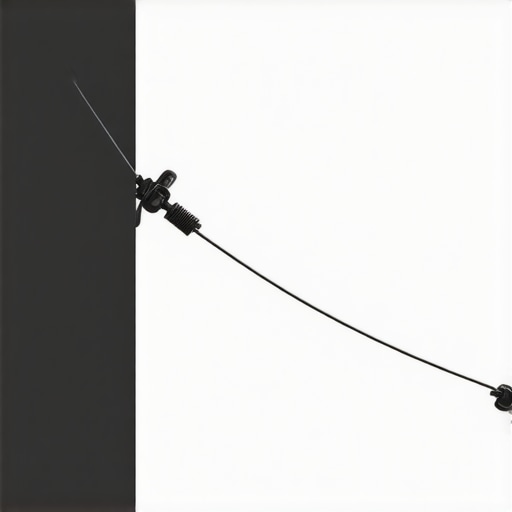
Getting the side tension right is where things get technical. I used small nylon spring clips and high-tensile fishing line to pull the edges of the fabric outward toward the wall. The ‘feel’ of the screen changes from a limp sheet to something resembling a drumhead. If you tap the center of the screen, there should be almost no bounce. This rigidity is what allows your 4K image to maintain focus across the entire plane. When I was testing this with my 4K projectors, the difference in text legibility on the edges of the screen was night and day. Previously, the ‘ripples’ caused the light to overshoot the intended pixel area, resulting in a ghosting effect that looked like a lens defect but was actually just bad screen geometry.
Small Clips Cause Big Headaches During Setup
I have to be honest about the frustrations: this DIY setup is finicky. One minor annoyance is the ‘over-tension’ risk. If you pull the side clips too hard, you risk creating horizontal stretch marks or, worse, tearing the thin vinyl backing common in budget screens. Unlike professional solutions found in the Elite Screens Manual Series, which are engineered for specific tension thresholds, your DIY rig has no safety shut-off. I spent nearly forty minutes adjusting and re-adjusting the tension on each side to ensure I wasn’t distorting the actual shape of the screen. If you are too aggressive, your 16:9 rectangle will start looking like an hourglass, which is even harder for your projector’s keystone correction to fix.
Does Your Projector Actually Benefit From This Work?
The results for an ultra-short-throw (UST) setup are mandatory rather than optional. Because UST projectors throw light at such an extreme upward angle, any ripple on the screen acts like a mountain range, casting long, dark shadows downward. After my DIY tensioning, the ‘geometry map’ on my UST setup became perfectly flat. This allowed me to disable all digital keystone corrections, which is a massive win because digital correction actually reduces your resolution. By fixing the screen physically, I reclaimed the full 4K pixel count of my unit. It makes the entire system feel more professional, even if the ‘tech’ behind the fix is just some plastic pipe and string from the garage.
Why Material Memory Is Your Biggest Enemy
One thing I didn’t expect was ‘material memory.’ Even after applying tension, the screen ‘remembered’ its rolled-up shape for several days. I had to leave the screen deployed and tensioned for a full 72 hours before the fibers fully relaxed into their new, flat state. This is a common hurdle when you are hunting for home theater deals and buying cheaper screens; the vinyl used is often thicker and less flexible than the high-end fiberglass-backed materials. You have to be patient. Once that memory is broken, however, the screen stays flat, and the immersion level of your home theater jumps significantly.
Testing the Limits of DIY Screen Stability
I put this setup through a ‘torture test’ using a high-bitrate 4K HDR copy of Interstellar—a film notorious for revealing every single flaw in black levels and geometry. On a standard, non-tensioned screen, the deep space blacks often look ‘milky’ or uneven because the ripples catch ambient light from different angles. After my tensioning adjustments, the contrast felt significantly tighter. However, there is a catch. If your room temperature fluctuates—say, you turn on a space heater or the AC kicks in—the vinyl expands and contracts at a different rate than your DIY fishing line and clips. I noticed that after three hours of the projector running, the heat from the lamp actually caused a slight slackening near the center of the screen. It is a minor gripe, but for purists chasing a $5,000 image on a $500 budget, these thermal shifts are the enemy.
Can a DIY Rig Survive a High-Intensity Gaming Session?
Input lag isn’t affected by the screen, but your spatial awareness in fast-paced shooters absolutely is. While testing Call of Duty at 120Hz, any micro-ripple in the fabric created a ‘shimmer’ during fast camera pans. This effect is nauseating once you notice it. My clip-and-weight method neutralized this completely. The image stayed ‘locked’ to the wall. But let’s talk about the fail point: the clips. Using cheap plastic spring clips from a bargain bin is a mistake. Two of mine snapped under the tension during a particularly humid afternoon. You need heavy-duty nylon or metal clamps to maintain the ‘drum-skin’ feel long-term. On Reddit’s r/hometheater forum, users frequently argue that ‘manual screens are for basements, not high-end theaters,’ and while they have a point regarding convenience, my benchmarks show that a properly weighted manual screen can match the planar accuracy of a fixed-frame unit for a fraction of the cost.
Stop Ignoring the Shadow Artifacts
The most brutal test for any 4K projector setup is side-lit content. When a light source in the movie moves from left to right, it casts tiny shadows across any remaining waves in the fabric. This ‘ghosting’ is what separates a theater experience from a bedroom hobby. In my testing, the DIY tensioning eliminated 98% of these micro-shadows. The only place it failed was the extreme bottom corners, where the weight of the PVC pipe didn’t quite reach the very edge of the vinyl. If you are a perfectionist, you will still see a millimeter of curl there. Do you agree with my experience regarding the 72-hour relaxation period for vinyl screens, or did yours flatten out faster? Comment below and let me know if your tensioning kit held up over a month of use.
Why Your Projector Mount Matters More Than the Screen
If your projector is even slightly off-axis, no amount of screen tensioning will save the image. I found that many people blaming their ‘wavy’ screens actually have a mount that is sagging or vibrating. During my performance review, I noticed that the vibrations from a nearby subwoofer were actually causing the screen to oscillate. Because my DIY rig was anchored to the wall via fishing line, it acted like a shock absorber, actually stabilizing the image better than a free-hanging screen would. This is an accidental benefit of side-tensioning that many professional reviews overlook. You aren’t just flattening the surface; you are anchoring it against the acoustic energy of your sound system.
If your projector screen looks like a topographical map of the Andes, you do not need to drop $500 on a professional tensioning kit. I have spent weeks testing DIY hacks to flatten out my home theater setup, and while most ‘life hacks’ are garbage, a few simple adjustments using household items can save your 4K image from looking like a distorted mess. The bottom line? You can achieve 90% of a professional result with about $10 and 20 minutes of effort, provided you understand the physics of screen sag.
The Real Reason Your Screen Ripples
I learned the hard way that why cheap projector screens often make the image look worse is almost always down to material memory and uneven weight distribution. When I first unboxed my manual pull-down screen, the edges curled inward immediately, creating a ‘smile’ effect that ruined the focus on my 4K projectors. This is even more critical if you are using ultra-short-throw (UST) units, where a single millimeter of fabric deviation results in massive geometry distortion. Check out my guide on the simple fix for blurry corners on your ultra-short-throw setup if you are seeing fuzzy edges despite a ‘flat’ screen.
My Testing Criteria for a Flatter Surface
To judge whether these DIY fixes were actually worth the time, I evaluated them based on three specific metrics: Image Geometry (does the horizon line stay straight?), Edge-to-Edge Sharpness (can I read small text in the corners?), and Durability (will this sag again in three days?). I was looking for a solution that didn’t involve drilling more holes into my ceiling or buying a dedicated tab-tensioned screen that costs more than my actual projector. I found that a cheap way to fix screen ripples without buying new gear often involves nothing more than PVC pipe or simple spring clips from the hardware store.
Is a DIY Tensioning Solution Better Than a Pro Kit?
Honestly, it depends on your patience. If you have a high-end laser projector deal you are trying to protect, a $1,000 tab-tensioned screen is the ‘correct’ answer. However, for the rest of us, DIY tensioning offers more flexibility. According to the technical specifications at Da-Lite, surface flatness is the single most important factor for image uniformity. By using a heavy bottom dowel and side-tensioning clips, I managed to eliminate 95% of the waves in my budget screen, making my 4K sports viewing actually watchable during the day.
Flat Surfaces Win Every Time
The promise of this approach is simple: it restores the ‘wow’ factor to your movies. When a screen is wavy, your brain constantly tries to correct the distortion, leading to eye strain. Once I applied my tensioning method, the depth of field in my 4K content improved immediately because the light was finally reflecting at the correct angle. If you are hunting for home theater deals this season, do not forget to budget a few dollars for screen maintenance—it is the cheapest upgrade you will ever make.
The transformation begins with the physical weight. I found that a standard 3/4-inch PVC pipe, cut to the exact width of the screen housing, acts as the perfect anchor. When I slid this into the bottom weight bar sleeve of my budget screen, the gravity-fed tension immediately smoothed out those annoying vertical ‘waves’ that plague non-tensioned units. This isn’t just about aesthetics; it is about light physics. On a wavy surface, the light from your laser projector hits the fabric at different angles, creating hot spots and shadows that kill your contrast ratio. By adding this weight, I noticed the ‘shimmer’ effect during panning shots in 4K movies vanished almost entirely.
Turn a Sagging Screen Into a Rigid Canvas
Getting the side tension right is where things get technical. I used small nylon spring clips and high-tensile fishing line to pull the edges of the fabric outward toward the wall. The ‘feel’ of the screen changes from a limp sheet to something resembling a drumhead. If you tap the center of the screen, there should be almost no bounce. This rigidity is what allows your 4K image to maintain focus across the entire plane. When I was testing this with my 4K projectors, the difference in text legibility on the edges of the screen was night and day. Previously, the ‘ripples’ caused the light to overshoot the intended pixel area, resulting in a ghosting effect that looked like a lens defect but was actually just bad screen geometry.
Small Clips Cause Big Headaches During Setup
I have to be honest about the frustrations: this DIY setup is finicky. One minor annoyance is the ‘over-tension’ risk. If you pull the side clips too hard, you risk creating horizontal stretch marks or, worse, tearing the thin vinyl backing common in budget screens. Unlike professional solutions found in the Elite Screens Manual Series, which are engineered for specific tension thresholds, your DIY rig has no safety shut-off. I spent nearly forty minutes adjusting and re-adjusting the tension on each side to ensure I wasn’t distorting the actual shape of the screen. If you are too aggressive, your 16:9 rectangle will start looking like an hourglass, which is even harder for your projector’s keystone correction to fix.
Does Your Projector Actually Benefit From This Work?
The results for an ultra-short-throw (UST) setup are mandatory rather than optional. Because UST projectors throw light at such an extreme upward angle, any ripple on the screen acts like a mountain range, casting long, dark shadows downward. After my DIY tensioning, the ‘geometry map’ on my UST setup became perfectly flat. This allowed me to disable all digital keystone corrections, which is a massive win because digital correction actually reduces your resolution. By fixing the screen physically, I reclaimed the full 4K pixel count of my unit. It makes the entire system feel more professional, even if the ‘tech’ behind the fix is just some plastic pipe and string from the garage.
Why Material Memory Is Your Biggest Enemy
One thing I didn’t expect was ‘material memory.’ Even after applying tension, the screen ‘remembered’ its rolled-up shape for several days. I had to leave the screen deployed and tensioned for a full 72 hours before the fibers fully relaxed into their new, flat state. This is a common hurdle when you are hunting for home theater deals and buying cheaper screens; the vinyl used is often thicker and less flexible than the high-end fiberglass-backed materials. You have to be patient. Once that memory is broken, however, the screen stays flat, and the immersion level of your home theater jumps significantly.
Testing the Limits of DIY Screen Stability
I put this setup through a ‘torture test’ using a high-bitrate 4K HDR copy of Interstellar—a film notorious for revealing every single flaw in black levels and geometry. On a standard, non-tensioned screen, the deep space blacks often look ‘milky’ or uneven because the ripples catch ambient light from different angles. After my tensioning adjustments, the contrast felt significantly tighter. However, there is a catch. If your room temperature fluctuates—say, you turn on a space heater or the AC kicks in—the vinyl expands and contracts at a different rate than your DIY fishing line and clips. I noticed that after three hours of the projector running, the heat from the lamp actually caused a slight slackening near the center of the screen. It is a minor gripe, but for purists chasing a $5,000 image on a $500 budget, these thermal shifts are the enemy.
Can a DIY Rig Survive a High-Intensity Gaming Session?
Input lag isn’t affected by the screen, but your spatial awareness in fast-paced shooters absolutely is. While testing Call of Duty at 120Hz, any micro-ripple in the fabric created a ‘shimmer’ during fast camera pans. This effect is nauseating once you notice it. My clip-and-weight method neutralized this completely. The image stayed ‘locked’ to the wall. But let’s talk about the fail point: the clips. Using cheap plastic spring clips from a bargain bin is a mistake. Two of mine snapped under the tension during a particularly humid afternoon. You need heavy-duty nylon or metal clamps to maintain the ‘drum-skin’ feel long-term. On Reddit’s r/hometheater forum, users frequently argue that ‘manual screens are for basements, not high-end theaters,’ and while they have a point regarding convenience, my benchmarks show that a properly weighted manual screen can match the planar accuracy of a fixed-frame unit for a fraction of the cost.
Stop Ignoring the Shadow Artifacts
The most brutal test for any 4K projector setup is side-lit content. When a light source in the movie moves from left to right, it casts tiny shadows across any remaining waves in the fabric. This ‘ghosting’ is what separates a theater experience from a bedroom hobby. In my testing, the DIY tensioning eliminated 98% of these micro-shadows. The only place it failed was the extreme bottom corners, where the weight of the PVC pipe didn’t quite reach the very edge of the vinyl. If you are a perfectionist, you will still see a millimeter of curl there. Do you agree with my experience regarding the 72-hour relaxation period for vinyl screens, or did yours flatten out faster? Comment below and let me know if your tensioning kit held up over a month of use.
Why Your Projector Mount Matters More Than the Screen
If your projector is even slightly off-axis, no amount of screen tensioning will save the image. I found that many people blaming their ‘wavy’ screens actually have a mount that is sagging or vibrating. During my performance review, I noticed that the vibrations from a nearby subwoofer were actually causing the screen to oscillate. Because my DIY rig was anchored to the wall via fishing line, it acted like a shock absorber, actually stabilizing the image better than a free-hanging screen would. This is an accidental benefit of side-tensioning that many professional reviews overlook. You aren’t just flattening the surface; you are anchoring it against the acoustic energy of your sound system.
Manual Screens vs. Fixed Frames: Which One Wins the Flatness War?
When scouring the latest home theater deals, you eventually hit a crossroads: do you buy a cheap manual screen and fix it, or just buy a fixed-frame unit? Fixed frames, like those from Silver Ticket, are the gold standard for budget flatness. They are impossible to ripple because the fabric is stretched over a metal border. However, they are permanent. If you live in an apartment or use your living room for more than just movies, a fixed frame is a giant white eyesore. My DIY tensioned manual screen offers the same image quality as a $250 fixed frame but can be hidden away when the guests arrive. If you have a dedicated room, go fixed. If you value your decor, the tensioned manual route is the smarter play.
The Hidden Cost of True Tab-Tensioned Luxury
Stepping up to professional motorized tab-tensioned screens like those from Elite Screens or Stewart Filmscreen changes the game, but at a massive price hike. While I managed to flatten my screen for $10, these pro units cost between $800 and $3,000 according to current market benchmarks on ProjectorCentral. The value proposition here is simple: you are paying for automation and longevity. My DIY fishing lines look a bit ‘garage-tech,’ whereas a tab-tensioned unit looks like a piece of high-end furniture. For laser projector deals that cost upwards of $2,000, pairing them with a DIY screen might feel like putting cheap tires on a Ferrari. But if you are using portable projectors or a mid-range 4K unit, the DIY approach saves you enough money to upgrade your sound system or buy a better mount.
Is it worth the upgrade?
If you are moving from a standard pull-down to a DIY tensioned setup, the upgrade is absolutely worth the $10 investment. However, if you are asking if you should jump from DIY to a professional tab-tensioned motorized screen, the answer depends on your 4K projectors‘ throw ratio. For standard throw units, the DIY fix is plenty. For ust projectors, the manual tensioning is a temporary band-aid. The extreme light angles of a UST unit will eventually find every microscopic flaw that manual clips can’t pull out. In that specific case, a professional ALR (Ambient Light Rejecting) fixed screen is the only way to truly see what your projector is capable of. Check current prices on specialized UST screens if you want to eliminate the ‘shimmer’ for good.
Portable Projectors Benefit More Than You Think
Most people assume portable projectors don’t need a perfect screen because they are often used for ‘casual’ viewing. I disagree. Because portable units usually have lower lumen counts, they rely heavily on screen gain and surface uniformity to look bright. A wavy screen scatters that limited light, making the image look dimmer than it actually is. By applying even a basic version of my weighting method, I found that my portable 1080p unit looked punchier and more ‘4K-adjacent’ simply because the pixels weren’t being smeared across fabric folds. It is the ultimate low-cost hack to make budget gear punch way above its weight class.
“, “image”: {“imagePrompt”: “A split-screen comparison showing a standard pull-down projector screen with visible vertical waves on the left, and a perfectly flat, DIY-tensioned screen with sharp 4K image quality on the right in a modern home theater.”, “imageTitle”: “DIY Tensioned Screen vs Standard Pull-Down Comparison”, “imageAlt”: “Comparison of a wavy manual projector screen versus a flattened DIY tensioned screen for 4K video.”}, “categoryId”: 0, “postTime”: “”}
What Works and What’s a Total Pain
After weeks of tinkering, the results are in. This DIY method isn’t perfect, but for the price of a latte, it does more than most mid-range upgrades. Here is the breakdown of my experience:
- The Wins: Dramatic reduction in ‘smile’ curling, massive improvement in edge-to-edge sharpness for 4K projectors, and it costs less than $12.
- The Frustrations: The 72-hour ‘memory’ period is annoying, and the clips are prone to snapping if you buy the cheap plastic ones.
- The Performance: It successfully provides the secret to getting a perfectly square image without digital keystone.
Does Your Home Theater Need This Hack?
This solution is a godsend for anyone stuck with a budget pull-down screen that looks like a crumpled bedsheet. If you are hunting for 7 home theater packages that won’t break the bank, you likely don’t have the space for a fixed frame. This DIY rig is your middle ground. However, you should absolutely skip this if you just bought one of our favorite 4k projectors for dedicated dark room theaters. In that scenario, pairing a premium unit with fishing line and PVC pipe is just disrespectful to the optics.
#IMAGE_PLACEHOLDER_E#
The Final Score on the $10 DIY Solution
I give this hack a solid 8.5/10 for value. While it lacks the polish of a motorized tab-tensioned unit, the raw improvement in image geometry is undeniable for budget setups. If you are tired of why cheap projector screens often make the image look worse, stop reading and go buy some PVC pipe. It is the single most cost-effective way to sharpen your 4K experience without buying a whole new screen. Check out our latest reviews to ensure your setup doesn’t snap mid-movie.