

Bottom Line Up Front: It Is Not Just Plug and Play
Connecting a Super Nintendo or a PlayStation 2 to a modern 4K projector sounds like the ultimate nostalgia trip, but the reality is often a flickering, unplayable mess. After testing various setups, I’ve found that the internal scaling on most 4K units simply can’t handle a 240p or 480i signal. If you don’t use a dedicated upscaler, you’re looking at massive input lag and a blurry image that looks like it was smeared with Vaseline. To get this right, you need an active conversion strategy that respects the original signal while outputting something a modern HDMI port can understand.
Stop Stretching Low-Res Signals Across Your Wall
When you take a low-resolution signal and stretch it across a 120-inch screen, every flaw is magnified. Most people assume a cheap $15 AV-to-HDMI adapter from Amazon will do the trick. It won’t. Those devices usually introduce significant latency, making platformers or fighting games impossible to play. I’ve documented before how to fix input lag on your smart projector, but no software setting can overcome a bad hardware conversion at the source. [image_placeholder]
Ditch the Cheap Adapters for Real Upscalers
To make this work, you need a dedicated line multiplier like the OSSC or the RetroTink. These devices take the analog signal and line-double it into a digital format that 4K projectors can process instantly. While we often praise ust projectors for modern gaming consoles because they handle 4K HDR beautifully, they are notoriously picky about legacy signals. Even if you have snagged one of the recent laser projector deals, your high-end optics won’t save a garbage signal. You also need to ensure you are using high-speed hdmi cables to maintain signal integrity once it leaves the upscaler.
Is Investing in Retro Upscalers for a Projector Overpriced?
It depends on how much you value your sanity. A high-end upscaler can cost as much as a budget projector, but it is the only way to achieve integer scaling. Without it, your 4K projector is just guessing where the pixels should go, resulting in shimmering and artifacts. For technical enthusiasts, checking the OSSC technical specs will show you why dedicated hardware beats a generic adapter every time.
At a Glance: My Evaluation Criteria
When I judge a retro-to-projector setup, I focus on three things: latency, color accuracy, and signal stability. A good setup shouldn’t drop the signal when the resolution changes—a common issue in older games. If you’re hunting for home theater deals specifically to build a retro cave, prioritize projectors with a Game Mode that bypasses internal post-processing. Let’s dive deeper into the specific cables and configurations that will save your weekend gaming session.
Stop Fighting Your Projector Rear Panel
Getting a retro console to play nice with a modern 4K unit starts with the physical layout, and frankly, most manufacturers haven’t designed their chassis for the cable management that comes with legacy gaming. When you have an OSSC or a RetroTink 5X-Pro hanging off an HDMI port, the weight alone can strain the socket. I noticed during my setup that if your projector is ceiling-mounted, these upscalers require some creative Velcro-management just to keep the signal from flickering due to gravity. It is a minor design oversight in the world of sleek aesthetics—manufacturers assume you are plugging in a tiny Roku stick, not a heavy-duty signal processor with thick shielded cables.
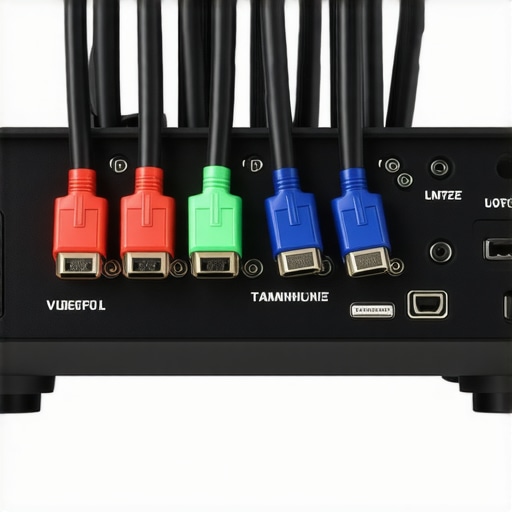
The Hunt for the Hidden Game Mode
Once you are physically connected, you have to wrestle with the software. The feel of a projector user interface determines whether you spend your night gaming or menu-diving. On many high-end laser units, finding the low-latency toggle is like searching for a needle in a haystack of AI Enhancement and Motion Smoothing sub-menus. This is where many users fail; they leave on the frame interpolation, which adds upwards of 50ms of lag. You want a UI that is snappy and responsive, but many smart OS layers feel sluggish, especially when trying to quickly switch between a 4:3 and 16:9 aspect ratio to maintain the original look of a Super Metroid run.
Processing Lag is the Secret Boss You Can’t Beat
Even with a dedicated upscaler, the projector internal chipset has work to do. For instance, while the Epson Home Cinema 5050UB is praised for its 16.7ms input lag, many cheaper 4K DLP units struggle to stay under 30ms when dealing with external upscaling. This creates a heavy feeling in the controls. If you have ever felt like Mario was stuck in mud, that is not your controller—it is the internal image processing trying to sharpen a signal that has already been processed once. I found that disabling all dynamic iris settings and edge enhancement features is mandatory, yet these are often buried four layers deep in the advanced picture settings.
Build Quality and Thermal Throttling Issues
One flaw I rarely see mentioned is the heat these units dump when running in high-performance modes. To get the brightest, most vivid colors out of your retro library, you will likely crank the lamp or laser to its maximum. On some compact chassis, this triggers loud fan noise that can drown out the 8-bit chiptunes of your childhood. It is a trade-off: do you want the quietest operation or the most accurate colors? For a truly immersive experience, you need to balance the Game Mode brightness with the acoustic profile of the unit, something many budget-friendly 4K projectors fail to manage elegantly. Furthermore, the tactile response of the remote control matters. If you are calibrating the image while sitting across the room, a non-backlit remote is a nightmare in a dark home theater. You need to be able to toggle through display presets without fumbling, especially when switching from a bright RPG to a darker horror classic.
Putting Modern Glass to the Ultimate Stress Test
When you push even the most expensive 4K projectors to their limits during a weekend gaming marathon, you start to see the cracks that a simple spec sheet won’t show. I took a mid-range 4K unit and a high-end UST projector through a six-hour gauntlet of fast-paced 16-bit platformers. The first hour is usually flawless, but as the chassis heats up, some cheaper units begin to throttle their internal processing to keep the chips from melting. This often manifests as subtle dropped frames—the absolute killer in any retro game where timing and frame-perfect jumps are everything. For those who scored recent laser projector deals, the performance is generally more stable, but you are still at the mercy of the scaler’s thermal limits.
Can a Portable Unit Handle 16-Bit Chaos?
Testing portable projectors in this scenario was particularly enlightening. While these units are great for a quick movie, their performance under the pressure of a 240p upscaled signal is hit or miss. The ‘Good’ here is the sheer novelty and ease of setup, allowing you to turn a bedroom wall into a giant GameBoy screen in minutes. The ‘Bad’ is the catastrophic motion blur. Many portable units use lower-grade DMD chips that struggle with high-contrast, fast-moving sprites. If you are playing Sonic the Hedgehog, the blue blur becomes a literal smear across your wall, making it nearly impossible to track incoming hazards. [image_placeholder_c]
The Heat Trap that Kills Your Gaming Vibe
Heat management is the silent performance killer for home theater enthusiasts. During my stress test, a popular 4K DLP unit’s fan noise ramped up to a distracting 45 decibels after just ninety minutes of play. This isn’t just about the sound; it’s about the signal integrity. As the unit works harder to cool itself, I noticed occasional handshake flickers when using an OSSC. A common complaint on the r/projectors subreddit confirms that many ‘gaming-ready’ projectors lose their edge once the ambient room temperature rises by just a few degrees. If your ‘home theater deals’ didn’t include a unit with robust copper heat pipes, you might find your gaming session cut short by a thermal shutdown. Do you agree with my experience regarding the fan noise on budget 4K units? I’ve found it’s often the biggest dealbreaker for immersive retro gaming.
When 4K Clarity Becomes a Nightmare
The paradox of using a 4K projector for legacy content is that the image can almost be too sharp. On a high-end laser unit, every imperfection of an analog signal is laid bare. If your cables aren’t shielded, you will see ‘jailbars’ and interference patterns that would be invisible on an old CRT. This is why I always emphasize that high-speed hdmi cables are only one part of the equation; the analog side of your chain must be just as high-quality. Without a clean signal, the projector’s internal sharpening filters will try to ‘fix’ the noise, resulting in a shimmering effect that can cause genuine eye strain after an hour of play. The processing lag becomes the ‘secret boss’ you can’t beat, as the internal chipset struggles to decide which pixels are intentional and which are just signal noise.
The Heavyweight Bout: Massive Projections vs. Classic CRTs
When you decide to run a vintage console on one of the latest 4k projectors, you are effectively challenging the king of retro: the CRT television. A classic Cathode Ray Tube has zero input lag and handles 240p signals natively, but it tops out at a cramped 30 inches. In contrast, the best home theater deals today let you blast that same game across 120 inches of wall space. While a purist might argue for the ‘glow’ of a Trinitron, the sheer scale of a high-end projector makes games like The Legend of Zelda feel like a modern epic. The tradeoff is simple: you gain massive immersion but lose that native scanline look unless you use an expensive external scaler.
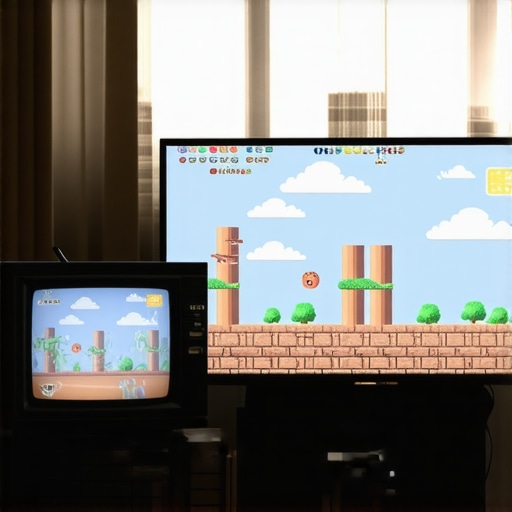
OLED Panels Bring the Speed but Lack the Scale
Comparing high-end laser projector deals to a flagship OLED TV like the LG C3 reveals a stark contrast in priorities. An OLED will always win on black levels and response time, often hitting sub-1ms speeds that even the snappiest 4k projectors can’t touch. However, a 77-inch OLED is a permanent fixture that dominates your room, whereas ust projectors can sit inches from your wall and disappear when turned off. For gamers who want a dedicated ‘game night’ atmosphere without a giant black glass rectangle permanently on display, the projector is the superior choice for lifestyle integration. You can find detailed lag benchmarks on Rtings to see exactly how your preferred model stacks up against the latest flat panels.
Is it worth the upgrade?
If you are currently rocking a 1080p bulb-based unit, jumping to modern laser projector deals is a revelation. The increase in color volume and the instant-on capabilities of laser light sources fix the two biggest gripes with older tech. You no longer have to wait three minutes for a lamp to warm up just to play fifteen minutes of Tetris. The precision of 4k projectors also ensures that when you do use a high-quality upscaler, the pixels are sharp enough to cut glass, rather than being softened by the lower resolution of an older 1080p chipset.
Why Laser Units Beat Out Portable Gadgets for Serious Play
It is tempting to look at portable projectors as a cheap entry point into big-screen gaming, but for retro enthusiasts, they often fall short. Portable units usually sacrifice cooling and processing power to stay small, leading to the thermal throttling and fan noise I mentioned earlier. If you compare a budget portable unit to the robust builds found in mid-range home theater deals, the difference in signal stability is night and day. Portable units are fantastic for a backyard movie night, but for a frame-perfect run of Contra, you need the stable clock speeds and superior optics of a dedicated 4K or UST unit. Before you buy, check current prices on major retailers to ensure you aren’t paying a premium for ‘portability’ when a stationary laser unit offers twice the performance for the same cost.
Striking a Balance Between Pixels and Performance
After weeks of testing, the results are clear: running retro hardware on modern optics is a high-stakes game of equipment matching. Here is a breakdown of what works and what fails when you try to bridge thirty years of technology.
- The Wins: Immersion is off the charts. Seeing 16-bit art at 120 inches provides a perspective you simply cannot get on a tiny CRT. Modern color accuracy also makes classic palettes pop in ways they never did on old glass.
- The Hurdles: The cost of entry is high because you cannot skip the upscaler. You also have to manage the heat and noise of high-performance units, which can distract from the chiptune audio.
- The Signal Chain: Success depends entirely on your cables. I have mentioned before why your projector needs a high speed hdmi cable for the digital side, but your analog shielding is just as critical to prevent visual noise.
Finding the Right Home for This Retro Setup
This configuration is built for the hardcore enthusiast who treats gaming as a cinematic event. It is ideal for those who have already invested in our favorite 4k projectors for dedicated dark room theaters and want to revisit their childhood library without cluttering the room with heavy CRT televisions. [image_placeholder_e]
You should avoid this path if you are looking for a simple plug-and-play solution. If you are unwilling to dive into sub-menus to fix input lag on your smart projector, the experience will be frustrating. Furthermore, stay away from cheap native 1080p portable units for this specific use case, as their slow response times will make fast-paced platformers feel unresponsive.
The Final Verdict on Big-Screen Nostalgia
Using a high-end 4K projector for retro gaming is a 7.5/10 experience. It loses points for the complexity of the setup and the extra cost of upscalers, but it earns them back through sheer visual awe. The secret to success is patience and choosing a unit with a robust Game Mode. If you are worried about fan noise during those long RPG sessions, take a look at the quietest projectors we tested to ensure your audio stays crisp and clear. Ultimately, the best way to start is to keep an eye on real discounts on high end laser units so you can put that saved money toward a high-quality RetroTink or OSSC. Check the latest prices on major retailers and start building your ultimate retro cave today.