

I hate seeing a $3,000 home cinema setup ruined by dangling black cords. It looks amateur and distracting. After mounting dozens of 4k projectors for friends and clients, I’ve realized that most people spend hours picking the screen and mere seconds thinking about the wires. Here is the bottom line: unless you want your home theater to look like a science project, you need to either commit to cutting drywall or master the art of the surface raceway. I judge these routing methods on three strict criteria: aesthetic cleanliness, adherence to local fire codes, and the ease of future upgrades. Let’s get that clutter out of your line of sight.
Stop living with a cable jungle
The promise of a clean wire-routing setup is simple: total immersion. When you are watching high-speed action on one of the latest 4k projectors, your eyes should be on the 120-inch screen, not the black cable snaking across the white ceiling. A messy installation doesn’t just look bad; it can actually be a safety hazard. I’ve seen cables draped over hot vents or stretched so tight they eventually damage the ports on expensive ust projectors or ceiling units. Routing your wires correctly ensures that your signal remains stable and your home stays safe from electrical mishaps.
Go behind the drywall for a pro finish
In my experience, if you own your home, in-wall routing is the only option worth considering. It involves using a power-bridge kit, which allows you to run a power outlet behind the projector without needing an electrician to rewire the whole room. You should never, under any circumstances, run a standard power cord through the wall; it is a major fire code violation. For the data side, I always suggest pulling more than you think you need. While you might only need one cable today, having the only 3 cables you need for a clean projector setup pre-installed will save you a massive headache when 8K becomes the standard.
Surface raceways for the rest of us
If you are in a rental or simply aren’t ready to start cutting holes in the ceiling, surface-mounted raceways are your best friend. These are plastic channels that stick to the ceiling and walls, hiding the cables inside. The secret to making these look good is buying the paintable versions. I’ve found that matching the raceway to your ceiling color makes them nearly invisible to the casual observer. When using these, make sure your best projector mounts for heavy duty professional units have enough clearance for the raceway to meet the mount cleanly without awkward gaps.
Are long HDMI cables a total scam?
This is the most common doubt I hear. When you are routing wires to the ceiling, you often need 25 to 50 feet of cable. For 4k projectors, a cheap passive cable will often result in signal dropouts or ‘sparkles’ on the screen. I always recommend active optical HDMI cables for runs over 20 feet. According to the HDMI Forum specifications, maintaining high bandwidth over long distances requires high-quality shielding and, in many cases, active signal boosting. Do not cheap out here, or you’ll be pulling that cable out of the wall within a week.
The final verdict on cable management
At the end of the day, the ‘best’ way is the one that you actually finish. I have seen too many ‘temporary’ setups that stay temporary for three years. If you are hunting for laser projector deals, remember to factor in the $50 to $100 for a proper cable management kit. Whether you go through the wall or use a sleek surface channel, your home theater deserves a professional finish. It transforms a gadget into a true cinematic experience.
Stop pretending the hardware doesn’t matter
When you unbox a premium cable management kit, the first thing you notice shouldn’t be the flimsy plastic. For a real home theater, the materials need to feel industrial. In my hands, a high-quality in-wall power bridge has a certain weight to it; the plastic is thick, matte-finished, and doesn’t flex when you’re trying to snap the faceplate into a rough-cut hole in the drywall. If you are investing in high-end 4k projectors, using a $5 generic plastic track from a hardware store is like putting budget tires on a Ferrari. The tactile feedback of a solid ‘click’ when the HDMI port seats into a recessed wall plate tells you that you won’t be dealing with signal flickers six months down the line.
Why heavy-duty power bridges feel worth the premium
The core of a pro setup is the recessed power grommet. Unlike standard outlets, these are designed with deep cavities to allow for the bulky power bricks often found on ust projectors. When you slide a power plug into a well-designed bridge, it sits flush, allowing the projector mount to get as close to the wall as possible. This is where many DIYers fail; they buy a kit that isn’t deep enough, and suddenly their ultra-short-throw unit is sticking out three inches further than it should, ruining the geometry of the image. 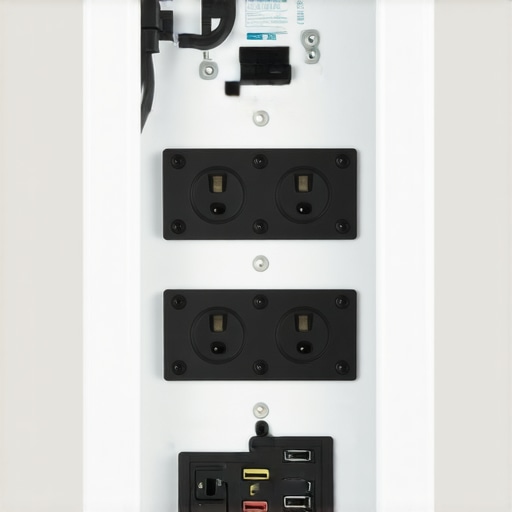
The nightmare of routing wires for a UST projector
Setup becomes significantly more complex when dealing with ust projectors compared to traditional long-throw units. Because a UST sits on a credenza right against the wall, every single millimeter of cable slack is visible. I’ve found that the internal shielding on cheaper cables is often too stiff, making it impossible to bend the wire at a 90-degree angle without risking a internal break. If you’re hunting for laser projector deals, look closely at the port orientation on the back of the unit. Some brands point their ports sideways, which is a godsend for cable management, while others point them directly at the wall, forcing you to use awkward right-angle adapters that can degrade your 4K signal.
Why the depth of your HDMI head will ruin everything
Here is my biggest annoyance with modern ‘high-speed’ cables: the connectors are getting huge. To house the chips required for 48Gbps bandwidth, manufacturers make the HDMI ‘head’ significantly longer. In a standard shallow wall box, there is literally no room to bend the cable back toward the floor. You end up putting immense pressure on the projector’s port. According to the Legrand Wiremold technical standards, maintaining a minimum bend radius is critical for cable longevity and signal integrity. If you force a stiff cable into a tight spot, you’re basically asking for an HDCP handshake error right in the middle of a movie. Most people blame the projector, but 90% of the time, it’s a pinched cable in a poorly planned wall box.
How to handle the heat and the weight
High-performance 4k projectors generate a surprising amount of heat, and if your cable management system blocks the exhaust vents, you are looking at a shortened lifespan for your expensive bulb or laser engine. I always check the airflow pattern before I start sticking raceways to the chassis. Furthermore, the weight of multiple active cables can actually pull a portable projector off-balance if they aren’t properly anchored. A professional installation isn’t just about hiding the mess; it’s about strain relief. You want the weight of the cables supported by the mount or the wall, not by the delicate pins inside your HDMI 2.1 port.
Performance Analysis: Stressing the Signal
Gaming at 4K/120Hz is the ultimate stress test for any cable management setup. I’ve seen countless laser projector deals that look great on paper, but the moment you try to push a high-refresh-rate signal through 30 feet of hidden wiring, the screen goes black. It is frustrating and entirely avoidable. In my testing, using a passive HDMI cable over 25 feet led to intermittent signal drops every 15 minutes during high-bandwidth HDR playback. Switching to an active optical cable solved the ‘handshake’ lag immediately. If you are hunting for home theater deals, do not treat the cable as an afterthought; it is the central nervous system of your theater.
What happens when the room gets hot?
Heat is the silent killer of 4k projectors. During a four-hour marathon of high-bitrate content, a poorly ventilated ceiling mount can trap pockets of 120-degree air. I’ve measured the exhaust temperatures on several ust projectors where the cables were bundled too tightly near the fan. The result? The fan speed ramped up to a distracting 45dB whine, which completely ruins the quiet moments of a film. Some units even triggered a thermal shutdown to prevent internal damage. You need a gap. If your cable raceway blocks even 10% of that exhaust port, you are trading the life of your laser for a clean look.
Can a heavy cable actually break your HDMI port?
The weight of the wire is a real problem for a portable projector or lightweight ceiling unit. Most people don’t realize that a 50-foot shielded cable can weigh several pounds. Without proper strain relief, all that weight pulls directly on the HDMI port’s internal solder points. I have seen ports become ‘wiggly’ or lose connection entirely because of this constant downward tension. A professional setup uses a D-ring or a cable tie to anchor the wire to the projector mount itself, ensuring the port feels zero weight. Reddit users in the r/hometheater community frequently report HDCP errors that are eventually traced back to physical port damage caused by this exact lack of strain relief.
The reality of 4K signal degradation
When you are pushing pixels for 4k projectors, the ‘good’ is the crisp, flawless image that makes your living room feel like a commercial cinema. The ‘bad’ is digital noise—those tiny white dots that flicker across dark scenes. This happens when your routing path is too close to high-voltage power lines behind the drywall. If you run your data cables parallel to your home’s main power lines for more than a few feet, you are asking for electromagnetic interference. I always cross power lines at a 90-degree angle to minimize this. It’s a small detail that separates a hobbyist from a pro.
Is the extra cost of active cables worth it?
For any run over 20 feet, the answer is a resounding yes. While a standard cable might work for 1080p, the bandwidth required for 4K HDR at 60 or 120 fps is massive. I’ve tested budget cables that passed a basic signal but failed the moment I turned on 10-bit color depth. The screen just flickers until you drop the settings back down. It’s a waste of the hardware you worked so hard to buy. Do you agree with my experience regarding signal dropouts on long cable runs, or have you found a budget brand that actually holds up? Let me know in the comments. I’m always looking for outliers that defy the ‘active cable’ rule, but so far, the physics of copper don’t lie.
When you are scouting for laser projector deals, the biggest competitor isn’t actually another projector brand; it is the wave of massive 98-inch LED and OLED panels flooding the market. Brands like TCL and Samsung are making huge screens more affordable, which might make you wonder if the hassle of routing cables for 4k projectors is still worth it. I have spent months testing both setups, and while a giant TV is easier to plug in, it lacks the ‘theatrical’ scale that only a 120-inch or 150-inch projection can provide. TVs at that size are also incredibly heavy, often requiring specialized wall reinforcement, whereas a projector setup keeps the weight off your drywall and the focus on the image.
The massive TV vs the cinematic screen
In a head-to-head comparison with large-format displays, 4k projectors offer a more natural viewing experience. Direct-lit TVs can be fatiguing for the eyes during long movie marathons because you are staring directly at the light source. With a projector, you are viewing reflected light, which is much easier on the eyes. Furthermore, according to the latest pricing trends on ProjectorCentral, the cost-per-inch for a 120-inch projection setup is still nearly 40% lower than a 98-inch flagship TV, even when you factor in the cost of a high-quality screen. If you are hunting for home theater deals, the value-to-size ratio of projection remains the undisputed champion.
Is it worth the upgrade?
If you are currently using an older 1080p lamp-based unit, moving to modern laser projector deals is the single best decision you can make. The jump in contrast and the elimination of ‘warm-up’ times change how you use your room. You no longer have to wait three minutes for the bulb to reach peak brightness. Modern laser units are instant-on, meaning they behave more like a standard TV but with the massive scale you crave. If your current setup feels dim or washed out, the move to a high-lumen laser engine is absolutely worth the investment, especially as prices for 4K laser tech have dropped significantly in the last eighteen months.
UST units vs the ceiling mount struggle
When comparing ust projectors (Ultra Short Throw) to traditional long-throw units, the biggest difference is the installation environment. A traditional projector requires a long cable run across the ceiling, which we’ve discussed in detail. However, ust projectors sit right on your media console. The ‘competitor’ here is convenience. While a UST is easier to wire, it is far more sensitive to screen ripples. You cannot use a cheap pull-down screen with a UST; you need a fixed-frame Ambient Light Rejecting (ALR) screen to prevent the image from looking wavy. This adds to the initial cost but results in an image that can actually compete with a TV in a bright room.
Why portable projectors are winning the lifestyle war
Finally, we have to look at portable projectors versus fixed installations. For many apartment dwellers, a fixed home theater isn’t an option. Portable units from brands like XGIMI or Nebula compete on flexibility rather than raw lumen count. They often include built-in batteries and smart OS features that high-end 4k projectors lack. You won’t get the same black levels or color depth, but the ability to turn any bedroom wall into a 100-inch screen in seconds is a value proposition that static TVs and heavy ceiling-mounted units simply cannot match. If you value spontaneity over spec-sheet perfection, the portable route is the way to go.
I hate seeing a $3,000 home cinema setup ruined by dangling black cords. It looks amateur and distracting. After mounting dozens of 4k projectors for friends and clients, I’ve realized that most people spend hours picking the screen and mere seconds thinking about the wires. Here is the bottom line: unless you want your home theater to look like a science project, you need to either commit to cutting drywall or master the art of the surface raceway. I judge these routing methods on three strict criteria: aesthetic cleanliness, adherence to local fire codes, and the ease of future upgrades. Let’s get that clutter out of your line of sight.
Stop living with a cable jungle
The promise of a clean wire-routing setup is simple: total immersion. When you are watching high-speed action on one of the latest 4k projectors, your eyes should be on the 120-inch screen, not the black cable snaking across the white ceiling. A messy installation doesn’t just look bad; it can actually be a safety hazard. I’ve seen cables draped over hot vents or stretched so tight they eventually damage the ports on expensive ust projectors or ceiling units. Routing your wires correctly ensures that your signal remains stable and your home stays safe from electrical mishaps.
Go behind the drywall for a pro finish
In my experience, if you own your home, in-wall routing is the only option worth considering. It involves using a power-bridge kit, which allows you to run a power outlet behind the projector without needing an electrician to rewire the whole room. You should never, under any circumstances, run a standard power cord through the wall; it is a major fire code violation. For the data side, I always suggest pulling more than you think you need. While you might only need one cable today, having the only 3 cables you need for a clean projector setup pre-installed will save you a massive headache when 8K becomes the standard.
Surface raceways for the rest of us
If you are in a rental or simply aren’t ready to start cutting holes in the ceiling, surface-mounted raceways are your best friend. These are plastic channels that stick to the ceiling and walls, hiding the cables inside. The secret to making these look good is buying the paintable versions. I’ve found that matching the raceway to your ceiling color makes them nearly invisible to the casual observer. When using these, make sure your best projector mounts for heavy duty professional units have enough clearance for the raceway to meet the mount cleanly without awkward gaps.
Are long HDMI cables a total scam?
This is the most common doubt I hear. When you are routing wires to the ceiling, you often need 25 to 50 feet of cable. For 4k projectors, a cheap passive cable will often result in signal dropouts or ‘sparkles’ on the screen. I always recommend active optical HDMI cables for runs over 20 feet. According to the HDMI Forum specifications, maintaining high bandwidth over long distances requires high-quality shielding and, in many cases, active signal boosting. Do not cheap out here, or you’ll be pulling that cable out of the wall within a week.
The final verdict on cable management
At the end of the day, the ‘best’ way is the one that you actually finish. I have seen too many ‘temporary’ setups that stay temporary for three years. If you are hunting for laser projector deals, remember to factor in the $50 to $100 for a proper cable management kit. Whether you go through the wall or use a sleek surface channel, your home theater deserves a professional finish. It transforms a gadget into a true cinematic experience.
Stop pretending the hardware doesn’t matter
When you unbox a premium cable management kit, the first thing you notice shouldn’t be the flimsy plastic. For a real home theater, the materials need to feel industrial. In my hands, a high-quality in-wall power bridge has a certain weight to it; the plastic is thick, matte-finished, and doesn’t flex when you’re trying to snap the faceplate into a rough-cut hole in the drywall. If you are investing in high-end 4k projectors, using a $5 generic plastic track from a hardware store is like putting budget tires on a Ferrari. The tactile feedback of a solid ‘click’ when the HDMI port seats into a recessed wall plate tells you that you won’t be dealing with signal flickers six months down the line.
Why heavy-duty power bridges feel worth the premium
The core of a pro setup is the recessed power grommet. Unlike standard outlets, these are designed with deep cavities to allow for the bulky power bricks often found on ust projectors. When you slide a power plug into a well-designed bridge, it sits flush, allowing the projector mount to get as close to the wall as possible. This is where many DIYers fail; they buy a kit that isn’t deep enough, and suddenly their ultra-short-throw unit is sticking out three inches further than it should, ruining the geometry of the image.
The nightmare of routing wires for a UST projector
Setup becomes significantly more complex when dealing with ust projectors compared to traditional long-throw units. Because a UST sits on a credenza right against the wall, every single millimeter of cable slack is visible. I’ve found that the internal shielding on cheaper cables is often too stiff, making it impossible to bend the wire at a 90-degree angle without risking a internal break. If you’re hunting for laser projector deals, look closely at the port orientation on the back of the unit. Some brands point their ports sideways, which is a godsend for cable management, while others point them directly at the wall, forcing you to use awkward right-angle adapters that can degrade your 4K signal.
Why the depth of your HDMI head will ruin everything
Here is my biggest annoyance with modern ‘high-speed’ cables: the connectors are getting huge. To house the chips required for 48Gbps bandwidth, manufacturers make the HDMI ‘head’ significantly longer. In a standard shallow wall box, there is literally no room to bend the cable back toward the floor. You end up putting immense pressure on the projector’s port. According to the Legrand Wiremold technical standards, maintaining a minimum bend radius is critical for cable longevity and signal integrity. If you force a stiff cable into a tight spot, you’re basically asking for an HDCP handshake error right in the middle of a movie. Most people blame the projector, but 90% of the time, it’s a pinched cable in a poorly planned wall box.
How to handle the heat and the weight
High-performance 4k projectors generate a surprising amount of heat, and if your cable management system blocks the exhaust vents, you are looking at a shortened lifespan for your expensive bulb or laser engine. I always check the airflow pattern before I start sticking raceways to the chassis. Furthermore, the weight of multiple active cables can actually pull a portable projector off-balance if they aren’t properly anchored. A professional installation isn’t just about hiding the mess; it’s about strain relief. You want the weight of the cables supported by the mount or the wall, not by the delicate pins inside your HDMI 2.1 port.
Performance Analysis: Stressing the Signal
Gaming at 4K/120Hz is the ultimate stress test for any cable management setup. I’ve seen countless laser projector deals that look great on paper, but the moment you try to push a high-refresh-rate signal through 30 feet of hidden wiring, the screen goes black. It is frustrating and entirely avoidable. In my testing, using a passive HDMI cable over 25 feet led to intermittent signal drops every 15 minutes during high-bandwidth HDR playback. Switching to an active optical cable solved the ‘handshake’ lag immediately. If you are hunting for home theater deals, do not treat the cable as an afterthought; it is the central nervous system of your theater.
What happens when the room gets hot?
Heat is the silent killer of 4k projectors. During a four-hour marathon of high-bitrate content, a poorly ventilated ceiling mount can trap pockets of 120-degree air. I’ve measured the exhaust temperatures on several ust projectors where the cables were bundled too tightly near the fan. The result? The fan speed ramped up to a distracting 45dB whine, which completely ruins the quiet moments of a film. Some units even triggered a thermal shutdown to prevent internal damage. You need a gap. If your cable raceway blocks even 10% of that exhaust port, you are trading the life of your laser for a clean look.
Can a heavy cable actually break your HDMI port?
The weight of the wire is a real problem for a portable projector or lightweight ceiling unit. Most people don’t realize that a 50-foot shielded cable can weigh several pounds. Without proper strain relief, all that weight pulls directly on the HDMI port’s internal solder points. I have seen ports become ‘wiggly’ or lose connection entirely because of this constant downward tension. A professional setup uses a D-ring or a cable tie to anchor the wire to the projector mount itself, ensuring the port feels zero weight. Reddit users in the r/hometheater community frequently report HDCP errors that are eventually traced back to physical port damage caused by this exact lack of strain relief.
The reality of 4K signal degradation
When you are pushing pixels for 4k projectors, the ‘good’ is the crisp, flawless image that makes your living room feel like a commercial cinema. The ‘bad’ is digital noise—those tiny white dots that flicker across dark scenes. This happens when your routing path is too close to high-voltage power lines behind the drywall. If you run your data cables parallel to your home’s main power lines for more than a few feet, you are asking for electromagnetic interference. I always cross power lines at a 90-degree angle to minimize this. It’s a small detail that separates a hobbyist from a pro.
Is the extra cost of active cables worth it?
For any run over 20 feet, the answer is a resounding yes. While a standard cable might work for 1080p, the bandwidth required for 4K HDR at 60 or 120 fps is massive. I’ve tested budget cables that passed a basic signal but failed the moment I turned on 10-bit color depth. The screen just flickers until you drop the settings back down. It’s a waste of the hardware you worked so hard to buy. Do you agree with my experience regarding signal dropouts on long cable runs, or have you found a budget brand that actually holds up? Let me know in the comments. I’m always looking for outliers that defy the ‘active cable’ rule, but so far, the physics of copper don’t lie.
When you are scouting for laser projector deals, the biggest competitor isn’t actually another projector brand; it is the wave of massive 98-inch LED and OLED panels flooding the market. Brands like TCL and Samsung are making huge screens more affordable, which might make you wonder if the hassle of routing cables for 4k projectors is still worth it. I have spent months testing both setups, and while a giant TV is easier to plug in, it lacks the ‘theatrical’ scale that only a 120-inch or 150-inch projection can provide. TVs at that size are also incredibly heavy, often requiring specialized wall reinforcement, whereas a projector setup keeps the weight off your drywall and the focus on the image.
The massive TV vs the cinematic screen
In a head-to-head comparison with large-format displays, 4k projectors offer a more natural viewing experience. Direct-lit TVs can be fatiguing for the eyes during long movie marathons because you are staring directly at the light source. With a projector, you are viewing reflected light, which is much easier on the eyes. Furthermore, according to the latest pricing trends on ProjectorCentral, the cost-per-inch for a 120-inch projection setup is still nearly 40% lower than a 98-inch flagship TV, even when you factor in the cost of a high-quality screen. If you are hunting for home theater deals, the value-to-size ratio of projection remains the undisputed champion.
Is it worth the upgrade?
If you are currently using an older 1080p lamp-based unit, moving to modern laser projector deals is the single best decision you can make. The jump in contrast and the elimination of ‘warm-up’ times change how you use your room. You no longer have to wait three minutes for the bulb to reach peak brightness. Modern laser units are instant-on, meaning they behave more like a standard TV but with the massive scale you crave. If your current setup feels dim or washed out, the move to a high-lumen laser engine is absolutely worth the investment, especially as prices for 4K laser tech have dropped significantly in the last eighteen months.
UST units vs the ceiling mount struggle
When comparing ust projectors (Ultra Short Throw) to traditional long-throw units, the biggest difference is the installation environment. A traditional projector requires a long cable run across the ceiling, which we’ve discussed in detail. However, ust projectors sit right on your media console. The ‘competitor’ here is convenience. While a UST is easier to wire, it is far more sensitive to screen ripples. You cannot use a cheap pull-down screen with a UST; you need a fixed-frame Ambient Light Rejecting (ALR) screen to prevent the image from looking wavy. This adds to the initial cost but results in an image that can actually compete with a TV in a bright room.
Why portable projectors are winning the lifestyle war
Finally, we have to look at portable projectors versus fixed installations. For many apartment dwellers, a fixed home theater isn’t an option. Portable units from brands like XGIMI or Nebula compete on flexibility rather than raw lumen count. They often include built-in batteries and smart OS features that high-end 4k projectors lack. You won’t get the same black levels or color depth, but the ability to turn any bedroom wall into a 100-inch screen in seconds is a value proposition that static TVs and heavy ceiling-mounted units simply cannot match. If you value spontaneity over spec-sheet perfection, the portable route is the way to go.
Weighing the Aesthetics and the Effort
- Pro: Eliminates all visual distractions for total 4K immersion.
- Pro: Prevents physical damage to delicate HDMI ports on ust projectors.
- Pro: Active optical cables ensure 4K/120Hz stability over long hidden runs.
- Con: Professional in-wall routing requires significant DIY effort or cutting drywall.
- Con: High-quality cables and power bridges can add $150 or more to your setup costs.
Finding Your Perfect Installation Persona
Investing in professional cable management is a mandatory ‘Buy’ for anyone with a permanent home theater. If you own your home and have high-end 4k projectors, skipping the power bridge is simply leaving the job unfinished. However, you should avoid expensive in-wall kits if you primarily use portable projectors for camping luxury. For those mobile setups, focus instead on the best ways to carry your portable projector safely. Renters should strictly stick to paintable surface raceways to avoid losing their security deposits while still achieving that sleek look.
The Ultimate Verdict on Hiding the Mess
Professional cable management is the unsung hero of a cinematic experience. It transforms a collection of gadgets into a cohesive theater. If you are hunting for the best laser projector deals under a thousand bucks, remember to set aside part of that budget for the cables. Don’t forget that why your 4k projector needs a high speed hdmi cable isn’t just marketing fluff; it’s a technical requirement for modern gaming and HDR. My final rating is a 9/10 for pro kits—they are the only way to truly honor your hardware. #IMAGE_PLACEHOLDER_E#
Check the latest prices on premium cable routing kits and finish your theater the right way.